

PixCarry: Photo Backup
PixCarry: Photo Backup is made and published by Yuix Networks Inc. AppBrain is an independent app data site and isn't affiliated with Yuix Networks Inc. The app name, icon, screenshots and description belong to Yuix Networks Inc. and are shown as published on the App Store.
AppBrain's verdict
New- Rating on App Store
- 5.00
- 1 ratings
- Last updated
- September 8, 2026
PixCarry: Photo Backup came out 38 days ago. It doesn't have enough ratings yet to judge what users think.
Rankings
App Store top chartsApp Store Rankings for PixCarry: Photo Backup
Competitors
Similar apps and more from Yuix Networks Inc.Alternatives to PixCarry: Photo Backup


More from Yuix Networks Inc.


Releases
Updates seen on the App Store- Version
- 1.0
- Launched
- September 2026
No changelog data
User feedback
Ratings and reviews on the App StoreComments on PixCarry: Photo Backup for iOS
We don't have enough comments to show example comments. Please check back later.
Technology
Found in the app by AppBrain- Price
- Free
- App size
- 25.9 MB
- Content rating
- Everyone
Technologies used by PixCarry: Photo Backup
About the app and developer
About PixCarry: Photo Backup
PixCarry: Photo Backup is an utilities app developed by Yuix Networks Inc.
What is the rating of PixCarry: Photo Backup?
PixCarry: Photo Backup is rated 5.00 out of 5 stars, based on one rating ratings.
Is PixCarry: Photo Backup free?
PixCarry: Photo Backup is free. The app size is 25.86 MB. The latest version available is 1.0. The last update was on September 8, 2026.
What are the requirements for PixCarry: Photo Backup?
The app has a content rating of Everyone. The app has been available on the App Store since September 2026.
Developer information for Yuix Networks Inc.
Address:
Store listing
By Yuix Networks Inc., from the App Store


Description by Yuix Networks Inc. Written by the developer, not by AppBrain. Click to read.
Out of storage on your phone? Send your library to your own storage, then delete the copies on the phone with one click.
THREE WAYS TO SEND
• Send specific photos — pick what you want, choose a destination, send it once.
• Automatic transfer — from now on, every photo you take or receive on this phone is sent on its own. Photos already on the phone stay put.
• All photos — one sweep of your entire existing library, running until everything on the phone has arrived.
You can have several running at once, to different places. Each transfer keeps its own progress and history, so "did it actually arrive?" always has an answer.
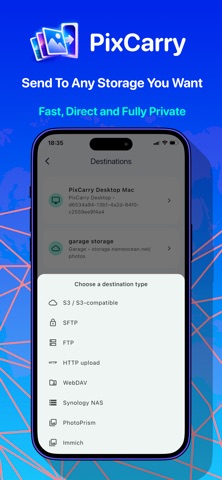
• Amazon S3, and S3-compatible storage: Cloudflare R2, Backblaze B2, Wasabi, DigitalOcean Spaces, MinIO, Garage
• Synology NAS, through DSM File Station
• Immich
• PhotoPrism
• Any server over SFTP, FTP or WebDAV
• Your own HTTP upload endpoint
• Any Mac or PC via PixCarry Desktop
BUILT TO BE TRUSTED
• Nothing is uploaded twice
• Interrupted transfers pick up where they stopped
• Re-send a finished transfer to repair the other end: anything still there is skipped, and only what is genuinely missing goes again
• Test connection tells you a destination works before you trust photos to it
• When a file can't be sent, the transfer says which one and why
YOUR CALL, NOT THE APP'S
• Wi-Fi only (optionally), so a big backlog never touches your cellular data
• Keep the screen on while a large transfer runs
• Pause and resume any transfer
• Free up space when you want to: one tap on a completed transfer deletes that transfer's originals from the phone after they have arrived, never before, and never without your confirmation
PRIVACY BY ARCHITECTURE
PixCarry has no backup servers, so there is nothing for it to see. Your phone talks directly to your destination over the protocol it speaks, using credentials that live in the iOS Keychain and are never sent anywhere else. No sign-up, no tracking, no photo of yours ever passing through us
WORTH KNOWING BEFORE YOU BUY
Transfers run fastest with PixCarry open on screen leave it in the foreground and a large library goes through in one sitting. Automatic transfers do keep working in the background, but iOS decides when a backgrounded app may run, so background progress can be slow and is not guaranteed. If you want a big first backup done today, plug the phone in and leave the app open
PixCarry Plus
Automatic transfers, whole-library backups and every destination type are part of PixCarry Plus, available weekly, monthly or yearly, or as a one-time lifetime purchase. Prices are shown in your own currency in the app before you buy. Subscriptions renew automatically unless cancelled at least 24 hours before the end of the current period, and can be managed or cancelled in your Apple ID settings.
• Title of services are "PixCarry Plus Weekly Plan", "PixCarry Plus Monthly Plan" and "PixCarry Plus Yearly Plan"
• Length of subscriptions are 1 week, 1 month, 1 year
• Payment will be charged to Apple Account at confirmation of purchase
• Subscription automatically renews unless auto-renew is turned off at least 24-hours before the end of the current period
• Account will be charged for renewal within 24-hours prior to the end of the current period, and identify the cost of the renewal
• Subscriptions may be managed by the user and auto-renewal may be turned off by going to the user's Account Settings after purchase
• Any unused portion of a free trial period, if offered, will be forfeited when the user purchases a subscription to that publication, where applicable
Terms: https://www.pixcarry.com/terms.html
Privacy Policy: https://www.pixcarry.com/privacy.html
Support: info@yuix.org