AppBrain
AppBrain
  • Apps
  • Apps being viewed right now Trending apps today Most popular apps All-time most installed apps Top rated apps iPhone and iPad apps
  • Intelligence ▾
    Intelligence overview → Track any Android app or your whole market
    Track & analyze
    Keyword Tracker & OptimizerTrack & improve Play rankings App Performance ReportOne-off PDF for any app StatisticsFree Android & Play market stats
    Promote your app
    Featured Apps App Links
  • Intelligence
  • Pricing
  • Dashboard
  • Sign up
  • Log in
App Store Apps > Graphics & Design > PixelLab: AI Background Eraser
PixelLab: AI Background Eraser icon

PixelLab: AI Background Eraser

by Sohel Ibna Saad · Graphics & Design · Free
On the App Store since December 2022 · Data updated 2026-10-17
App Store

PixelLab: AI Background Eraser is made and published by Sohel Ibna Saad. AppBrain is an independent app data site and isn't affiliated with Sohel Ibna Saad. The app name, icon, screenshots and description belong to Sohel Ibna Saad and are shown as published on the App Store.

AppBrain's verdict

Well rated
Rating on App Store
4.30
265 ratings
Last updated
November 19, 2025

Users rate it well: 4.3 stars from 265 ratings.

Rankings

App Store top charts

App Store Rankings for PixelLab: AI Background Eraser

This app is not ranked

Competitors

Similar apps and more from Sohel Ibna Saad

Alternatives to PixelLab: AI Background Eraser

Remove Objects・AI Photo Eraser icon Remove Objects・AI Photo Eraser
AI Creative Studio
4.4
Free
545 ratings
AI Background Remover & Eraser icon AI Background Remover & Eraser
AI Creative Studio
4.3
Free
266 ratings
Auto BG Erase: Edit, Remove BG icon Auto BG Erase: Edit, Remove BG
Rajeev kumar
3.7
Free
37 ratings
remove unwanted object Retouch icon remove unwanted object Retouch
Sounak Sarkar
4.3
Free
288 ratings
Object Removal AI - AI Retouch icon Object Removal AI - AI Retouch
Spring Tech Co., Ltd.
4.6
Free
655 ratings
Remove objects and background+ icon Remove objects and background+
Dmitriy Beloglazov
4.4
Free
120 ratings
Resize: No Crop & Square Fit icon Resize: No Crop & Square Fit
Human Apps
4.5
Free
613 ratings
Background Eraser: Remove BG icon Background Eraser: Remove BG
Appostrophe AB
4.3
Free
658 ratings

More from Sohel Ibna Saad

Blur Photo Editor icon Blur Photo Editor
Sohel Ibna Saad
4.4
Free
10.6K ratings
Blur Video - AI Blur Maker icon Blur Video - AI Blur Maker
Sohel Ibna Saad
4.6
Free
2.0K ratings
Inva: Invitation Maker + RSVP icon Inva: Invitation Maker + RSVP
Sohel Ibna Saad
4.7
Free
236 ratings
Vidz: Reels Templates & Maker icon Vidz: Reels Templates & Maker
Sohel Ibna Saad
4.7
Free
169 ratings
Dark Table - Presets for LR icon Dark Table - Presets for LR
Sohel Ibna Saad
4.5
Free
94 ratings
AI Art: AI Photo Generator icon AI Art: AI Photo Generator
Sohel Ibna Saad
4.0
Free
81 ratings
KapiCam - Filters for Pictures icon KapiCam - Filters for Pictures
Sohel Ibna Saad
4.1
Free
55 ratings

Releases

Updates seen on the App Store
Version
1.2.6
Launched
December 2022

No changelog data

User feedback

Ratings and reviews on the App Store

Comments on PixelLab: AI Background Eraser for iOS

We don't have enough comments to show example comments. Please check back later.

Technology

Found in the app by AppBrain
Price
Free
App size
105.1 MB
Content rating
Everyone

Technologies used by PixelLab: AI Background Eraser

About the app and developer

About PixelLab: AI Background Eraser

PixelLab: AI Background Eraser is a graphics & design app developed by Sohel Ibna Saad.

User Ratings

PixelLab: AI Background Eraser is rated 4.30 out of 5 stars. The rating is based on 270 ratings.

App Information

PixelLab: AI Background Eraser is freely available from the App Store. The app size is 105.12 MB. The latest version available is 1.2.6. The last update was on November 19, 2025.

Technical Requirements

The app has a content rating of Everyone. The app has been available on the App Store since December 2022.

Developer information for Sohel Ibna Saad

Sohel Ibna Saad

Address:

Share PixelLab: AI Background Eraser

Store listing

By Sohel Ibna Saad, from the App Store
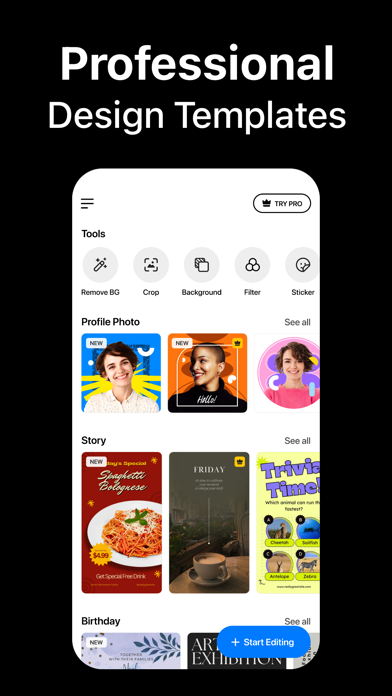
PixelLab: AI Background Eraser Screenshot 1 of 8
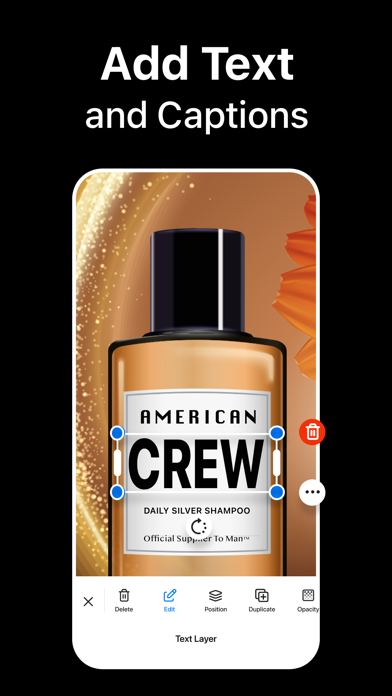
PixelLab: AI Background Eraser Screenshot 2 of 8
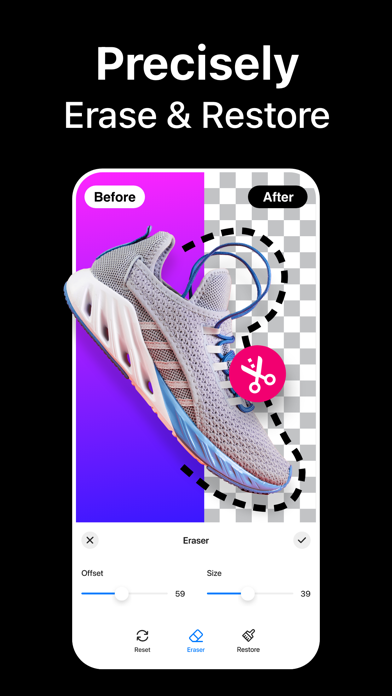
PixelLab: AI Background Eraser Screenshot 3 of 8
PixelLab: AI Background Eraser Screenshot 4 of 8
PixelLab: AI Background Eraser Screenshot 5 of 8
PixelLab: AI Background Eraser Screenshot 6 of 8
PixelLab: AI Background Eraser Screenshot 7 of 8
PixelLab: AI Background Eraser Screenshot 8 of 8
Screenshots by Sohel Ibna Saad, from the the App Store listing
Description by Sohel Ibna Saad Written by the developer, not by AppBrain. Click to read.
Instantly remove background from images and create transparent or colorful backgrounds on your iPhone. Background Eraser lets you apply colors, filters, borders, and even add text to change background in your photos and save as high-quality PNG or JPEG.

Looking for the best background removal app for iPhone? Use our AI-infused tool to automatically cut out objects or people in the background. Simply select your image from the library, and the app will do the rest!

Key Features of Background Eraser:
• One tap to remove background from photos automatically
• Crop, rotate, and flip images for adjustment
• Manual background remover to erase or restore any objects
• Add custom text and emojis to a photo background
• Add border outline to a photo with different colors
• Inbuilt image background color changer
• Apply amazing photo filters from 100+ presets
• Change resolution before saving your edited photos in PNG or JPEG format
• Instantly share your creation on multiple platforms like Facebook, Instagram, etc.

Remove Background with AI
The built-in automatic background remover works like a charm – needing you to only select an image from the gallery. After the AI background removal, you can use the Eraser tool to manually delete background from images and achieve perfection.

Change Background Color
Wondering how to change the background of a photo to a different color? Choose your pick from the palette and change background color of any photo on your iPhone. You can add white background to a photo or make the background transparent as well.

Text, Emojis, Filters – You name it
Add text and emojis to images to personalize your captures the way you want. You can also apply photo effects and filters to enhance the appearance, add border frame to change the outlook, and so on.

How to remove background from a picture on iPhone?
Using the Background Eraser app to crop out or remove people and objects from photo backgrounds is easy –
- Launch the app and tap on the Plus (+) button.
- Choose an image from your iPhone Library.
- Crop or rotate if needed. Then hit Next.
- It will automatically remove the background for you. To further refine the edges, use the Eraser tool for adjustments.

Auto-Renewable Subscription Terms:
Subscribe to get unrestricted access to all the features outlined above.

- Subscription Length: Weekly, Yearly
- Subscription with a free trial period will automatically renew to a paid subscription unless it is canceled at least 24 hours before the end of the trial period.
- Payment will be charged to iTunes Account at confirmation of purchase.
- Your Apple ID account will be charged for renewal within 24 hours before the end of the trial period.
- You can manage and cancel your subscriptions by going to your account settings on the App Store.
- Any unused portion of a free trial period, if offered, will be forfeited when the user purchases a subscription to that publication, where applicable.
- By signing up for this subscription, you agree to our Terms of Use and Privacy Policy.

Terms of Use:
https://pixeltouch.net/legal/bgeraser/terms.html
Privacy Policy:
https://pixeltouch.net/legal/bgeraser/privacy.html
Official page on the App Store
Today's trending apps Apps other people are watching Price drops on Google Play Top new apps Popular Graphics & Design Apps
Remove Objects・AI Photo Eraser icon Remove Objects・AI Photo Eraser
AI Background Remover & Eraser icon AI Background Remover & Eraser
Auto BG Erase: Edit, Remove BG icon Auto BG Erase: Edit, Remove BG
remove unwanted object Retouch icon remove unwanted object Retouch
Object Removal AI - AI Retouch icon Object Removal AI - AI Retouch
Remove objects and background+ icon Remove objects and background+
Resize: No Crop & Square Fit icon Resize: No Crop & Square Fit
Background Eraser: Remove BG icon Background Eraser: Remove BG
Overview Alternatives Reviews Rankings Technology
AppBrain Intelligence premium content

Subscribe now to get full and unlimited access to AppBrain Intelligence. You'll have access to:

  • App Intelligence dashboard (performance timeline, competitor comparison, country rankings, insight cards)
  • Detailed ranking data per app
  • Full timeline per developer
  • Device market shares data per country
  • Unlimited keyword tracking
1 Month

$75/mo
(billed every month)

SAVE 0%
Subscribe
3 Months

$65/mo
($195 billed every 3 months)

SAVE 13%
Subscribe
1 Year

$57.50/mo
($690 billed every year)

SAVE 23%
Subscribe
Each subscription will automatically renew 3 days before the expiration date for the same time period. Subscriptions can be cancelled at any time before the renewal.

AppBrain is an app data site, we track rankings, ratings, installs for all apps and games on Google Play and the App Store. AppBrain doesn't host app files or APKs, all install links go directly to the official store. All trademarks are owned by their respective owners. As an Amazon Associate AppBrain earns from qualifying purchases.

More apps

  • Top Android apps being viewed
  • Efiko: Aesthetic Filters & Eff
  • Shiny: TCG Card Scanner
  • View Sudoku

App statistics

  • Android statistics
  • Google Play Developer stats
  • Trending Android Apps
  • Trending iOS apps
  • Top popular Apps
  • Buy the best Android phone
  • Buy & sell app businesses

About AppBrain

  • Contact
  • Privacy
  • Documentation
  • DMCA takedowns
  • Articles
  • Blog
  • Tips to improve your Android promotional campaign
© 2010-2026 - AppBrain