

PlanMeasure Takeoff
PlanMeasure Takeoff is made and published by KRISHNA PINNAMANENI. AppBrain is an independent app data site and isn't affiliated with KRISHNA PINNAMANENI. The app name, icon, screenshots and description belong to KRISHNA PINNAMANENI and are shown as published on the App Store.
AppBrain's verdict
- Rating on App Store
- 5.00
- 2 ratings
- Last updated
- October 15, 2026
It doesn't have enough ratings yet to judge what users think.
Rankings
App Store top chartsApp Store Rankings for PlanMeasure Takeoff
Competitors
Similar apps and more from KRISHNA PINNAMANENIAlternatives to PlanMeasure Takeoff


More from KRISHNA PINNAMANENI


Releases
Updates seen on the App Store- Version
- 1.8
- Launched
- June 2026
No changelog data
User feedback
Ratings and reviews on the App StoreComments on PlanMeasure Takeoff for iOS
We don't have enough comments to show example comments. Please check back later.
Technology
Found in the app by AppBrain- Price
- Free
- App size
- 2.22 MB
- Content rating
- Everyone
Technologies used by PlanMeasure Takeoff
About the app and developer
About PlanMeasure Takeoff
PlanMeasure Takeoff is a productivity app developed by KRISHNA PINNAMANENI.
User Ratings
PlanMeasure Takeoff is rated 5.00 out of 5 stars. The rating is based on 2 ratings.
App Information
PlanMeasure Takeoff is freely available from the App Store. The app size is 2.22 MB. The latest version available is 1.8. The last update was on October 15, 2026.
Technical Requirements
The app has a content rating of Everyone. The app has been available on the App Store since June 2026.
Developer information for KRISHNA PINNAMANENI
Address:
Frequently asked questions about PlanMeasure Takeoff
Is PlanMeasure Takeoff free?
Yes. PlanMeasure Takeoff is free on the App Store.
Is PlanMeasure Takeoff still available?
Yes. PlanMeasure Takeoff is on the App Store, and the last update we saw was on October 15, 2026.
How large is PlanMeasure Takeoff?
PlanMeasure Takeoff is 2.22 MB.
Is PlanMeasure Takeoff suitable for children?
App Store rates the content of PlanMeasure Takeoff as suitable for everyone.
How do people rate PlanMeasure Takeoff?
PlanMeasure Takeoff scores 5.00 out of 5 stars, from 2 ratings on the App Store.
Who made PlanMeasure Takeoff?
PlanMeasure Takeoff was developed by KRISHNA PINNAMANENI. It is listed in the productivity category on the App Store.
What are the best alternatives to PlanMeasure Takeoff?
People looking at PlanMeasure Takeoff also look at these productivity apps: ScaleTap: PDF Plan Measure, DraftPlanar: PDF Plan Viewer, PlanBridge: Measure PDF Plans, PlanMeasure, Planformer – Smart Takeoffs.
Store listing
By KRISHNA PINNAMANENI, from the App Store


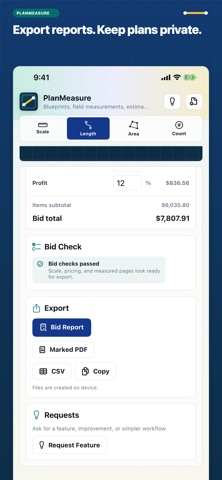
Description by KRISHNA PINNAMANENI Written by the developer, not by AppBrain. Click to read.
PlanMeasure Takeoff opens blueprint PDFs and plan images, measures lengths, areas, and counts, and helps you price the work. Plans and project data are processed locally; no account or plan upload is required.
CHECK THE SCALE
• Calibrate each sheet from a known dimension.
• Use architectural, engineering, and metric PDF scale presets.
• Check the scale against a second known dimension and see its provenance and verification status.
• Review missing-scale warnings before export. A printed scale alone cannot confirm that a scanned or resized plan is accurate.
ORGANIZE BY ROOM OR FLOOR
• Label selected items with a room, floor, zone, or other location.
• Search those labels and keep them in CSV exports.
• See location subtotals in text and PDF reports, with length, area, and count quantities kept separate.
• Items missing a page or required scale are identified and excluded from location subtotals.
• Locations are assigned manually; the app does not automatically divide a drawing into rooms.
MEASURE AND PRICE
• Trace lengths and areas, count fixtures, and enter field quantities.
• Snap to traced endpoints, midpoints, intersections, or the grid, with optional angle constraints and a touch loupe.
• Apply unit prices, waste, and slack; reuse personal cost kits.
• Convert estimated quantities into whole-package material orders using your package coverage.
• Review package counts, overage, trade totals, and missing-price checks.
• See purchase estimates and extra whole-package costs in the editor and reports. These use your entered unit rate, including any labor in that rate, and exclude tax and delivery. Existing bid totals remain unchanged.
• Calculate contingency, overhead, profit, and a final bid total.
KEEP AND SHARE YOUR WORK
• Undo and redo changes across the estimating workflow.
• Restore automatic draft checkpoints after an interrupted session.
• Export a portable project backup with its plan pages and restore it as a separate copy on a compatible device.
• Export CSV, marked-up plans, and PDF bid reports.
• Try the included demo before importing your own plan.
For framing, flooring, drywall, painting, roofing, concrete, electrical, plumbing, HVAC, and general estimating.
Measurements depend on the source drawing, calibration, and your inputs. Verify dimensions, scope, prices, and exported quantities before ordering materials or submitting a bid.
• Preview measured quantities before applying a known-dimension scale change, including the affected item count and reminders when units change.