AppBrain
AppBrain
  • Apps
  • Apps being viewed right now Trending apps today Most popular apps All-time most installed apps Top rated apps iPhone and iPad apps
  • Intelligence ▾
    Intelligence overview → Track any Android app or your whole market
    Track & analyze
    Keyword Tracker & OptimizerTrack & improve Play rankings App Performance ReportOne-off PDF for any app StatisticsFree Android & Play market stats
    Promote your app
    Featured Apps App Links
  • Intelligence
  • Pricing
  • Dashboard
  • Sign up
  • Log in
App Store Apps > Utilities > Prime Speed Controller
Prime Speed Controller icon

Prime Speed Controller

by Kohei Ishikawa · Utilities · Free
On the App Store since September 2026 · Data updated 2026-10-31

Prime Speed Controller is made and published by Kohei Ishikawa. AppBrain is an independent app data site and isn't affiliated with Kohei Ishikawa. The app name, icon, screenshots and description belong to Kohei Ishikawa and are shown as published on the App Store.

AppBrain's verdict

Last updated
September 21, 2026
Size
776.0 KB
Official page on the App Store

User feedback

Ratings and reviews on the App Store

Comments on Prime Speed Controller for iOS

We don't have enough comments to show example comments. Please check back later.

Store listing

By Kohei Ishikawa, from the App Store
Prime Speed Controller Screenshot 1 of 5
Prime Speed Controller Screenshot 2 of 5
Prime Speed Controller Screenshot 3 of 5
Prime Speed Controller Screenshot 4 of 5
Prime Speed Controller Screenshot 5 of 5
Screenshots by Kohei Ishikawa, from the the App Store listing
Description by Kohei Ishikawa Written by the developer, not by AppBrain. Click to read.
Prime Speed Controller is a Safari extension that adds A-B loop repeat, playback speed control, seek, and time-saved tracking exclusively to Prime Video on iPhone and iPad. Perfect for language learners and anyone who wants to get more out of Prime Video.

■ A-B Loop Repeat
Tap A to mark a start point, tap B to mark an end point — the video loops that segment continuously. Replay any dialogue, scene, or lecture as many times as you need.

■ Playback Speed
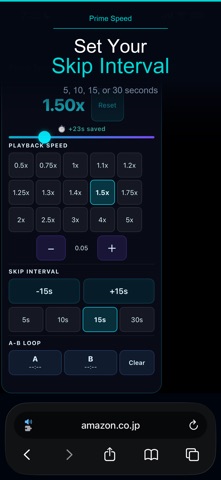
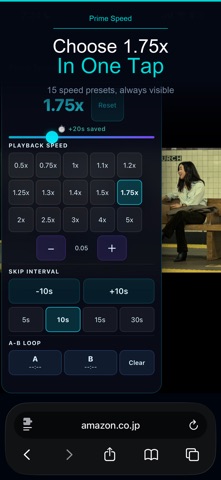
15 presets from 0.5x to 5x, with 0.05x fine-tuning. Subtle steps like 1.1x and 1.2x let you boost speed while keeping audio clear.

■ Forward & Rewind
Choose 5, 10, 15, or 30-second intervals. Jump back instantly to catch missed dialogue.

■ Time-Saved Tracker
The panel shows how much real time you have saved by watching above 1.0x speed, accumulated across sessions.

Key Features

• A-B Loop: mark any segment for continuous repeat
• 15 playback speed presets from 0.5x to 5x
• Fine-tune in 0.05x steps
• Forward and rewind at 5, 10, 15, or 30 seconds
• Time-saved tracker displayed in the panel
• Settings saved automatically across sessions
• Works on iPhone and iPad
• Activates only on Prime Video — no other sites
• No data sent to external servers

How to Use

1. Follow the in-app guide to enable the extension in Safari Settings.
2. Open Prime Video in Safari and start a video.
3. Use the floating panel to set speed, seek interval, or A-B loop points.

Playback speed or seeking may be restricted by Prime Video for certain titles. This app does not detect or skip advertisements.

This is an independent, unofficial Safari extension. It is not provided, endorsed, or approved by Amazon, Prime Video, or their affiliates. Amazon and Prime Video are trademarks or registered trademarks of their respective owners.
Official page on the App Store

Safety and technology

Found in the app by AppBrain
Price
Free
App size
776.0 KB
Content rating
Everyone

Technologies used by Prime Speed Controller

Releases

Updates seen on the App Store
Version
1.0
Launched
September 2026

No changelog data

Alternatives

Similar apps and more from Kohei Ishikawa

Alternatives to Prime Speed Controller

Simple Video Speed Controller icon Simple Video Speed Controller
Chase Olson
0.0
Free
Video Editor – Reverse, Speed icon Video Editor – Reverse, Speed
国立 胡
0.0
Free
Video Editor - FFmpeg Pro icon Video Editor - FFmpeg Pro
Nishaben Patel
5.0
Free
2 ratings
Video Speed for Safari icon Video Speed for Safari
Atamert Harut
5.0
Free
2 ratings
Video Compressor - Shrinker icon Video Compressor - Shrinker
seohyeon yoon
0.0
Free
NetworkHD Touch icon NetworkHD Touch
wyrestorm
0.0
Free
VoiceMagic - Voice AI Effects icon VoiceMagic - Voice AI Effects
aiip Co., Ltd
4.1
Free
7 ratings
Audio Speed Modifier icon Audio Speed Modifier
Na Liang
5.0
Free
4 ratings

More from Kohei Ishikawa

Copy All: Text icon Copy All: Text
Kohei Ishikawa
5.0
Free
3 ratings
Ensemble Stage: Seating Chart icon Ensemble Stage: Seating Chart
Kohei Ishikawa
5.0
Free
1 ratings
WorkoutQuest: Habit Tracker icon WorkoutQuest: Habit Tracker
Kohei Ishikawa
0.0
Free
FotoSlim: Photo Cleaner icon FotoSlim: Photo Cleaner
Kohei Ishikawa
0.0
Free
NameSpark: Never Forget Names icon NameSpark: Never Forget Names
Kohei Ishikawa
0.0
$1.99
Unit Price Scanner: Price Tags icon Unit Price Scanner: Price Tags
Kohei Ishikawa
0.0
$0.99
Netacho: One-Line Idea Notes icon Netacho: One-Line Idea Notes
Kohei Ishikawa
0.0
Free
Shopping List: Never Forget icon Shopping List: Never Forget
Kohei Ishikawa
0.0
Free

Rankings

App Store top charts

App Store Rankings for Prime Speed Controller

This app is not ranked

About the app and developer

About Prime Speed Controller

Prime Speed Controller is an utilities app developed by Kohei Ishikawa.

What is the rating of Prime Speed Controller?

Prime Speed Controller has no ratings yet.

Is Prime Speed Controller free?

Prime Speed Controller is free. The app size is 776.00 kB. The latest version available is 1.0. The last update was on September 21, 2026.

What are the requirements for Prime Speed Controller?

The app has a content rating of Everyone. The app has been available on the App Store since September 2026.

Developer information for Kohei Ishikawa

Kohei Ishikawa

Address:

Frequently asked questions about Prime Speed Controller

Is Prime Speed Controller free?

Yes. Prime Speed Controller is free on the App Store.

Is Prime Speed Controller still available?

Yes. Prime Speed Controller is on the App Store, and the last update we saw was on September 21, 2026.

How large is Prime Speed Controller?

Prime Speed Controller is 776.00 kB.

Is Prime Speed Controller suitable for children?

App Store rates the content of Prime Speed Controller as suitable for everyone.

Who made Prime Speed Controller?

Prime Speed Controller was developed by Kohei Ishikawa. It is listed in the utilities category on the App Store.

What are the best alternatives to Prime Speed Controller?

People looking at Prime Speed Controller also look at these utilities apps: Simple Video Speed Controller, Video Editor – Reverse, Speed, Video Editor - FFmpeg Pro, Video Speed for Safari, Video Compressor - Shrinker.

Share Prime Speed Controller

Top new apps Apps other people are watching Price drops on Google Play Popular Utilities Apps Today's trending apps
Simple Video Speed Controller icon Simple Video Speed Controller
Video Editor – Reverse, Speed icon Video Editor – Reverse, Speed
Video Editor - FFmpeg Pro icon Video Editor - FFmpeg Pro
Video Speed for Safari icon Video Speed for Safari
Video Compressor - Shrinker icon Video Compressor - Shrinker
NetworkHD Touch icon NetworkHD Touch
VoiceMagic - Voice AI Effects icon VoiceMagic - Voice AI Effects
Audio Speed Modifier icon Audio Speed Modifier
Overview Alternatives Reviews Rankings Technology
AppBrain Intelligence premium content

Subscribe now to get full and unlimited access to AppBrain Intelligence. You'll have access to:

  • App Intelligence dashboard (performance timeline, competitor comparison, country rankings, insight cards)
  • Detailed ranking data per app
  • Full timeline per developer
  • Device market shares data per country
  • Unlimited keyword tracking
1 Month

$75/mo
(billed every month)

SAVE 0%
Subscribe
3 Months

$65/mo
($195 billed every 3 months)

SAVE 13%
Subscribe
1 Year

$57.50/mo
($690 billed every year)

SAVE 23%
Subscribe
Each subscription will automatically renew 3 days before the expiration date for the same time period. Subscriptions can be cancelled at any time before the renewal.

AppBrain is an app data site, we track rankings, ratings, installs for all apps and games on Google Play and the App Store. AppBrain doesn't host app files or APKs, all install links go directly to the official store. All trademarks are owned by their respective owners.

More apps

  • Top Android apps being viewed
  • Cartoon Classics - Movies & TV
  • TapCook: Budget Meal Plans stats
  • PicShot: Photo Editor App Android App

App statistics

  • Android statistics
  • Google Play Developer stats
  • Trending Android Apps
  • Trending iOS apps
  • Top popular Apps
  • Buy the best Android phone
  • Buy & sell app businesses

About AppBrain

  • Contact
  • Privacy
  • Documentation
  • DMCA takedowns
  • Blog
  • Android app Install tracking and attribution options for the AppBrain ad network
© 2010-2026 - AppBrain