

Shopping List: Never Forget
Shopping List: Never Forget is made and published by Kohei Ishikawa. AppBrain is an independent app data site and isn't affiliated with Kohei Ishikawa. The app name, icon, screenshots and description belong to Kohei Ishikawa and are shown as published on the App Store.
AppBrain's verdict
- Last updated
- September 13, 2026
Rankings
App Store top chartsApp Store Rankings for Shopping List: Never Forget
Competitors
Similar apps and more from Kohei IshikawaAlternatives to Shopping List: Never Forget


More from Kohei Ishikawa


Releases
Updates seen on the App Store- Version
- 1.3
- Launched
- July 2026
No changelog data
User feedback
Ratings and reviews on the App StoreComments on Shopping List: Never Forget for iOS
We don't have enough comments to show example comments. Please check back later.
Technology
Found in the app by AppBrain- Price
- Free
- App size
- 12.1 MB
- Content rating
- Everyone
Technologies used by Shopping List: Never Forget
About the app and developer
About Shopping List: Never Forget
Shopping List: Never Forget is a shopping app developed by Kohei Ishikawa.
What is the rating of Shopping List: Never Forget?
Shopping List: Never Forget has no ratings yet.
Is Shopping List: Never Forget free?
Shopping List: Never Forget is free. The app size is 12.07 MB. The latest version available is 1.3. The last update was on September 13, 2026.
What are the requirements for Shopping List: Never Forget?
The app has a content rating of Everyone. The app has been available on the App Store since July 2026.
Developer information for Kohei Ishikawa
Address:
Store listing
By Kohei Ishikawa, from the App Store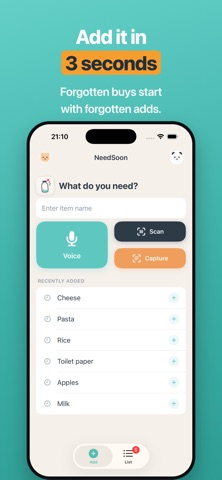


Description by Kohei Ishikawa Written by the developer, not by AppBrain. Click to read.
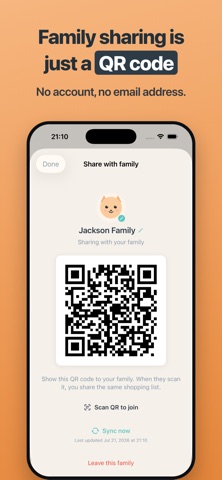
Family sharing needs no account. Just show a QR code, and everyone shares the same list.
Widget, Lock Screen, Siri, Apple Watch, barcode scan, or a photo of the label—add from wherever you are, in the fewest taps possible.
◆ Sound familiar?
• At the store, you can't remember what you needed
• You and your family buy the same thing twice
• You forgot to put it on the list in the first place
NeedSoon isn't about organizing a list—it's about catching the moment you notice.
◆ Add the moment you notice
• A home screen that's ready to type the second you open it
• Re-add recent and frequent items with one tap
• Add several at once by voice ("milk and eggs" → 2 items)
• Scan a barcode to fill in the product name automatically
• Snap a photo of the label to add it—no connection needed
• Add from Widget, Lock Screen, Control Center, Siri, and Apple Watch
◆ Family sharing is just a QR code
• No account, no email address
• Family joins by scanning a QR code
• Additions and purchases sync to everyone right away
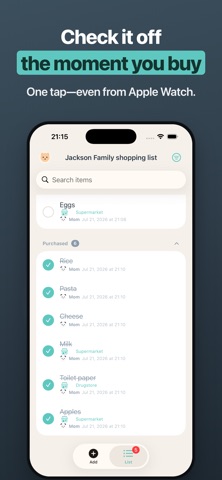
• See who added and who bought each item, with names and photos
◆ Never lost while shopping
• Sort by aisle, by store, or by person
• Check off with one tap—undo instantly if you slip
• Purchased items tidy themselves away
◆ Use it with confidence
• Add and check off even when offline
• Skip sharing and your data stays on your device only
• Camera and microphone are requested only when you choose that feature
Free, and ready to use right away.