




AppBrain's verdict
- Rating on App Store
- 3.67
- 9 ratings
- Last updated
- November 9, 2026
- Size
- 6.19 MB
It doesn't have enough ratings yet to judge what users think.
User feedback
Ratings and reviews on the App StoreComments on Printer: PDF to Word & Scan for iOS
We don't have enough comments to show example comments. Please check back later.
Store listing
By Dipankar Das, from the App StoreDescription by Dipankar Das Written by the developer, not by AppBrain. Click to read.
SCAN PAPER OR IMPORT PHOTOS
Use the camera or choose images from your gallery and files from the Files app. Choose Document, ID Card, Passport, Business Card or Receipt format. Adjust each corner after capture or import, correct perspective and choose a cleanup style for a readable page. Keep the original image so you can adjust it again.
KEEP YOUR DOCUMENTS CLOSE
Save scans automatically to your local library. Rename documents, search names and recognized text, preview pages and save a PDF to Files. Initial multi-page scans and imports, corner adjustment, cleanup and PDF saving are included in the basic workspace.
PRINT WITH AIRPRINT
Preview your PDF or photo and use the familiar Apple print sheet. Printing requires an AirPrint-compatible printer on the same network. Printer does not add support for printers that do not support AirPrint.
DO MORE WITH PRINTER PREMIUM
• Add camera scans, gallery images or files to an existing PDF.
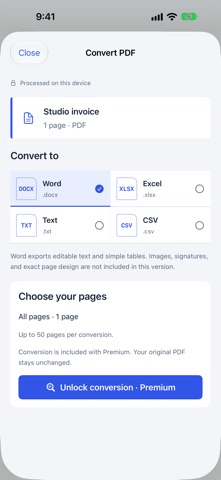
• Convert PDF text and simple tables to Word (DOCX), Excel (XLSX), text or CSV on your device.
• Review and edit detected table cells before exporting to Excel.
• Unlock unlimited printing and PDF sharing.
Conversion recreates editable text and simple tables. Images, signatures and exact page layout are not preserved. Excel exports do not recover formulas. Results depend on source clarity and document structure; review important files before use.
YOUR WORKSPACE, YOUR CHOICE
A short question-led setup suggests a first task and document format. Compare Premium plans after setup or continue with the basic workspace. Document processing and conversion run on your device. You choose when to export, print or share a file. Files can also access document providers you have enabled in the Files app.
SUBSCRIPTIONS
Premium is available as a weekly, monthly or yearly auto-renewing subscription. The localized price and billing period appear before purchase. Payment is charged to your Apple Account after confirmation. Subscriptions renew automatically unless canceled at least 24 hours before the current period ends. Manage or cancel in your App Store account settings. Restore purchases from the paywall or Settings.
Privacy Policy
https://sites.google.com/view/printer-app-privacy/home
Terms of Use
https://sites.google.com/view/printer-app-terms-use/home
Safety and technology
Found in the app by AppBrain- Price
- Free
- App size
- 6.19 MB
- Content rating
- Everyone
Technologies used by Printer: PDF to Word & Scan
Releases
Updates seen on the App Store- Version
- 4.2
- Launched
- September 2022
No changelog data
Alternatives
Similar apps and more from Dipankar DasAlternatives to Printer: PDF to Word & Scan







More from Dipankar Das


Rankings
App Store top chartsApp Store Rankings for Printer: PDF to Word & Scan
About the app and developer
About Printer: PDF to Word & Scan
Printer: PDF to Word & Scan is a business app developed by Dipankar Das.
User Ratings
Printer: PDF to Word & Scan is rated 3.67 out of 5 stars. The rating is based on 9 ratings.
App Information
Printer: PDF to Word & Scan is freely available from the App Store. The app size is 6.19 MB. The latest version available is 4.2. The last update was on November 9, 2026.
Technical Requirements
The app has a content rating of Everyone. The app has been available on the App Store since September 2022.
Printer: PDF to Word & Scan is made and published by Dipankar Das. AppBrain is an independent app data site and isn't affiliated with Dipankar Das. The app name, icon, screenshots and description belong to Dipankar Das and are shown as published on the App Store.
Developer information for Dipankar Das
Address: