

Private Camera: Video Vault
Private Camera: Video Vault is made and published by 2784951 Alberta Inc. AppBrain is an independent app data site and isn't affiliated with 2784951 Alberta Inc. The app name, icon, screenshots and description belong to 2784951 Alberta Inc. and are shown as published on the App Store.
AppBrain's verdict
- Last updated
- October 7, 2026
Rankings
App Store top chartsApp Store Rankings for Private Camera: Video Vault
Competitors
Similar apps and more from 2784951 Alberta Inc.Alternatives to Private Camera: Video Vault




More from 2784951 Alberta Inc.

Also available on Google Play

Releases
Updates seen on the App Store- Version
- 1.0.6
- Launched
- June 2026
No changelog data
User feedback
Ratings and reviews on the App StoreComments on Private Camera: Video Vault for iOS
We don't have enough comments to show example comments. Please check back later.
Technology
Found in the app by AppBrain- Price
- Free
- App size
- 69.3 MB
- Content rating
- Everyone
Technologies used by Private Camera: Video Vault
About the app and developer
About Private Camera: Video Vault
Private Camera: Video Vault is a photo & video app developed by 2784951 Alberta Inc.
User Ratings
The app has no ratings yet.
App Information
Private Camera: Video Vault is freely available from the App Store. The app size is 69.30 MB. The latest version available is 1.0.6. The last update was on October 7, 2026.
Technical Requirements
The app has a content rating of Everyone. The app has been available on the App Store since June 2026.
Developer information for 2784951 Alberta Inc.
Address:
Frequently asked questions about Private Camera: Video Vault
Is Private Camera: Video Vault free?
Yes. Private Camera: Video Vault is free on the App Store.
Is Private Camera: Video Vault still available?
Yes. Private Camera: Video Vault is on the App Store, and the last update we saw was on October 7, 2026.
How large is Private Camera: Video Vault?
Private Camera: Video Vault is 69.30 MB.
Is Private Camera: Video Vault suitable for children?
App Store rates the content of Private Camera: Video Vault as suitable for everyone.
Who made Private Camera: Video Vault?
Private Camera: Video Vault was developed by 2784951 Alberta Inc. It is listed in the photo & video category on the App Store.
What are the best alternatives to Private Camera: Video Vault?
People looking at Private Camera: Video Vault also look at these photo & video apps: OutVault: Private Camera, PrivacyCam: Hide My Photos, SwipeTidy: Photo Cleaner, Candfly: AI Candid Camera, MightyDash: Private Dash Cam.
Store listing
By 2784951 Alberta Inc., from the App Store

Description by 2784951 Alberta Inc. Written by the developer, not by AppBrain. Click to read.
RECORD STRAIGHT TO YOUR VAULT
Use the front or rear camera with simple recording controls. Keep recording sessions together on your device, then return to the camera when you finish.
A CALCULATOR WITH A PURPOSE
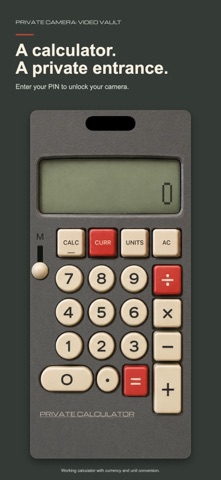
Use a working retro calculator with currency and unit conversion. Enter your app PIN to unlock the camera and your private media tools.
DIFFERENT PASSWORDS, DIFFERENT VAULTS
Your app PIN unlocks the calculator screen. Your master password opens all your vaults. A custom vault password opens its matching recordings, so you can keep different collections separate. Keep your passwords somewhere safe.
IMPORT AND ORGANIZE
Bring existing photos and videos into a password-protected vault from your gallery or the file chooser. Imported originals stay in their original location until you remove them yourself.
QUICK VIDEO EDITS
Open a clip from your vault to trim it, change playback speed, rotate it or mute its sound. Save an edited copy and keep the original.
PASSWORD-PROTECTED FILE SHARING
Choose Share Encrypted File to create a download link with a separate file password. Links expire after 30 days. Anyone with the link can download the encrypted file; the password is needed to open its contents. Share the password separately. Ordinary sharing remains a separate option.
CLEAR PRIVACY CONTROLS
Review backup settings before recording. Camera and microphone permissions are required, and system privacy indicators remain visible. Dark-screen mode is an in-app view, not a promise of recording while your phone is locked. Record only with permission and respect other people's privacy. Some features depend on your device and plan. See the privacy policy for storage, backup and sharing details.