

Qisa is made and published by Ryu Iwasaki. AppBrain is an independent app data site and isn't affiliated with Ryu Iwasaki. The app name, icon, screenshots and description belong to Ryu Iwasaki and are shown as published on the App Store.
AppBrain's verdict
Established- Rating on App Store
- 4.50
- 2 ratings
- Last updated
- August 4, 2026
It doesn't have enough ratings yet to judge what users think.
Rankings
App Store top chartsApp Store Rankings for Qisa
Competitors
Similar apps and more from Ryu IwasakiAlternatives to Qisa








More from Ryu Iwasaki



Releases
Updates seen on the App Store- Version
- 1.6.0
- Launched
- May 2016
No changelog data
User feedback
Ratings and reviews on the App StoreComments on Qisa for iOS
We don't have enough comments to show example comments. Please check back later.
Technology
Found in the app by AppBrain- Price
- $7.99
- App size
- 59.3 MB
- Content rating
- Everyone
Technologies used by Qisa
About the app and developer
About Qisa
Qisa is a productivity app developed by Ryu Iwasaki.
User Ratings
Qisa is rated 4.50 out of 5 stars. The rating is based on 2 ratings.
App Information
Qisa costs $7.99. The app size is 59.26 MB. The latest version available is 1.6.0. The last update was on August 4, 2026.
Technical Requirements
The app has a content rating of Everyone. The app has been available on the App Store since May 2016.
Developer information for Ryu Iwasaki
Address:
Store listing
By Ryu Iwasaki, from the App Store

Description by Ryu Iwasaki Written by the developer, not by AppBrain. Click to read.
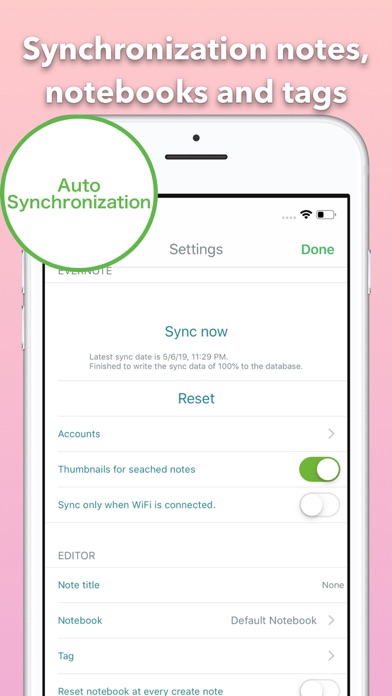
With the ability to sync, you can't only create new notes, but also edit them again! Let's download it!
Qisa is a client app that can sync Evernote without the two devices limits.
It was developed with the greatest care to allow you to quickly and easily take notes.
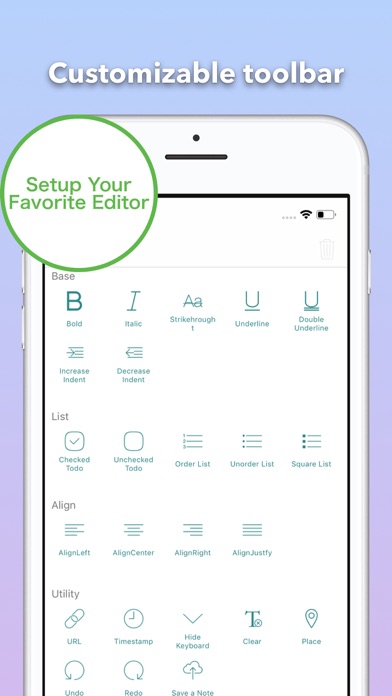
It is a text editor that allows you to do things like change the appearance of notes font, create lists and attach images and other files.
Going into detail on all of its many features would make it sound complicated, but it is truly designed in such a way as to make the use of these features simple and intuitive.
This is because the main functions for editing rich text are available from a toolbar which is easily accessible with a single touch.
Although the main functionality of Qisa is designed for creating new notes, it is also very good for editing notes.
It supports synchronization with Evernote and easily handles tasks like editing and even searching.
And there is absolutely no need to worry about small core usage. Qisa also has support for business accounts and shared notebooks.
Features
- Creates notes with the minimum number of steps
- Supports for rich text
- Customizable toolbar
- Searches notes
- Lightweight synchronization
- Automatic title creation
- Supports for variety of file attachments
- Import files from Dropbox
- Support offline
- Support Business
- Supports search and replace for text in notes
Note:
- Not support writing table element of HTML, but support reading table element.
Privacy Policy and Term of Use
http://www.jagaimopotato.com/apps/privacypolicy/qisa-privacy-policy-en.html
The app creates, views, and edits Evernote notes, tags, notebooks.
These permissions are provided from Evernote to third party developers.
This is the official permission that Evernote users approved to Evernote and provides to Evernote's third-party developers.
This is based on a license agreed to use the API of Evernote.
Please check Evernote's API-License, privacy policy and terms of use.
API License: http://dev.evernote.com/doc/reference/api_license.php
Evernote's Privacy Policy and Terms of Use: https://evernote.com/intl/us/privacy/policy
We do not provide all of Evernote notes contents to third parties except Evernote.
This app dose not include Siri shortcut features, but only provides the features for the shortcut.app of iOS 13.
If you have any feedback or questions, we’d love to hear from you. You can take a e-mail ryu.contact.jp+qisa@gmail.com or tweet @ja_gaimopotato.