AppBrain
AppBrain
  • Apps
  • Apps being viewed right now Trending apps today Most popular apps All-time most installed apps Top rated apps iPhone and iPad apps
  • Intelligence ▾
    Intelligence overview → Track any Android app or your whole market
    Track & analyze
    Keyword Tracker & OptimizerTrack & improve Play rankings App Performance ReportOne-off PDF for any app StatisticsFree Android & Play market stats
    Promote your app
    Featured Apps App Links
  • Intelligence
  • Pricing
  • Dashboard
  • Sign up
  • Log in
App Store Apps > Utilities > QuickExplorer - File & Storage
QuickExplorer - File & Storage icon

QuickExplorer - File & Storage

5.1.56
KAZUHIRO KAKIMOTO
0.00
0 reviews
Free

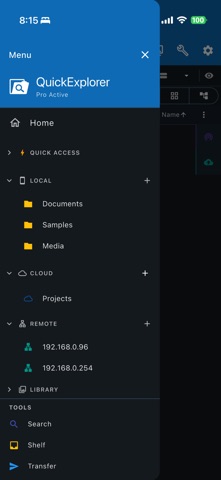
QuickExplorer - File & Storage Screenshot 1 of 9
QuickExplorer - File & Storage Screenshot 2 of 9
QuickExplorer - File & Storage Screenshot 3 of 9
QuickExplorer - File & Storage Screenshot 4 of 9
QuickExplorer - File & Storage Screenshot 5 of 9
QuickExplorer - File & Storage Screenshot 6 of 9
QuickExplorer - File & Storage Screenshot 7 of 9
QuickExplorer - File & Storage Screenshot 8 of 9
QuickExplorer - File & Storage Screenshot 9 of 9
Screenshots by KAZUHIRO KAKIMOTO, from the the App Store listing
View on the App Store Also on Google Play

About QuickExplorer - File & Storage

QuickExplorer - File & Storage is an utilities app developed by KAZUHIRO KAKIMOTO.

What is the rating of QuickExplorer - File & Storage?

QuickExplorer - File & Storage has no ratings yet.

Is QuickExplorer - File & Storage free?

QuickExplorer - File & Storage is free. The app size is 67.64 MB. The latest version available is 5.1.56. The last update was on November 11, 2026.

What are the requirements for QuickExplorer - File & Storage?

The app has a content rating of Everyone. The app has been available on the App Store since October 2018.

QuickExplorer - File & Storage is made and published by KAZUHIRO KAKIMOTO. AppBrain is an independent app data site and isn't affiliated with KAZUHIRO KAKIMOTO. The app name, icon, screenshots and description belong to KAZUHIRO KAKIMOTO and are shown as published on the App Store.

Description by KAZUHIRO KAKIMOTO (from the App Store)
QuickExplorer is a file manager for local storage, cloud services, NAS and remote servers. Multiple folder panes, full-text search, batch rename, ZIP, Diff, storage analysis and Wi-Fi sharing simplify file organization and transfers.

KEY FEATURES
• Tabs and multiple panes: open folders side by side and copy or move files with drag and drop.
• Flexible views: switch between lists, folder trees and thumbnail grids; sort by name, size, date or type.
• File shelf: gather files from different folders or levels for batch copying and moving.
• Batch rename: combine replacements, additions, deletions, numbering, dates and case changes; preview results first.
• Advanced search: search names, text and metadata; filter by regex, extension, modification date and size.
• ZIP compression and extraction: archive multiple files or folders and unpack compressed files.
• Diff and merge: compare file or folder changes side by side and merge them.
• Text merge and split: combine documents or code into one text, then split and write it back to the original files.
• Preview and streaming: view images, text and syntax-highlighted code; play network video and music directly without downloading first.
• Backups: save source, destination and exclusion rules; use full/incremental backups, ZIP storage and version retention.
• Disk usage: visualize folder sizes, locate large files and identify ways to free storage.
• Cloud, NAS and remote access: use SMB (CIFS), SFTP (SSH), WebDAV and FTP, with LAN device discovery.
• Wi-Fi and QR sharing: transfer files between LAN devices and share via QR codes or browser-based HTTP/WebDAV.
• Built-in terminal (desktop): run shell commands alongside file operations for development and server maintenance.

USE CASES
• Organize documents, photos, videos and work files with tabs or two-pane views.
• Rename batches of photos and documents with numbering and date rules.
• Copy or move files between devices, cloud storage, NAS and servers.
• Keep versioned backups and find large files taking up storage.
• Compare code/configuration folders and combine or split text files.
• Send files directly between phones and computers over Wi-Fi or QR sharing.

DATA AND STORAGE
Manage files directly at your chosen location with consistent controls for local, cloud and network storage. Wi-Fi sharing stays on the local network, so large or confidential files can be transferred without uploading them to an external cloud.

FREE AND PRO
All basic features remain free after the 7-day trial.
Pro, available as an annual subscription or lifetime purchase, removes mobile ads and desktop upgrade reminders.

Terms of Use: https://kakitiro.com/quickapps/quickexplorer/terms/
Show more Show less

Also available on Google Play

QuickExplorer - File & Storage icon QuickExplorer - File & Storage
kakitiro
0.0
Free
100+

Alternatives to QuickExplorer - File & Storage

File Explorer (File Manager) icon File Explorer (File Manager)
Certchip Corp
3.6
Free
35 ratings
FileBrowser: Documents Manager icon FileBrowser: Documents Manager
Stratospherix Ltd
4.7
$7.99
5.7K ratings
File Explorer & Manager icon File Explorer & Manager
Nalin Savaliya
2.0
Free
5 ratings
FE File Explorer - SMB & FTP icon FE File Explorer - SMB & FTP
Skyjos Co., Ltd.
4.7
$4.99
5.8K ratings
Owlfiles - File Manager icon Owlfiles - File Manager
Skyjos Co., Ltd.
4.6
Free
7.3K ratings
File Managers icon File Managers
Laxay Gajera
4.4
Free
345 ratings
File Explorer-File Manager Zip icon File Explorer-File Manager Zip
农 葛
3.9
Free
79 ratings
Disk Mounter icon Disk Mounter
Certchip Corp
3.8
Free
9 ratings

More from KAZUHIRO KAKIMOTO

QuickVibrator - Remote Sync icon QuickVibrator - Remote Sync
KAZUHIRO KAKIMOTO
2.8
Free
305 ratings
QuickEditor - Text & Code icon QuickEditor - Text & Code
KAZUHIRO KAKIMOTO
3.7
Free
3 ratings
QuickRecorder - Voice Library icon QuickRecorder - Voice Library
KAZUHIRO KAKIMOTO
5.0
Free
3 ratings
QuickVideo - Cam & Edit icon QuickVideo - Cam & Edit
KAZUHIRO KAKIMOTO
3.0
Free
2 ratings
QuickNote - Text Library icon QuickNote - Text Library
KAZUHIRO KAKIMOTO
2.5
Free
2 ratings
QuickRemote - Desktop Manager icon QuickRemote - Desktop Manager
KAZUHIRO KAKIMOTO
1.0
Free
1 ratings
QuickDIY - Sketch & Build icon QuickDIY - Sketch & Build
KAZUHIRO KAKIMOTO
0.0
Free
QuickHumming - Melody Maker icon QuickHumming - Melody Maker
KAZUHIRO KAKIMOTO
0.0
Free

Changelog of QuickExplorer - File & Storage

No changelog data

Developer information for KAZUHIRO KAKIMOTO

KAZUHIRO KAKIMOTO

Address:

Share QuickExplorer - File & Storage

Comments on QuickExplorer - File & Storage for iOS

We don't have enough comments to show example comments. Please check back later.

App Store Rankings for QuickExplorer - File & Storage

This app is not ranked

Technologies used by QuickExplorer - File & Storage

Frequently asked questions about QuickExplorer - File & Storage

Is QuickExplorer - File & Storage free?

Yes. QuickExplorer - File & Storage is free on the App Store.

Is QuickExplorer - File & Storage still available?

Yes. QuickExplorer - File & Storage is on the App Store, and the last update we saw was on November 11, 2026.

How large is QuickExplorer - File & Storage?

QuickExplorer - File & Storage is 67.64 MB.

Is QuickExplorer - File & Storage suitable for children?

App Store rates the content of QuickExplorer - File & Storage as suitable for everyone.

Who made QuickExplorer - File & Storage?

QuickExplorer - File & Storage was developed by KAZUHIRO KAKIMOTO. It is listed in the utilities category on the App Store.

What are the best alternatives to QuickExplorer - File & Storage?

People looking at QuickExplorer - File & Storage also look at these utilities apps: File Explorer (File Manager), FileBrowser: Documents Manager, File Explorer & Manager, FE File Explorer - SMB & FTP, Owlfiles - File Manager.

Apps other people are watching Top new apps Popular Utilities Apps Price drops on Google Play Today's trending apps
File Explorer (File Manager) icon File Explorer (File Manager)
FileBrowser: Documents Manager icon FileBrowser: Documents Manager
File Explorer & Manager icon File Explorer & Manager
FE File Explorer - SMB & FTP icon FE File Explorer - SMB & FTP
Owlfiles - File Manager icon Owlfiles - File Manager
File Managers icon File Managers
File Explorer-File Manager Zip icon File Explorer-File Manager Zip
Disk Mounter icon Disk Mounter
AppBrain Intelligence premium content

Subscribe now to get full and unlimited access to AppBrain Intelligence. You'll have access to:

  • App Intelligence dashboard (performance timeline, competitor comparison, country rankings, insight cards)
  • Detailed ranking data per app
  • Full timeline per developer
  • Device market shares data per country
  • Unlimited keyword tracking
1 Month

$75/mo
(billed every month)

SAVE 0%
Subscribe
3 Months

$65/mo
($195 billed every 3 months)

SAVE 13%
Subscribe
1 Year

$57.50/mo
($690 billed every year)

SAVE 23%
Subscribe
Each subscription will automatically renew 3 days before the expiration date for the same time period. Subscriptions can be cancelled at any time before the renewal.

AppBrain is an app data site, we track rankings, ratings, installs for all apps and games on Google Play and the App Store. AppBrain doesn't host app files or APKs, all install links go directly to the official store. All trademarks are owned by their respective owners.

More apps

  • Top Android apps being viewed
  • WatchFlick for Android
  • Bible Scroll: Daily Verse
  • Arrow Tap Money: Earn Cash

App statistics

  • Android statistics
  • Google Play Developer stats
  • Trending Android Apps
  • Trending iOS apps
  • Top popular Apps
  • Buy the best Android phone
  • Buy & sell app businesses

About AppBrain

  • Contact
  • Privacy
  • Documentation
  • DMCA takedowns
  • Blog
  • Monetization tips: Understanding your eCPM
© 2010-2026 - AppBrain