

QuickHumming - Melody Maker
QuickHumming - Melody Maker is made and published by KAZUHIRO KAKIMOTO. AppBrain is an independent app data site and isn't affiliated with KAZUHIRO KAKIMOTO. The app name, icon, screenshots and description belong to KAZUHIRO KAKIMOTO and are shown as published on the App Store.
AppBrain's verdict
- Last updated
- August 29, 2026
Rankings
App Store top chartsApp Store Rankings for QuickHumming - Melody Maker
Competitors
Similar apps and more from KAZUHIRO KAKIMOTOAlternatives to QuickHumming - Melody Maker


More from KAZUHIRO KAKIMOTO


Also available on Google Play

Releases
Updates seen on the App Store- Version
- 0.1.5
- Launched
- August 2026
No changelog data
User feedback
Ratings and reviews on the App StoreComments on QuickHumming - Melody Maker for iOS
We don't have enough comments to show example comments. Please check back later.
Technology
Found in the app by AppBrain- Price
- Free
- App size
- 47.8 MB
- Content rating
- Everyone
Technologies used by QuickHumming - Melody Maker
About the app and developer
About QuickHumming - Melody Maker
QuickHumming - Melody Maker is a music app developed by KAZUHIRO KAKIMOTO.
User Ratings
The app has no ratings yet.
App Information
QuickHumming - Melody Maker is freely available from the App Store. The app size is 47.77 MB. The latest version available is 0.1.5. The last update was on August 29, 2026.
Technical Requirements
The app has a content rating of Everyone. The app has been available on the App Store since August 2026.
Developer information for KAZUHIRO KAKIMOTO
Address:
Frequently asked questions about QuickHumming - Melody Maker
Is QuickHumming - Melody Maker free?
Yes. QuickHumming - Melody Maker is free on the App Store.
Is QuickHumming - Melody Maker still available?
Yes. QuickHumming - Melody Maker is on the App Store, and the last update we saw was on August 29, 2026.
How large is QuickHumming - Melody Maker?
QuickHumming - Melody Maker is 47.77 MB.
Is QuickHumming - Melody Maker suitable for children?
App Store rates the content of QuickHumming - Melody Maker as suitable for everyone.
Who made QuickHumming - Melody Maker?
QuickHumming - Melody Maker was developed by KAZUHIRO KAKIMOTO. It is listed in the music category on the App Store.
What are the best alternatives to QuickHumming - Melody Maker?
People looking at QuickHumming - Melody Maker also look at these music apps: Botsong, Ikatomape Midigene, Chord Navigator - Progression, Cantus - Voicing Lab, SongPulse: BPM & Key Finder.
Store listing
By KAZUHIRO KAKIMOTO, from the App Store


Description by KAZUHIRO KAKIMOTO Written by the developer, not by AppBrain. Click to read.
KEY FEATURES:
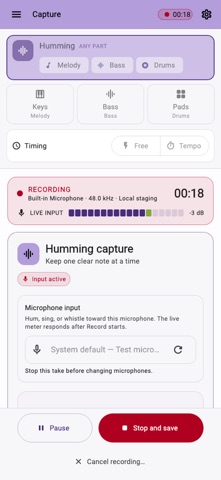
- Three capture modes: Record Humming or enter notes with Keys and Pads.
- On-device pitch analysis: Convert a monophonic voice or whistle into detected note candidates without uploading audio.
- Honest review: Compare Original and detected timing, inspect confidence, edit notes, and approve only what sounds right.
- Non-destructive correction: Trim, timing, pitch, sound, and volume remain project settings instead of replacing the recording.
- Takes and recovery: New recordings become new takes and interrupted work remains available for review.
- Share and continue: Export audio or MIDI, archive the draft, or open a copy in QuickTrack.
PERFECT FOR:
- Capturing a melody before it is forgotten
- Turning a single hummed or whistled line into editable MIDI
- Entering ideas with an on-screen keyboard or pads
- Continuing a reviewed melody in QuickTrack
GETTING STARTED:
- Choose Humming, Keys, or Pads.
- Record one take and stop when the idea is safely captured.
- Review uncertain notes and compare Before with After.
- Approve the candidate or continue editing timing and pitch non-destructively.
- Export audio or MIDI, archive the draft, or open a copy in QuickTrack.
PRIVACY & SECURITY:
- Original Audio is saved first as WAV and is never replaced by analysis.
- Pitch analysis runs on-device without uploading music.
- Corrections are non-destructive project settings.
- Recovery preserves interrupted or partially finalized takes for review.
FREE AND PRO:
- Start with a seven-day ad-free trial.
- Free keeps the full feature set and may show mobile advertising or a daily desktop support reminder.
- QuickHumming Pro removes ads and reminders through a yearly subscription or a one-time lifetime purchase.
Terms of Use: https://kakitiro.com/quickapps/quickhumming/terms/