AppBrain
AppBrain
  • Apps
  • Apps being viewed right now Trending apps today Most popular apps All-time most installed apps Top rated apps iPhone and iPad apps
  • Intelligence ▾
    Intelligence overview → Track any Android app or your whole market
    Track & analyze
    Keyword Tracker & OptimizerTrack & improve Play rankings App Performance ReportOne-off PDF for any app StatisticsFree Android & Play market stats
    Promote your app
    Featured Apps App Links
  • Intelligence
  • Pricing
  • Dashboard
  • Sign up
  • Log in
App Store Apps > Productivity > ReflowPDF: PDF Reader Mode
App profile & analytics · Productivity · Data updated 2026-10-07
ReflowPDF: PDF Reader Mode icon

ReflowPDF: PDF Reader Mode

by 亚雄 邹 · Free · Version 1.4
Availability On the App Store since August 2026 ↗
Rating on App Store
4.33/5
3 ratings
Rating
4.33
3 reviews
Best rank
–
not in the top lists
Last updated
September 24, 2026
1.4
AppBrain's verdict New

ReflowPDF: PDF Reader Mode came out 73 days ago. It doesn't have enough ratings yet to judge what users think.

ReflowPDF: PDF Reader Mode is made and published by 亚雄 邹. AppBrain is an independent app data site and isn't affiliated with 亚雄 邹. The app name, icon, screenshots and description belong to 亚雄 邹 and are shown as published on the App Store.

About ReflowPDF: PDF Reader Mode

ReflowPDF: PDF Reader Mode is a productivity app developed by 亚雄 邹.

User Ratings

ReflowPDF: PDF Reader Mode is rated 4.33 out of 5 stars. The rating is based on 3 ratings.

App Information

ReflowPDF: PDF Reader Mode is freely available from the App Store. The app size is 8.07 MB. The latest version available is 1.4. The last update was on September 24, 2026.

Technical Requirements

The app has a content rating of Everyone. The app has been available on the App Store since August 2026.

Description by 亚雄 邹 (from the App Store)
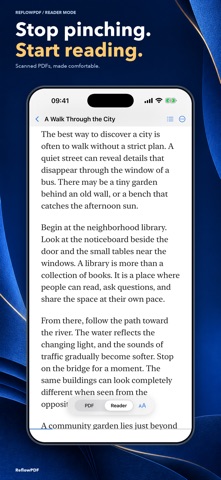
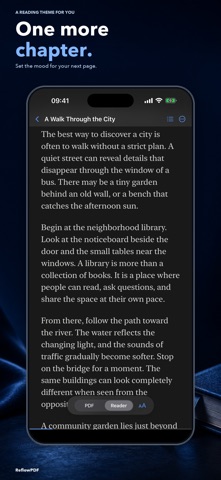
Read scanned PDFs without zooming. Scanned pages should be as comfortable to read as any article.

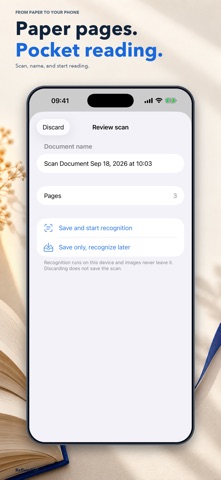
ReflowPDF turns scanned books, papers, archives, and regular PDFs into clean, reflowed text designed for your iPhone and iPad. Import a document, process it on device, and read without constantly zooming or panning.

READER MODE FOR PDFS
• Reflow scanned and text-based PDFs into adjustable text
• Choose font size, typeface, line spacing, and reading theme
• Keep your reading progress and return where you left off

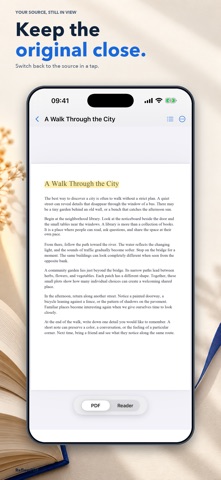
CHECK THE ORIGINAL ANY TIME
• Move between Reader Mode and the source PDF
• Jump from a paragraph to its original page for quick verification
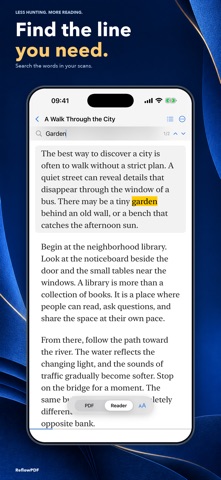
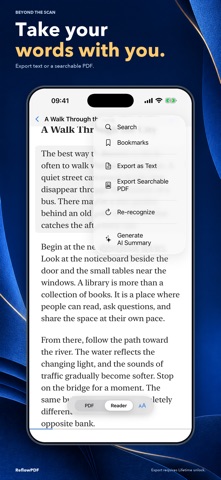
• Search text, add bookmarks, and navigate document headings

PRIVATE BY DESIGN
• OCR and document processing happen on your device
• Your PDFs and recognized text are not uploaded
• No account, in-app analytics, advertising, or tracking

USE YOUR RESULTS
• Export recognized text as TXT
• Create a searchable PDF while preserving the original pages
• On supported devices, generate an on-device summary with Apple Intelligence

The free version includes full processing for three standard documents. An optional one-time Lifetime unlock removes document limits and unlocks full large-document processing and export.

OCR and document structure accuracy depend on scan quality, language, and page layout.
Show more Show less

More data about ReflowPDF: PDF Reader Mode

Price Free
Rating 4.33 based on 3 ratings
Ranking Not ranked
Version 1.4
App size 8.07 MB
Suitable for Everyone

Screenshots

ReflowPDF: PDF Reader Mode Screenshot 1 of 6
ReflowPDF: PDF Reader Mode Screenshot 2 of 6
ReflowPDF: PDF Reader Mode Screenshot 3 of 6
ReflowPDF: PDF Reader Mode Screenshot 4 of 6
ReflowPDF: PDF Reader Mode Screenshot 5 of 6
ReflowPDF: PDF Reader Mode Screenshot 6 of 6
Screenshots by 亚雄 邹, from the the App Store listing
Official page on the App Store

Alternatives to ReflowPDF: PDF Reader Mode

MonkMode - Work like a Monk icon MonkMode - Work like a Monk
Media Toss UG
5.0
Free
1 ratings
HackLens – Hacker News Reader icon HackLens – Hacker News Reader
Azz-eddine BERRAMOU
0.0
Free
Falcon PDF - Editor & Tools icon Falcon PDF - Editor & Tools
ANRMS Private Limited
0.0
Free
Artiful Reader: Read & Listen icon Artiful Reader: Read & Listen
Frank Liu
5.0
Free
12 ratings
PDF Reflow icon PDF Reflow
AppBlit LLC
3.6
Free
27 ratings
PDFDarkMode - Customize PDFs icon PDFDarkMode - Customize PDFs
Wildcatter LLC
4.2
Free
5 ratings
Star Label Print icon Star Label Print
STAR MICRONICS CO.,LTD.
5.0
Free
3 ratings
Dark PDF: Night Mode Reader icon Dark PDF: Night Mode Reader
Muhammet Ozturk
0.0
Free

More from 亚雄 邹

PouncePad for Cats icon PouncePad for Cats
亚雄 邹
5.0
Free
3 ratings

Changelog of ReflowPDF: PDF Reader Mode

No changelog data

Developer information for 亚雄 邹

亚雄 邹

Address:

Share ReflowPDF: PDF Reader Mode

Comments on ReflowPDF: PDF Reader Mode for iOS

We don't have enough comments to show example comments. Please check back later.

App Store Rankings for ReflowPDF: PDF Reader Mode

This app is not ranked

Technologies used by ReflowPDF: PDF Reader Mode

Frequently asked questions about ReflowPDF: PDF Reader Mode

Is ReflowPDF: PDF Reader Mode free?

Yes. ReflowPDF: PDF Reader Mode is free on the App Store.

Is ReflowPDF: PDF Reader Mode still available?

Yes. ReflowPDF: PDF Reader Mode is on the App Store, and the last update we saw was on September 24, 2026.

How large is ReflowPDF: PDF Reader Mode?

ReflowPDF: PDF Reader Mode is 8.07 MB.

Is ReflowPDF: PDF Reader Mode suitable for children?

App Store rates the content of ReflowPDF: PDF Reader Mode as suitable for everyone.

How do people rate ReflowPDF: PDF Reader Mode?

ReflowPDF: PDF Reader Mode scores 4.33 out of 5 stars, from 3 ratings on the App Store.

Who made ReflowPDF: PDF Reader Mode?

ReflowPDF: PDF Reader Mode was developed by 亚雄 邹. It is listed in the productivity category on the App Store.

What are the best alternatives to ReflowPDF: PDF Reader Mode?

People looking at ReflowPDF: PDF Reader Mode also look at these productivity apps: MonkMode - Work like a Monk, HackLens – Hacker News Reader, Falcon PDF - Editor & Tools, Artiful Reader: Read & Listen, PDF Reflow.

Popular Productivity Apps Today's trending apps Price drops on Google Play Top new apps Apps other people are watching
MonkMode - Work like a Monk icon MonkMode - Work like a Monk
HackLens – Hacker News Reader icon HackLens – Hacker News Reader
Falcon PDF - Editor & Tools icon Falcon PDF - Editor & Tools
Artiful Reader: Read & Listen icon Artiful Reader: Read & Listen
PDF Reflow icon PDF Reflow
PDFDarkMode - Customize PDFs icon PDFDarkMode - Customize PDFs
Star Label Print icon Star Label Print
Dark PDF: Night Mode Reader icon Dark PDF: Night Mode Reader
Overview Alternatives Reviews Rankings Technology
AppBrain Intelligence premium content

Subscribe now to get full and unlimited access to AppBrain Intelligence. You'll have access to:

  • App Intelligence dashboard (performance timeline, competitor comparison, country rankings, insight cards)
  • Detailed ranking data per app
  • Full timeline per developer
  • Device market shares data per country
  • Unlimited keyword tracking
1 Month

$75/mo
(billed every month)

SAVE 0%
Subscribe
3 Months

$65/mo
($195 billed every 3 months)

SAVE 13%
Subscribe
1 Year

$57.50/mo
($690 billed every year)

SAVE 23%
Subscribe
Each subscription will automatically renew 3 days before the expiration date for the same time period. Subscriptions can be cancelled at any time before the renewal.

AppBrain is an app data site, we track rankings, ratings, installs for all apps and games on Google Play and the App Store. AppBrain doesn't host app files or APKs, all install links go directly to the official store. All trademarks are owned by their respective owners.

More apps

  • Top Android apps being viewed
  • View Crafting Idle Clicker
  • Adnan Mail
  • Seekho: Short Learning Videos

App statistics

  • Android statistics
  • Google Play Developer stats
  • Trending Android Apps
  • Trending iOS apps
  • Top popular Apps
  • Buy the best Android phone
  • Buy & sell app businesses

About AppBrain

  • Contact
  • Privacy
  • Documentation
  • DMCA takedowns
  • Articles
  • Blog
  • Top Free Games Apps for your iPhone or iPad
© 2010-2026 - AppBrain