




AppBrain's verdict
- Last updated
- October 5, 2026
- Size
- 1.90 MB
User feedback
Ratings and reviews on the App StoreComments on Replay Breakdown: Video Coach for iOS
We don't have enough comments to show example comments. Please check back later.
Store listing
By Pablo Miranda, from the App StoreDescription by Pablo Miranda Written by the developer, not by AppBrain. Click to read.
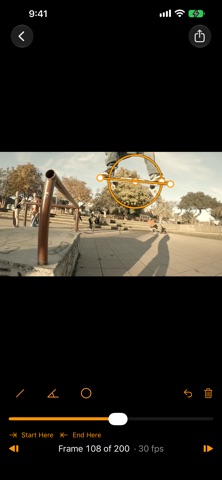
Replay Breakdown is for coaches, riders and parents who film the move and then need to show what went right and what didn't. Scrub the clip a frame at a time, draw on it, measure it, and send it back slowed down with the drawings on it.
EVERY FRAME, NOT PHOTOS' PLAYBACK COPY
A slow-motion clip picked the usual way comes back as a 30 fps render with most of its frames gone. Replay Breakdown opens the original file, so a 240 fps clip keeps all 240 frames a second. The newest clip in your library is one tap from the home screen.
STEP THROUGH IT
Drag through the clip with the picture keeping up under your finger, or step one frame at a time. Pinch to zoom in up to 8× on a foot or a hand; the frame on screen sharpens to the file's full resolution when you stop.
DRAW AND MEASURE
• Lines and arrows that snap to level and plumb
• Angles, read off the picture as it really is, not as the screen squashes it
• Circles and a freehand pen
• An airtime timer: start it on the take-off frame, stop it on the landing, and it counts up through the trick and holds the total
• Five colours, and each drawing shows for one frame, half a second, or the rest of the clip
Drawings stay with the clip, so they're there the next time you open it.
SIDE BY SIDE
Put two clips on the same moment, the pop or the take-off, and link them there. From then on they move together, frame by frame, each at its own frame rate, side by side or one laid over the other. Nudge either one a frame to get the line-up exact. Last week's attempt against today's, or the student against the pro.
TALK IT THROUGH
Press the microphone and talk while you scrub, draw and zoom, the way you'd explain it standing next to them. Play it back to check it, then send it as one video: your voice over every frame you stepped to, every line you drew and every zoom, in step.
SEND IT BACK
Trim to the move, then export at real speed, half speed or quarter speed as an MP4 that plays in any messenger, with your drawings and the timer painted in. Or save the one frame that says it all as a full-size picture.
ON IPAD, WITH APPLE PENCIL
The Pencil draws while your fingers scrub and zoom, and angles and lines snap level and plumb. Double-tap or squeeze for the tool you used before. Open two clips in two windows with Stage Manager. Turn a phone sideways and the tools sit beside the picture.
FREE, THEN ONE PAYMENT
Everything above is free, at full quality, with no limit on clips or frames. Videos exported from the free version carry a small Replay Breakdown mark in the corner. One payment takes it off, and exports comparisons and voiceovers as one video. Shared with your family, no subscription, no account.
NOTHING LEAVES YOUR PHONE
No analytics, no tracking, no server, no sign-up. Your clips are read where they are, and the only thing that goes anywhere is what you share yourself.
Safety and technology
Found in the app by AppBrain- Price
- Free
- App size
- 1.90 MB
- Content rating
- Everyone
Technologies used by Replay Breakdown: Video Coach
Releases
Updates seen on the App Store- Version
- 1.1
- Launched
- September 2026
No changelog data
Alternatives
Similar apps and more from Pablo MirandaAlternatives to Replay Breakdown: Video Coach


More from Pablo Miranda


Rankings
App Store top chartsApp Store Rankings for Replay Breakdown: Video Coach
About the app and developer
About Replay Breakdown: Video Coach
Replay Breakdown: Video Coach is a sports app developed by Pablo Miranda.
User Ratings
The app has no ratings yet.
App Information
Replay Breakdown: Video Coach is freely available from the App Store. The app size is 1.90 MB. The latest version available is 1.1. The last update was on October 5, 2026.
Technical Requirements
The app has a content rating of Everyone. The app has been available on the App Store since September 2026.
Replay Breakdown: Video Coach is made and published by Pablo Miranda. AppBrain is an independent app data site and isn't affiliated with Pablo Miranda. The app name, icon, screenshots and description belong to Pablo Miranda and are shown as published on the App Store.
Developer information for Pablo Miranda
Address:
Frequently asked questions about Replay Breakdown: Video Coach
Is Replay Breakdown: Video Coach free?
Yes. Replay Breakdown: Video Coach is free on the App Store.
Is Replay Breakdown: Video Coach still available?
Yes. Replay Breakdown: Video Coach is on the App Store, and the last update we saw was on October 5, 2026.
How large is Replay Breakdown: Video Coach?
Replay Breakdown: Video Coach is 1.90 MB.
Is Replay Breakdown: Video Coach suitable for children?
App Store rates the content of Replay Breakdown: Video Coach as suitable for everyone.
Who made Replay Breakdown: Video Coach?
Replay Breakdown: Video Coach was developed by Pablo Miranda. It is listed in the sports category on the App Store.
What are the best alternatives to Replay Breakdown: Video Coach?
People looking at Replay Breakdown: Video Coach also look at these sports apps: CoachCam: Video Analysis, MotionTagger: Video Form Coach, EYED: Frame by Frame, Dogwood Golf Club LLC, FreezeCoach- Sports Video Edit.