

Results in Folders
Results in Folders is made and published by Alexander Garmash. AppBrain is an independent app data site and isn't affiliated with Alexander Garmash. The app name, icon, screenshots and description belong to Alexander Garmash and are shown as published on the App Store.
AppBrain's verdict
Established- Rating on App Store
- 4.00
- 1 ratings
- Last updated
- September 24, 2026
- Size
- 7.03 MB
It doesn't have enough ratings yet to judge what users think.
User feedback
Ratings and reviews on the App StoreComments on Results in Folders for iOS
We don't have enough comments to show example comments. Please check back later.
Store listing
By Alexander Garmash, from the App Store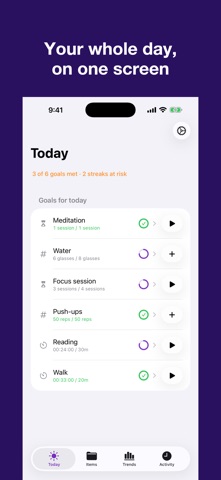


Description by Alexander Garmash Written by the developer, not by AppBrain. Click to read.
Four tracking modes for any activity:
• Counter — tap to count. Track pushups, glasses of water, pages read, or anything you want to tally up.
• Timer — start and stop to record duration. Perfect for workouts, study sessions, meditation, or practice time.
• Timer + Limit — set a countdown and get notified when time's up. Great for focused work intervals or timed exercises.
• Timer + Counter — track both duration and count together. Ideal for sets and reps with rest timing.
Set goals and see your progress:
• Define daily, weekly, monthly, or yearly goals for any item
• Color-coded progress shows green when you've hit your target
• Today's totals visible right in the folder list — no need to open each item
Organize your way:
• Create folders and subfolders to group related activities
• Mark favorites for quick access from the Favorites tab and Apple Watch
• Move items between folders as your system evolves
See your data from every angle:
• Swipe between days, weeks, months, and years
• Drill down from yearly to monthly to daily views
• Latest tab shows all items with today's activity in one place
• Recents tab shows your most recent tracking entries
Apple Watch companion:
• See your favorite items on your wrist
• Tap to count or start/stop timers directly
• Goal progress syncs automatically via iCloud
Home Screen widget:
• Small, medium, and large sizes
• Shows today's tracked items with goal progress
• Updates hourly and after every tracking action
Reminders that keep you on track:
• Set notification reminders per item at any time of day
• Choose specific weekdays (Mon/Wed/Fri, weekends only, etc.)
• Custom reminder messages
• Timer+Limit completion alerts even when the app is in the background
Your data, everywhere:
• iCloud sync keeps everything up to date across iPhone, iPad, and Apple Watch
• Automatic migration from Results 1.x — all your existing data carries over seamlessly
Safety and technology
Found in the app by AppBrain- Price
- Free
- App size
- 7.03 MB
- Content rating
- Everyone
Technologies used by Results in Folders
Releases
Updates seen on the App Store- Version
- 3.0.1
- Launched
- May 2015
No changelog data
Alternatives
Similar apps and more from Alexander GarmashAlternatives to Results in Folders


More from Alexander Garmash


Rankings
App Store top chartsApp Store Rankings for Results in Folders
About the app and developer
About Results in Folders
Results in Folders is a productivity app developed by Alexander Garmash.
User Ratings
Results in Folders is rated 4.00 out of 5 stars. The rating is based on one rating ratings.
App Information
Results in Folders is freely available from the App Store. The app size is 7.03 MB. The latest version available is 3.0.1. The last update was on September 24, 2026.
Technical Requirements
The app has a content rating of Everyone. The app has been available on the App Store since May 2015.
Developer information for Alexander Garmash
Address:
Frequently asked questions about Results in Folders
Is Results in Folders free?
Yes. Results in Folders is free on the App Store.
Is Results in Folders still available?
Yes. Results in Folders is on the App Store, and the last update we saw was on September 24, 2026.
How large is Results in Folders?
Results in Folders is 7.03 MB.
Is Results in Folders suitable for children?
App Store rates the content of Results in Folders as suitable for everyone.
How do people rate Results in Folders?
Results in Folders has one rating of 4.00 stars on the App Store.
Who made Results in Folders?
Results in Folders was developed by Alexander Garmash. It is listed in the productivity category on the App Store.
What are the best alternatives to Results in Folders?
People looking at Results in Folders also look at these productivity apps: Quick Note: Sticky Notes Menu, Foldered: File Manager, Outliner : Ideas & Lists, Artiful Reader: Read & Listen, Lattics - "Brain-like" Writing.