



AppBrain's verdict
- Last updated
- January 9, 2025
- Size
- 20.8 MB
User feedback
Ratings and reviews on the App StoreComments on RoundedPic for iOS
We don't have enough comments to show example comments. Please check back later.
Store listing
By Limit Point Software, from the App StoreDescription by Limit Point Software Written by the developer, not by AppBrain. Click to read.
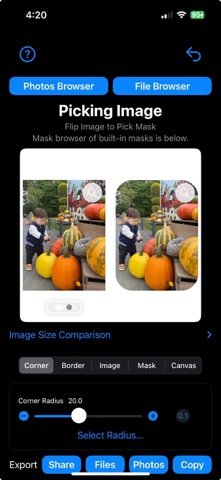
• Put rounded corners on images with radius from 0 to half the length of smallest side of the image
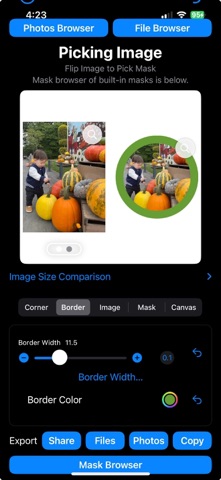
• Border images with thickness from 0 to half the length of smallest side of the image
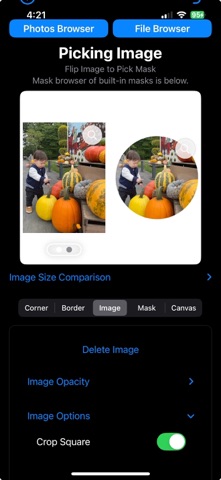
• Image options to crop square, crop to the same aspect ratio of any mask image selected
• Change opacity of an image to any value between 0 and 1
• Transform the image by flipping vertical or horizontal, rotate in increments of 90º
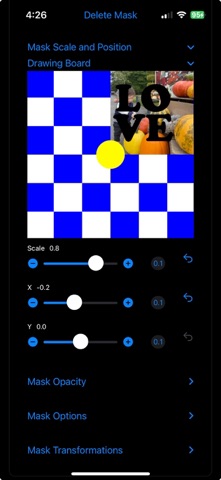
• Apply a mask as an overlay to an image, with opacity from 0 to 1 and scaling
• Move the overlay precisely across the image using sliders
• Masks can be inverted, changing transparent pixels to opaque and opaque pixels to transparent
• Convert color images, specifically black and white images, to images with transparency based on their intensity
• Masks can be applied in two different modes - using transparency to cutout or blend pixels
• Like images, masks can be transformed by flipping vertical or horizontal, and rotated in increments of 90º
• Apply a filter to the image, mask and canvas separately.
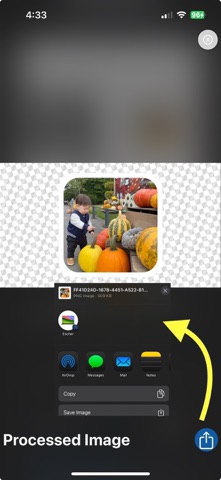
You can adjust the corner radius from 0, no rounding, to half the width of the smallest side of the image, enabling you to create anything from subtly rounded edges to perfect circles. Add borders with color.
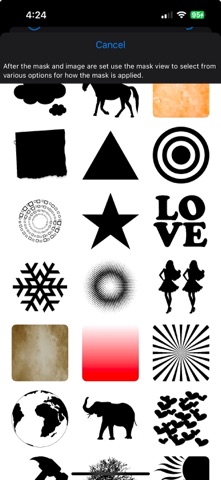
The app features masking and overlay capabilities. For example by applying a mask with a transparent region in the shape of a star, the app can use the transparent parts of the mask to crop your image to a star-shape, leaving the rest of the image transparent or filled with a solid background color. Using the transparency of this star shape, it can then be drawn over another image like a stamp.
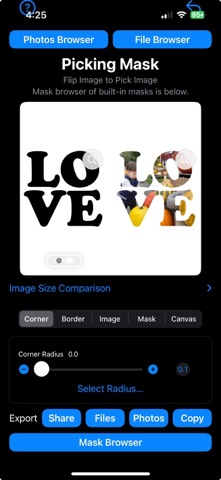
For convenience, the app includes a collection of built-in masks to help get started quickly.
The canvas is an optional drawing area with a specified aspect ratio. The canvas acts as a backdrop for the image, much like a mask overlays the image. Key functionalities include:
• Image Positioning and Scaling:
When a canvas is specified, the image can be scaled and positioned relative to the canvas, and any applied mask follows these transformations.
• Canvas Specification Options:
You can choose the canvas aspect ratio from common paper types or define custom dimensions. Available options include:
- US Letter (11:8.5) — Ratio: 1.294
- US Legal (14:8.5) — Ratio: 1.647
- Executive (10.5:7.25) — Ratio: 1.448
- Tabloid (17:11) — Ratio: 1.545
- B5 (250:176) — Ratio: 1.420
- A4 (297:210) — Ratio: 1.414
- HD (16:9) — Ratio: 1.778
- Cinematic (21:9) — Ratio: 2.333
- SD (4:3) — Ratio: 1.333
- Golden Ratio (1.618:1) — Ratio: 1.618
- Square (1:1) — Ratio: 1.000
- Custom — User-defined ratio
- None — No canvas applied
The actual canvas size is the smallest rectangle with the selected aspect ratio that fully contains the current image, centered within it.
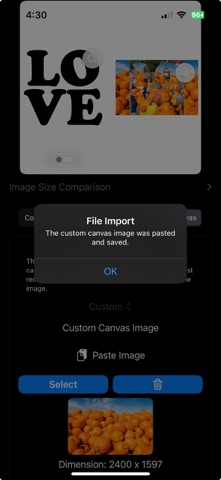
• Custom Canvas Image:
If a custom image is used as the canvas:
- The image is displayed inside the canvas.
- Transparent images can set the canvas size without visual distractions.
• Canvas Background Options:
- Solid color (user-selectable).
- Predefined background images (via browser).
- Procedural textures (generated randomly).
• Canvas Transforms:
Apply the following transformations to the canvas:
- Flip: Horizontal or vertical.
- Rotation: 90º, 180º, or 270º.
Safety and technology
Found in the app by AppBrain- Price
- Free
- App size
- 20.8 MB
- Content rating
- Everyone
Technologies used by RoundedPic
Releases
Updates seen on the App Store- Version
- 1.0.8
- Launched
- December 2024
No changelog data
Alternatives
Similar apps and more from Limit Point SoftwareAlternatives to RoundedPic



More from Limit Point Software




Rankings
App Store top chartsApp Store Rankings for RoundedPic
About the app and developer
About RoundedPic
RoundedPic is a graphics & design app developed by Limit Point Software.
User Ratings
The app has no ratings yet.
App Information
RoundedPic is freely available from the App Store. The app size is 20.82 MB. The latest version available is 1.0.8. The last update was on January 9, 2025.
Technical Requirements
The app has a content rating of Everyone. The app has been available on the App Store since December 2024.
RoundedPic is made and published by Limit Point Software. AppBrain is an independent app data site and isn't affiliated with Limit Point Software. The app name, icon, screenshots and description belong to Limit Point Software and are shown as published on the App Store.
Developer information for Limit Point Software
Address:
Frequently asked questions about RoundedPic
Is RoundedPic free?
Yes. RoundedPic is free on the App Store.
Is RoundedPic still available?
Yes. RoundedPic is on the App Store, and the last update we saw was on January 9, 2025.
How large is RoundedPic?
RoundedPic is 20.82 MB.
Is RoundedPic suitable for children?
App Store rates the content of RoundedPic as suitable for everyone.
Who made RoundedPic?
RoundedPic was developed by Limit Point Software. It is listed in the graphics & design category on the App Store.
What are the best alternatives to RoundedPic?
People looking at RoundedPic also look at these graphics & design apps: Frame It Up, AI Clips: Video Highlights, Screenshot Editor - SnapIt, DS Card - Markdown text card, SMMAI: Social Media Templates.