

SC Installer aligner Parabole
SC Installer aligner Parabole is made and published by Souria HAKKAR. AppBrain is an independent app data site and isn't affiliated with Souria HAKKAR. The app name, icon, screenshots and description belong to Souria HAKKAR and are shown as published on the App Store.
AppBrain's verdict
Established- Rating on App Store
- 4.50
- 10 ratings
- Last updated
- February 14, 2024
It doesn't have enough ratings yet to judge what users think.
Rankings
App Store top chartsApp Store Rankings for SC Installer aligner Parabole
Competitors
Similar apps and more from Souria HAKKARAlternatives to SC Installer aligner Parabole





More from Souria HAKKAR





Releases
Updates seen on the App Store- Version
- 8
- Launched
- May 2016
No changelog data
User feedback
Ratings and reviews on the App StoreComments on SC Installer aligner Parabole for iOS
We don't have enough comments to show example comments. Please check back later.
Technology
Found in the app by AppBrain- Price
- Free
- App size
- 61.4 MB
- Content rating
- Everyone
Technologies used by SC Installer aligner Parabole
About the app and developer
About SC Installer aligner Parabole
SC Installer aligner Parabole is an utilities app developed by Souria HAKKAR.
User Ratings
SC Installer aligner Parabole is rated 4.50 out of 5 stars. The rating is based on 10 ratings.
App Information
SC Installer aligner Parabole is freely available from the App Store. The app size is 61.37 MB. The latest version available is 8. The last update was on February 14, 2024.
Technical Requirements
The app has a content rating of Everyone. The app has been available on the App Store since May 2016.
Developer information for Souria HAKKAR
Address:
Frequently asked questions about SC Installer aligner Parabole
Is SC Installer aligner Parabole free?
Yes. SC Installer aligner Parabole is free on the App Store.
Is SC Installer aligner Parabole still available?
Yes. SC Installer aligner Parabole is on the App Store, and the last update we saw was on February 14, 2024.
How large is SC Installer aligner Parabole?
SC Installer aligner Parabole is 61.37 MB.
Is SC Installer aligner Parabole suitable for children?
App Store rates the content of SC Installer aligner Parabole as suitable for everyone.
How do people rate SC Installer aligner Parabole?
SC Installer aligner Parabole scores 4.50 out of 5 stars, from 10 ratings on the App Store.
Who made SC Installer aligner Parabole?
SC Installer aligner Parabole was developed by Souria HAKKAR. It is listed in the utilities category on the App Store.
What are the best alternatives to SC Installer aligner Parabole?
People looking at SC Installer aligner Parabole also look at these utilities apps: Installation parabole, IP-Easy Pointer, Satellite Transponders HD, Gigalis (Pays de la Loire), Thomson Smart Connect.
Store listing
By Souria HAKKAR, from the App Store


Description by Souria HAKKAR Written by the developer, not by AppBrain. Click to read.
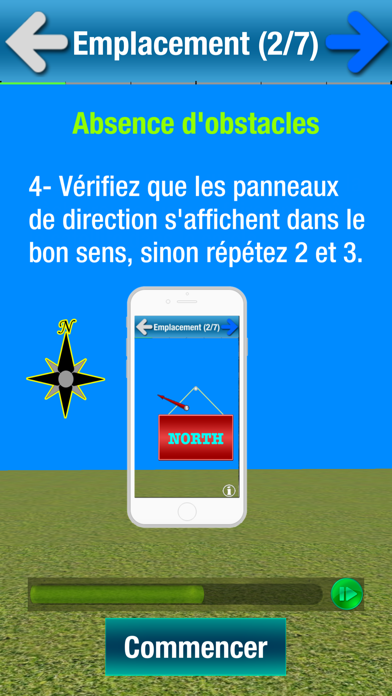
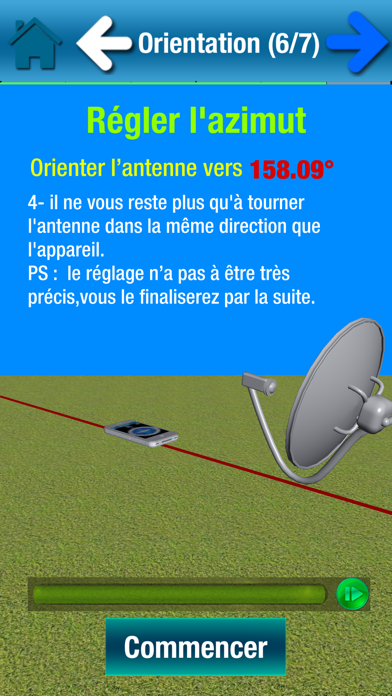
SatCatcher est une application qui vous permet d’orienter votre antenne vers n’importe quel satellite. Grâce à la réalité augmentée, cette application affiche le satellite cible dans l’espace afin de mieux choisir l’emplacement de votre antenne et de s’assurer de l’absence d’un éventuel obstacle (mur, arbre…).
SatCatcher utilise également le GPS pour afficher votre position sur une carte puis affiche la direction du satellite depuis votre position.
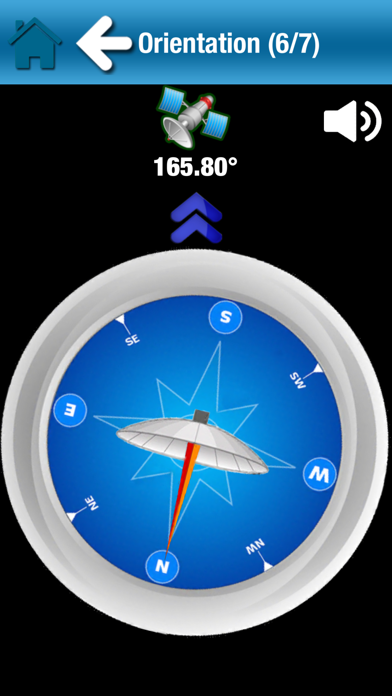
La boussole accompagnée d’un bip sonore vous permet d’orienter votre antenne en suivant l’accélération des bips ou la flèche de la boussole.
L’accéléromètre est utilisé pour vérifier que le support de votre antenne est bien vertical.
Les étapes de réglage de l’antenne:
1- choisir un satellite et autoriser la géolocalisation pour calculer le sens d’orientation de l’antenne.
2- Afficher le satellite en réalité augmentée grâce à votre caméra et s’assurer qu’il n’y a pas d’obstacle et valider l’emplacement de votre antenne.
3- Vérifier que le support de votre antenne est bien vertical.
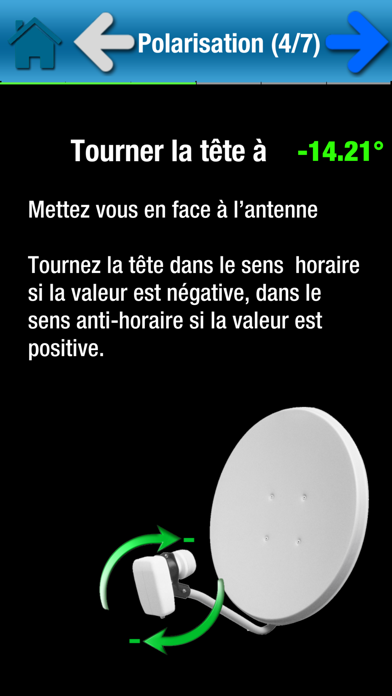
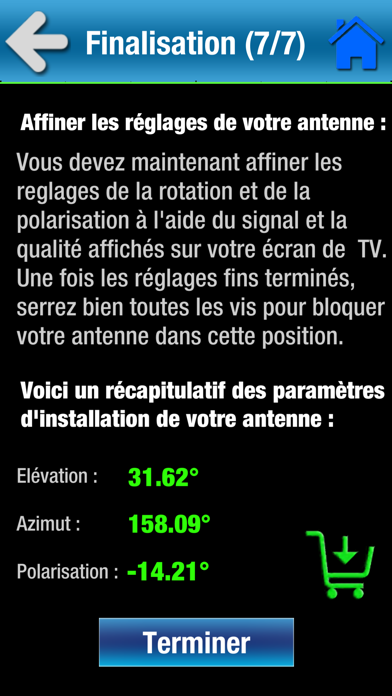
4- Calculer la polarisation et ajuster la rotation du LNB (la tête de votre antenne)
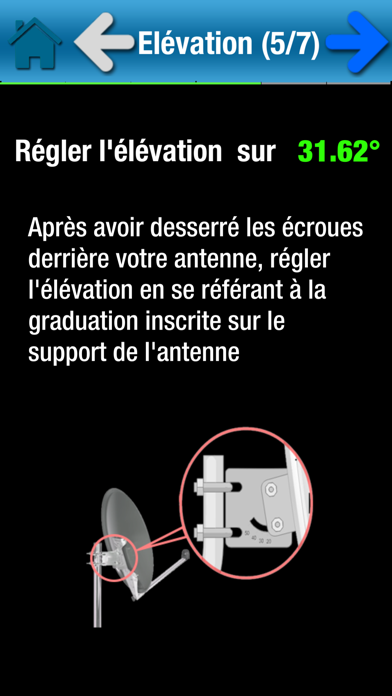
5- Régler l’élévation
6- Rechercher l’orientation grâce à l’assistant visuel et sonore
7- Affiner les réglages.
Pour le bon fonctionnement de l’application, SatCatcher aura besoin de la caméra, la boussole, le gyroscope, l’accéléromètre et le GPS de votre smartphone.
Astuces :
- Si votre smartphone ne possède pas de GPS, vous pouvez déplacer manuellement le « marker » sur la carte jusqu’à ce qu’il pointe votre position exacte. Utilisez le zoom pour plus de précisions.
- La boussole est très importante pour régler votre parabole, mais si votre smartphone n’en possède pas, vous pouvez quand même utiliser l’application. Dans ce cas, elle vous aidera à fixer des repères grâce à la direction affichée sur la carte depuis votre position. Elle vous permet également de calculer l’orientation. Il ne vous restera plus qu’à utiliser une boussole manuelle pour vous orienter.
- N’hésitez pas à recalibrer la boussole et éviter de l’approchez trop près du bras de la parabole car elle est sensible aux éléments métalliques. Essayer de placer votre smartphone la ou il y a le moins d’interférences magnétiques.
SatCatcher Free est la version lite du SatCatcher.
La réalité augmentée et l'orientation boussole sont uniquement disponibles dans la version complète ici : https://appsto.re/fr/9Bywbb.i
Contact : infosoftycontactfree@gmail.com