



AppBrain's verdict
- Last updated
- October 15, 2026
- Size
- 15.5 MB
User feedback
Ratings and reviews on the App StoreComments on ScanLeaf: Scan to PDF & OCR for iOS
We don't have enough comments to show example comments. Please check back later.
Store listing
By ATA DOGMAZ, from the App StoreDescription by ATA DOGMAZ Written by the developer, not by AppBrain. Click to read.
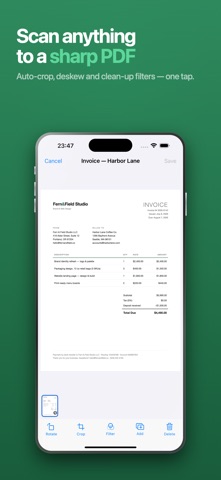
Turn paperwork into sharp PDFs in seconds. Sign a form, arrange its pages, and share it from your iPhone.
ScanLeaf helps you get documents ready to send: capture receipts and contracts, crop scans, combine PDFs, and copy the text you need. Keep everything organised in folders and find your documents again without digging through paperwork.
SCAN
Automatic edge detection with auto-capture, or take the shot yourself. Scan
page after page in one session, review and re-crop before you save, and pick
the look with colour, greyscale and black & white filters.
CONVERT
Turn photos from your library into a multi-page PDF, or export any PDF back
out as JPG images.
TEXT RECOGNITION (OCR)
Pull the text out of a scan and copy it, or export a searchable PDF you can
find words in later. Works across many languages, and reads embedded text
from digital PDFs verbatim instead of guessing at it.
SIGN
Draw your signature once, save it, then place and resize it on any page.
Signatures stay removable while you work; the copy you share is flattened.
ORGANISE
Folders, renaming, page reordering, and full-text search across everything
you have scanned.
PDF TOOLS
Merge, split, duplicate and compress — with an honest size check that refuses
the change when it would not actually make the file smaller.
BACKUP
Export your whole library as a single archive and restore it on another
device. It is your file, saved where you choose — we never receive a copy.
WHAT'S FREE
Scanning, page editing, signatures, folders, and the PDF tools — merge, split,
compress, convert to JPG — with no watermarks, no ads and no trial countdown.
Text extraction is included too, up to 5 pages a day.
WHAT PRO ADDS
Unlimited text extraction, searchable PDF export, and merging 3 or more files
at once.
SMART SUGGESTIONS WITH PRO
Turn important document details into useful actions. Review suggestions for reminders, calendar events, contacts, and payment details before acting. Requires a supported device with iOS 26 or later, Apple Intelligence enabled, and the on-device model available. Suggestions may not be available for every document.
YOUR DOCUMENTS, YOUR CONTROL
Scanning, text recognition, and PDF creation run on your device. No account, ads, or watermarks.
ScanLeaf Pro is an auto-renewing subscription.
• Plans: Monthly and Annual, with a free trial (3 days monthly, 7 days annual).
• Payment is charged to your Apple ID at confirmation of purchase.
• Your subscription renews automatically unless auto-renew is turned off at
least 24 hours before the end of the current period.
• Manage or cancel anytime in your Apple ID account settings.
Terms of Use: https://scanleaf-legal.pages.dev/scanleaf/terms/
Privacy Policy: https://scanleaf-legal.pages.dev/scanleaf/privacy/
Safety and technology
Found in the app by AppBrain- Price
- Free
- App size
- 15.5 MB
- Content rating
- Everyone
Technologies used by ScanLeaf: Scan to PDF & OCR
Releases
Updates seen on the App Store- Version
- 1.0.5
- Launched
- August 2026
No changelog data
Alternatives
Similar apps and more from ATA DOGMAZAlternatives to ScanLeaf: Scan to PDF & OCR


More from ATA DOGMAZ

Rankings
App Store top chartsApp Store Rankings for ScanLeaf: Scan to PDF & OCR
About the app and developer
About ScanLeaf: Scan to PDF & OCR
ScanLeaf: Scan to PDF & OCR is a business app developed by ATA DOGMAZ.
User Ratings
The app has no ratings yet.
App Information
ScanLeaf: Scan to PDF & OCR is freely available from the App Store. The app size is 15.55 MB. The latest version available is 1.0.5. The last update was on October 15, 2026.
Technical Requirements
The app has a content rating of Everyone. The app has been available on the App Store since August 2026.
ScanLeaf: Scan to PDF & OCR is made and published by ATA DOGMAZ. AppBrain is an independent app data site and isn't affiliated with ATA DOGMAZ. The app name, icon, screenshots and description belong to ATA DOGMAZ and are shown as published on the App Store.
Developer information for ATA DOGMAZ
Address:
Frequently asked questions about ScanLeaf: Scan to PDF & OCR
Is ScanLeaf: Scan to PDF & OCR free?
Yes. ScanLeaf: Scan to PDF & OCR is free on the App Store.
Is ScanLeaf: Scan to PDF & OCR still available?
Yes. ScanLeaf: Scan to PDF & OCR is on the App Store, and the last update we saw was on October 15, 2026.
How large is ScanLeaf: Scan to PDF & OCR?
ScanLeaf: Scan to PDF & OCR is 15.55 MB.
Is ScanLeaf: Scan to PDF & OCR suitable for children?
App Store rates the content of ScanLeaf: Scan to PDF & OCR as suitable for everyone.
Who made ScanLeaf: Scan to PDF & OCR?
ScanLeaf: Scan to PDF & OCR was developed by ATA DOGMAZ. It is listed in the business category on the App Store.
What are the best alternatives to ScanLeaf: Scan to PDF & OCR?
People looking at ScanLeaf: Scan to PDF & OCR also look at these business apps: Bonstructer: Meals & Household, Scanry: PDF Scanner & OCR, Skan: PDF & Document Scanner, PDF Scanner: Scan Docs - Lumi, Garage Connect.