




AppBrain's verdict
- Rating on App Store
- 3.67
- 6 ratings
- Last updated
- November 17, 2026
- Size
- 90.6 MB
It doesn't have enough ratings yet to judge what users think.
User feedback
Ratings and reviews on the App StoreComments on Scannr: Floor Plan & 3D Scan for iOS
We don't have enough comments to show example comments. Please check back later.
Store listing
By Kanopy Labs LLC, from the App StoreDescription by Kanopy Labs LLC Written by the developer, not by AppBrain. Click to read.
ROOMS
• Scan a room with LiDAR, built on Apple RoomPlan. Walls, doors and windows are detected as you walk.
• Get a 2D floor plan in feet and inches, with room areas in square feet.
• Fix it in the editor: tap a wall or label to change it.
• Add room after room to one project, across several floors, and see your whole home as one plan.
• No LiDAR on your iPhone? Measure a room by tapping its corners and Scannr draws the plan.
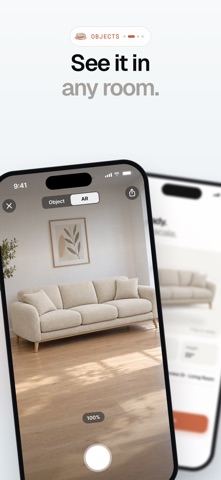
OBJECTS
• Scan a couch, a chair or a cabinet and get a true-scale 3D model, made with Apple Object Capture.
• Open it in AR Quick Look to see how it fits in any room.
SPACE
• Scan any space, inside or out: garages, basements, workshops and whole yards.
• Walk the yard once to capture a 3D mesh of decks, fences, patios and driveways.
MEASURE
• An AR tape measure in your pocket. Measure lines and areas, then save them to the project.
EXPORT
• Floor plans as PDF and PNG, plus SVG and DXF for CAD and design tools (Pro).
• 3D models as USDZ (Pro).
• Add your logo and company details to exports (Business).
PROJECTS AND TEAMS
• File every job by address, with all its rooms, objects and measurements in one place.
• Cloud sync keeps your projects on all your devices.
• With a Team plan, your crew shares projects in one workspace. Invite people with a code.
BUILT FOR
Contractors, remodelers, real estate agents, insurance adjusters, interior designers, property managers and anyone planning a move or a renovation.
PLANS
• Free: unlimited scans and 5 floor-plan exports a month (PDF, PNG) with a watermark.
• Pro: unlimited exports, SVG and DXF floor plans, 3D model exports, no watermark.
• Business: everything in Pro, plus your logo and company details on exports.
• Team: everything in Business, plus a shared workspace for your crew. Pick a plan for 3, 5 or 10 people. The workspace owner pays; members join free by invite. More than 10? Contact us from the app.
Pro, Business and Team are auto-renewing subscriptions, billed monthly or yearly. Yearly plans start with a 3-day free trial; monthly plans have no trial. Payment is charged to your Apple Account when you confirm the purchase. A subscription renews automatically unless you turn it off at least 24 hours before the end of the current period. Manage or cancel it in your App Store account settings.
REQUIREMENTS
• iOS 17 or later.
• Room scanning with LiDAR, object scanning and space scanning need an iPhone or iPad with LiDAR (iPhone Pro and Pro Max models from iPhone 12 Pro, iPad Pro 2020 and later).
• Corner-tap room measuring works on iPhones without LiDAR.
• Measurements depend on the device, lighting and how you scan. Check critical dimensions before you build or order materials.
Privacy Policy: https://getscannr.com/privacy
Terms of Use: https://www.apple.com/legal/internet-services/itunes/dev/stdeula/
Safety and technology
Found in the app by AppBrain- Price
- Free
- App size
- 90.6 MB
- Content rating
- Everyone
Technologies used by Scannr: Floor Plan & 3D Scan
Releases
Updates seen on the App Store- Version
- 2.1.1
- Launched
- April 2026
No changelog data
Alternatives
Similar apps and more from Kanopy Labs LLCAlternatives to Scannr: Floor Plan & 3D Scan




Rankings
App Store top chartsApp Store Rankings for Scannr: Floor Plan & 3D Scan
About the app and developer
About Scannr: Floor Plan & 3D Scan
Scannr: Floor Plan & 3D Scan is a productivity app developed by Kanopy Labs LLC.
What is the rating of Scannr: Floor Plan & 3D Scan?
Scannr: Floor Plan & 3D Scan is rated 3.67 out of 5 stars, based on 6 ratings.
Is Scannr: Floor Plan & 3D Scan free?
Scannr: Floor Plan & 3D Scan is free. The app size is 90.60 MB. The latest version available is 2.1.1. The last update was on November 17, 2026.
What are the requirements for Scannr: Floor Plan & 3D Scan?
The app has a content rating of Everyone. The app has been available on the App Store since April 2026.
Scannr: Floor Plan & 3D Scan is made and published by Kanopy Labs LLC. AppBrain is an independent app data site and isn't affiliated with Kanopy Labs LLC. The app name, icon, screenshots and description belong to Kanopy Labs LLC and are shown as published on the App Store.
Developer information for Kanopy Labs LLC
Address: