

ScreenTimeBlocker
ScreenTimeBlocker is made and published by forYou inc. AppBrain is an independent app data site and isn't affiliated with forYou inc. The app name, icon, screenshots and description belong to forYou inc. and are shown as published on the App Store.
AppBrain's verdict
- Last updated
- October 10, 2026
- Size
- 1.72 MB
User feedback
Ratings and reviews on the App StoreComments on ScreenTimeBlocker for iOS
We don't have enough comments to show example comments. Please check back later.
Store listing
By forYou inc., from the App Store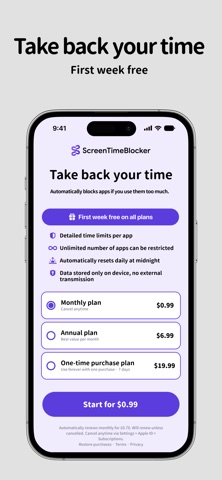


Description by forYou inc. Written by the developer, not by AppBrain. Click to read.
ScreenTimeBlocker is a focus tool for stopping the apps you can't help opening — TikTok, YouTube, Instagram, X, and more. Built on Apple's Screen Time / Family Controls, it shields only the apps you choose, the moment you hit your daily limit or step into a quiet hour.
---
■ What it does
▶ Per-app daily limits
Set fine-grained time caps per app — TikTok 30 min, YouTube 60 min, X 30 min — independently from each other.
▶ Category-wide limits
Limit entire categories like "Social" or "Games" in one tap. Newly installed apps in that category are covered automatically.
▶ Block websites too
Apply the same time limits to specific web domains opened in Safari and other browsers.
▶ Automatic shield at the limit
When the cap is reached, the target app becomes unopenable and a dedicated shield screen appears. It comes back tomorrow.
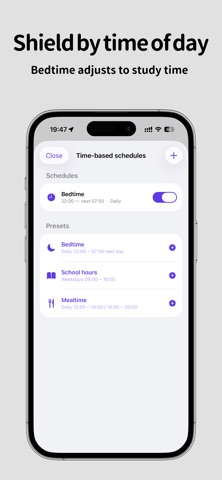
▶ Schedule-based auto-block
Force a block during specific hours — Bedtime (22:00 – 07:00 next day), School Hours (weekdays 08:00 – 15:00), Mealtime, and more. One-tap presets are included, and overnight ranges that cross midnight are supported.
▶ Parental passcode
Set a 4-digit PIN so kids can't quietly disable the limits. Three wrong attempts trigger a full shield across all monitored apps, closing off the workarounds.
▶ Edit lock
While monitoring is active, settings become read-only — you can't impulsively raise a limit or remove a restriction. Scrolling and viewing the list stay free.
---
■ Privacy
- Fully on-device. All settings are stored only on your iPhone.
- No personal data or usage statistics are sent to our servers.
- No analytics, no advertising SDKs, no tracking identifiers.
- Apple's Family Controls passes apps and categories as opaque tokens, so even the developer cannot see which apps you chose.
- The parental PIN is stored encrypted in the iOS Keychain.
---
■ Pricing
The first week is free. Keep it if you like it.
- Monthly plan
- Yearly plan
- Lifetime plan (one-time purchase)
The monthly and yearly plans include a 7-day free trial (first time only). If you do not cancel during the trial, the plan converts to a paid subscription at the end of the trial period.
Subscriptions automatically renew for the same period and price unless auto-renewal is turned off at least 24 hours before the end of the current period.
The renewal charge is billed to the Apple ID payment method within 24 hours prior to the end of the current period.
You can manage subscriptions and turn off auto-renewal in Settings → Apple ID → Subscriptions on the iPhone.
Any unused portion of the free trial is forfeited when a subscription is purchased.
---
■ Who it's for
- People who want to stop late-night short-video binges
- Parents who want kids' social-app time governed by rules, not arguments
- Anyone who needs distractions silenced during work or study hours
- Users who find iOS's built-in Screen Time not quite enough
---
Terms of Use (EULA): https://www.apple.com/legal/internet-services/itunes/dev/stdeula/
Privacy Policy: https://uuuu.to/screenblocker-privacy-policy/
Safety and technology
Found in the app by AppBrain- Price
- Free
- App size
- 1.72 MB
- Content rating
- Everyone
Technologies used by ScreenTimeBlocker
Releases
Updates seen on the App Store- Version
- 1.4
- Launched
- May 2026
No changelog data
Alternatives
Similar apps and more from forYou inc.Alternatives to ScreenTimeBlocker


More from forYou inc.


Rankings
App Store top chartsApp Store Rankings for ScreenTimeBlocker
About the app and developer
About ScreenTimeBlocker
ScreenTimeBlocker is a productivity app developed by forYou inc.
What is the rating of ScreenTimeBlocker?
ScreenTimeBlocker has no ratings yet.
Is ScreenTimeBlocker free?
ScreenTimeBlocker is free. The app size is 1.72 MB. The latest version available is 1.4. The last update was on October 10, 2026.
What are the requirements for ScreenTimeBlocker?
The app has a content rating of Everyone. The app has been available on the App Store since May 2026.
Developer information for forYou inc.
Address: