

ScrollArc – AI Markdown Reader
ScrollArc – AI Markdown Reader is made and published by ByungJo Ahn. AppBrain is an independent app data site and isn't affiliated with ByungJo Ahn. The app name, icon, screenshots and description belong to ByungJo Ahn and are shown as published on the App Store.
AppBrain's verdict
- Last updated
- August 31, 2026
Rankings
App Store top chartsApp Store Rankings for ScrollArc – AI Markdown Reader
Competitors
Similar apps and more from ByungJo AhnAlternatives to ScrollArc – AI Markdown Reader


More from ByungJo Ahn


Releases
Updates seen on the App Store- Version
- 1.0.0
- Launched
- August 2026
No changelog data
User feedback
Ratings and reviews on the App StoreComments on ScrollArc – AI Markdown Reader for iOS
We don't have enough comments to show example comments. Please check back later.
Technology
Found in the app by AppBrain- Price
- Free
- App size
- 47.7 MB
- Content rating
- Everyone
Technologies used by ScrollArc – AI Markdown Reader
About the app and developer
About ScrollArc – AI Markdown Reader
ScrollArc – AI Markdown Reader is a productivity app developed by ByungJo Ahn.
User Ratings
The app has no ratings yet.
App Information
ScrollArc – AI Markdown Reader is freely available from the App Store. The app size is 47.71 MB. The latest version available is 1.0.0. The last update was on August 31, 2026.
Technical Requirements
The app has a content rating of Everyone. The app has been available on the App Store since August 2026.
Developer information for ByungJo Ahn
Address:
Frequently asked questions about ScrollArc – AI Markdown Reader
Is ScrollArc – AI Markdown Reader free?
Yes. ScrollArc – AI Markdown Reader is free on the App Store.
Is ScrollArc – AI Markdown Reader still available?
Yes. ScrollArc – AI Markdown Reader is on the App Store, and the last update we saw was on August 31, 2026.
How large is ScrollArc – AI Markdown Reader?
ScrollArc – AI Markdown Reader is 47.71 MB.
Is ScrollArc – AI Markdown Reader suitable for children?
App Store rates the content of ScrollArc – AI Markdown Reader as suitable for everyone.
Who made ScrollArc – AI Markdown Reader?
ScrollArc – AI Markdown Reader was developed by ByungJo Ahn. It is listed in the productivity category on the App Store.
What are the best alternatives to ScrollArc – AI Markdown Reader?
People looking at ScrollArc – AI Markdown Reader also look at these productivity apps: Branchnote: Notes & Checklists, md Viewer: Markdown, Markd.ly - Markdown Editor, DayTick: Smart Productivity, Ki-note.
Store listing
By ByungJo Ahn, from the App Store



Description by ByungJo Ahn Written by the developer, not by AppBrain. Click to read.
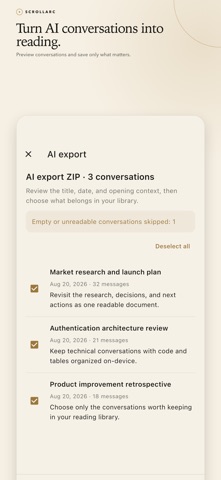
AI conversations, ready to read
• Import supported ZIP and JSON conversation exports
• Preview conversations and choose only what you want to save
• Convert supported text on your device without sending it to an AI model
• Keep imported documents available offline
GitHub, GitLab, and Bitbucket in one reader
• Import public Markdown from all three providers for free
• Connect private repositories with ScrollArc Plus
• Keep READMEs, specifications, runbooks, and technical notes together
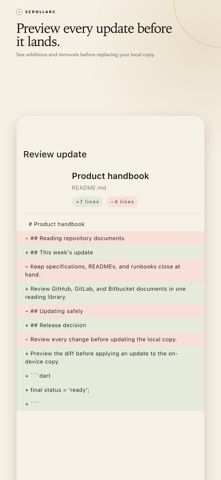
• Preview additions and removals before updating the local copy
Built to finish long documents
• Return to the exact reading position you left
• Use Reading Map to see headings, progress, and structured sections
• Search inside a document and move between results
• Adjust text size, line spacing, content width, and themes
Markdown that stays readable
• Syntax-highlighted code, tables, task lists, quotes, links, and images
• Math and Mermaid diagrams rendered on your device
• Full-screen Mermaid viewer with pinch-to-zoom
Keep, compare, and take your work with you
• Export the original Markdown for free
• Export PDF or self-contained HTML with ScrollArc Plus
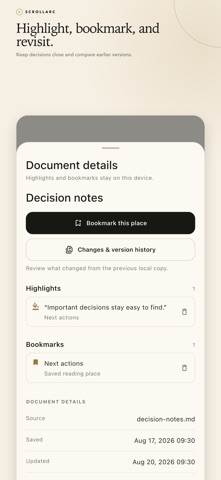
• Create highlights and bookmarks with Plus
• Keep local version history, compare readable diffs, and restore an earlier version with Plus
Private by design
No account. No ads. Your document text stays in the app's local storage. ScrollArc does not upload your documents or analyze them with AI. You can delete one document or clear the entire local library at any time. Release builds send limited feature-use totals and crash diagnostics; document text, titles, filenames, search terms, repository names, links, and annotations are never included.
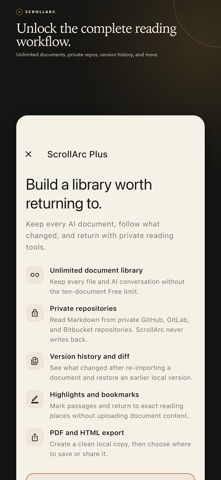
Free and ScrollArc Plus
The free version saves up to ten documents and includes the complete reading experience, AI export import, public repository import, and Markdown export. ScrollArc Plus removes the document limit and adds private GitHub, GitLab, and Bitbucket connections, local version history with diff and restore, PDF and HTML export, and new highlights and bookmarks. Existing documents and annotations are not deleted when a subscription ends. Monthly and yearly plans are available; localized prices and billing periods appear on the purchase screen. Manage or cancel through your Apple Account and restore an eligible purchase from Settings.
ScrollArc is a focused AI Markdown reader—not an editor or AI chat service. It gives long conversations, reports, READMEs, specifications, and technical notes a better place to be read.
Terms of Use (EULA): https://www.apple.com/legal/internet-services/itunes/dev/stdeula/