AppBrain
AppBrain
  • Apps
  • Apps being viewed right now Trending apps today Most popular apps All-time most installed apps Top rated apps iPhone and iPad apps
  • Intelligence ▾
    Intelligence overview → Track any Android app or your whole market
    Track & analyze
    Keyword Tracker & OptimizerTrack & improve Play rankings App Performance ReportOne-off PDF for any app StatisticsFree Android & Play market stats
    Promote your app
    Featured Apps App Links
  • Intelligence
  • Pricing
  • Dashboard
  • Sign up
  • Log in
App Store Apps > Productivity > Set · ADHD Task Manager
Set · ADHD Task Manager icon

Set · ADHD Task Manager

4.1
MATTHEW PETER DICKERSON
0.00
0 reviews
Free

Set · ADHD Task Manager Screenshot 1 of 10
Set · ADHD Task Manager Screenshot 2 of 10
Set · ADHD Task Manager Screenshot 3 of 10
Set · ADHD Task Manager Screenshot 4 of 10
Set · ADHD Task Manager Screenshot 5 of 10
Set · ADHD Task Manager Screenshot 6 of 10
Set · ADHD Task Manager Screenshot 7 of 10
Set · ADHD Task Manager Screenshot 8 of 10
Set · ADHD Task Manager Screenshot 9 of 10
Set · ADHD Task Manager Screenshot 10 of 10
Screenshots by MATTHEW PETER DICKERSON, from the the App Store listing
View on the App Store

About Set · ADHD Task Manager

Set · ADHD Task Manager is a productivity app developed by MATTHEW PETER DICKERSON.

What is the rating of Set · ADHD Task Manager?

Set · ADHD Task Manager has no ratings yet.

Is Set · ADHD Task Manager free?

Set · ADHD Task Manager is free. The app size is 108.83 MB. The latest version available is 4.1. The last update was on October 19, 2026.

What are the requirements for Set · ADHD Task Manager?

The app has a content rating of Low Maturity. The app has been available on the App Store since November 2025.

Set · ADHD Task Manager is made and published by MATTHEW PETER DICKERSON. AppBrain is an independent app data site and isn't affiliated with MATTHEW PETER DICKERSON. The app name, icon, screenshots and description belong to MATTHEW PETER DICKERSON and are shown as published on the App Store.

Description by MATTHEW PETER DICKERSON (from the App Store)
Set is a planner built around time. Every task has a length and a start time, so Today always shows when your day will finish. When the morning slips, one tap rebuilds the rest of it.

TODAY, AS A TIMELINE
Tasks, breaks and calendar events sit in one list, each with its start time. The overview at the top shows what is left and when you will finish; tap it for a countdown to what is next. Overplan and the finish time turns orange, and Set offers to move the overflow to the days ahead. Swipe down for the week strip and drag a task onto any day.

ONE-TAP RESCHEDULE
Running behind? Tap Reschedule and everything moves forward from now, in order. Locked tasks and breaks keep their times, the rest flow around them and your meetings, and nothing is shortened. Hold it to start from the next half hour or any time.

ADDING IS QUICK
Tap + for a new task, or drag one out of it into place. End a title with "45m", "tomorrow" or "at 2pm" and Set fills in the details, in all 20 languages. Ask Siri to add a Set task, or use Shortcuts and the Action button. Templates (Pro) give you 30 ready-made tasks.

A TIMER THAT FITS REAL LIFE
It counts the time you really spend, not rigid Pomodoro blocks. Run past your estimate and it counts on in red; finish, and the real minutes go to Stats (Pro), which compares them with your estimates. Add an overdue alarm and ambient sounds, and follow it on the Lock Screen, in the Dynamic Island, or in the Mac menu bar and a floating window.

BLOCK THE DISTRACTIONS (PRO)
On iPhone and iPad, App Blocker blocks chosen apps, or allows only the ones you need, while the timer runs, never in breaks. Or keep them blocked until Today is clear. Turning it off means typing a sentence, so impulse doesn't win.

BREAKS AND ROUTINES
Name breaks, lock their start time, repeat them, or let Auto Breaks add one after each task. Repeat tasks daily, weekly, monthly or your own way. A routine returns at its usual time, a missed one carries over or skips, and each keeps its streak.

PROJECTS, STAGES AND INBOX
Capture anything in the Inbox and sort it later. Split big work into projects and stages, with progress and deadlines that warn you when the work won't fit. Drop a task on another to make a subtask (Pro), and duplicate any task, stage or project.

MADE FOR ADHD MINDS
Time blindness is easier to fight when time is visible. On iPhone and iPad, Focus mode strips Today back to your list. Hold a task to select several and change them at once, and Sort mode takes a messy Inbox one question at a time.

NOTES THAT DO MORE (PRO)
Markdown notes with a formatting toolbar, preview and checklists. With Apple Intelligence, tidy messy notes or turn them into clear steps.

YOUR CALENDAR AND REMINDERS (PRO)
Events show in Today at their real times without being copied in; edit or skip them there. Your tasks can add events to any calendar, and Reminders import or sync both ways.

SCAN, EXPORT AND BACK UP
Photograph a handwritten list and Scan Tasks (Pro) turns it into tasks. Export any day, project or your Inbox as PDF, Markdown or Rich Text, or email it, and back up everything.

APPLE WATCH
Today's timeline on your wrist: complete, reorder, Reschedule and add tasks by voice. The timer runs on the watch even without your iPhone, and complications show what is next.

EVERYWHERE, IN 20 LANGUAGES
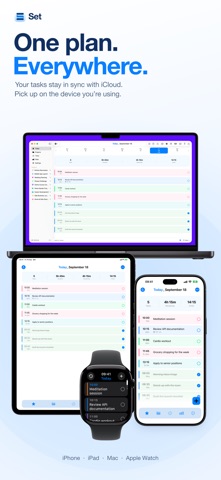
iPhone, iPad, Mac and Apple Watch, synced through your own iCloud, no account needed. A real Mac app with its own window, menu bar and shortcuts. Widgets, Siri, Shortcuts and themes.

FREE, WITH PRO WHEN YOU WANT IT
Free: 3 projects, 8 tasks a day, 3 repeating tasks, Reschedule, the timer, Focus, Select and Sort, deadlines, widgets, Apple Watch, iCloud sync, export and backup. Pro removes the limits and adds notes, subtasks, templates, stats, Calendar and Reminders, App Blocker, Scan Tasks, AI rewriting, ambient sounds and more colors. Family Sharing covers your household.

Not a medical device. Consult healthcare professionals for medical advice.
Show more Show less

Alternatives to Set · ADHD Task Manager

Traverse outliner mobile icon Traverse outliner mobile
Stuart Marshall
5.0
Free
1 ratings
Habit Tracker: Nesta icon Habit Tracker: Nesta
Nikhil Singh
5.0
Free
1 ratings
3by4: Goal & Task Planner icon 3by4: Goal & Task Planner
Karimulla Mohammed
5.0
Free
2 ratings
Calendar & Focus - Modo icon Calendar & Focus - Modo
Ruslan Trischenkov
4.0
Free
2 ratings
Unium icon Unium
Uncertainty Works Ltd
5.0
Free
2 ratings
Weeklii icon Weeklii
Saurabh Sharma
0.0
Free
ThinkFlow AI Task Planner icon ThinkFlow AI Task Planner
Drue Rozier
5.0
Free
4 ratings
warpSpeed icon warpSpeed
warpSpeed
5.0
Free
1 ratings

More from MATTHEW PETER DICKERSON

Habiroll · Habit Tracker RPG icon Habiroll · Habit Tracker RPG
MATTHEW PETER DICKERSON
0.0
Free

Changelog of Set · ADHD Task Manager

No changelog data

Developer information for MATTHEW PETER DICKERSON

MATTHEW PETER DICKERSON

Address:

Share Set · ADHD Task Manager

Comments on Set · ADHD Task Manager for iOS

We don't have enough comments to show example comments. Please check back later.

App Store Rankings for Set · ADHD Task Manager

This app is not ranked

Technologies used by Set · ADHD Task Manager

Popular Productivity Apps Top new apps Price drops on Google Play Today's trending apps Apps other people are watching
Traverse outliner mobile icon Traverse outliner mobile
Habit Tracker: Nesta icon Habit Tracker: Nesta
3by4: Goal & Task Planner icon 3by4: Goal & Task Planner
Calendar & Focus - Modo icon Calendar & Focus - Modo
Unium icon Unium
Weeklii icon Weeklii
ThinkFlow AI Task Planner icon ThinkFlow AI Task Planner
warpSpeed icon warpSpeed
AppBrain Intelligence premium content

Subscribe now to get full and unlimited access to AppBrain Intelligence. You'll have access to:

  • App Intelligence dashboard (performance timeline, competitor comparison, country rankings, insight cards)
  • Detailed ranking data per app
  • Full timeline per developer
  • Device market shares data per country
  • Unlimited keyword tracking
  • AI assistant access via MCP (Claude, Cursor or any MCP client)
1 Month

$75/mo
(billed every month)

SAVE 0%
Subscribe
3 Months

$65/mo
($195 billed every 3 months)

SAVE 13%
Subscribe
1 Year

$57.50/mo
($690 billed every year)

SAVE 23%
Subscribe
Each subscription will automatically renew 3 days before the expiration date for the same time period. Subscriptions can be cancelled at any time before the renewal.

AppBrain is an app data site, we track rankings, ratings, installs for all apps and games on Google Play and the App Store. AppBrain doesn't host app files or APKs, all install links go directly to the official store. All trademarks are owned by their respective owners.

More apps

  • Top Android apps being viewed
  • MethStreams
  • Vela Reels Pro Android App
  • Short Reels: Love Story Drama

App statistics

  • Android statistics
  • Google Play Developer stats
  • Trending Android Apps
  • Trending iOS apps
  • Top popular Apps
  • Buy the best Android phone
  • Buy & sell app businesses

About AppBrain

  • Contact
  • Privacy
  • Documentation
  • DMCA takedowns
  • Blog
  • Tips to improve your Android promotional campaign
© 2010-2026 - AppBrain