




AppBrain's verdict
New- Rating on App Store
- 5.00
- 1 ratings
- Last updated
- September 30, 2026
- Size
- 2.08 MB
Traverse outliner mobile came out 80 days ago. It doesn't have enough ratings yet to judge what users think.
User feedback
Ratings and reviews on the App StoreComments on Traverse outliner mobile for iOS
We don't have enough comments to show example comments. Please check back later.
Store listing
By Stuart Marshall, from the App StoreDescription by Stuart Marshall Written by the developer, not by AppBrain. Click to read.
Use Traverse Mobile to plan projects, map research, structure writing, organise notes, build checklists, break down tasks, prepare reports, develop scripts or think through difficult ideas one level at a time.
THE OUTLINE VIEW, WHEREVER YOU GO
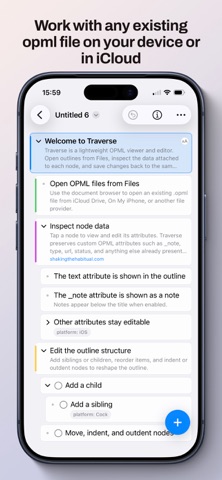
Traverse Mobile brings the classic Outline view from Traverse for Mac to a touch-first app. Open an OPML document from Files or create a new one, then build and reshape its hierarchy in a familiar indented outline.
Traverse Mobile is completely free. There are no subscriptions, in-app purchases or adverts, and no account to create. Create and edit as many outlines as you need.
Store files locally, in iCloud Drive or with a compatible Files provider, then continue working with the same OPML documents in Traverse app on your Mac or in other compatible apps.
KEY FEATURES
• Classic outline view
See the shape of your ideas in a clean, indented hierarchy. Expand individual branches or reveal the whole outline when you need the complete picture.
• Fast, flexible editing
Add siblings and children, edit text in place, move items up or down, indent and outdent, or drag items before, inside or after another branch.
• Focus mode
Work inside a single branch without deleting, moving or changing its underlying place in the full outline.
• Tasks and checklists
Turn items into tasks, mark them complete and keep action points in context alongside the rest of your thinking.
• Notes, links and colour marks
Add supporting notes, attach URLs and use colour marks to make important items easy to recognise. Open links directly from the outline.
• Custom attributes
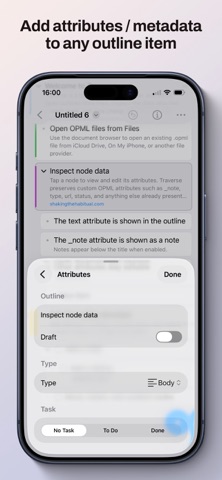
Give your outline the structure your work needs with text, numbers, dates, URLs, checkboxes and reusable lookup values.
• Draft status
Mark an item or an entire branch as draft while keeping it in place.
• OPML-based documents
Create, open and edit portable OPML files directly through Files. Your outlines remain accessible and under your control.
• Works with Traverse for Mac
Share compatible OPML documents between mobile and desktop. Traverse Mobile preserves Traverse metadata and can display and edit Markdown Type and Fountain roles already present in compatible documents.
• Undo and redo
Reverse text edits, structural changes, task updates and attribute changes with descriptive document history.
• Made for iPhone and iPad
Use touch gestures for quick edits or a hardware keyboard for efficient navigation and restructuring. On larger iPads, inspect attributes alongside your outline in landscape.
• Control your view
Show or hide notes and attributes, wrap long text, or expand and collapse every branch at once.
Traverse Mobile deliberately concentrates on the classic Outline view. When you want Traverse’s horizontal Column views, Writer view, advanced filtering, templates, snippets and export tools, continue with Traverse for Mac.
TERMS OF USE: https://www.apple.com/legal/internet-services/itunes/dev/stdeula/
PRIVACY: https://knowledge.shakingthehabitual.com/en/article/212-traverse-privacy-policy
Safety and technology
Found in the app by AppBrain- Price
- Free
- App size
- 2.08 MB
- Content rating
- Everyone
Technologies used by Traverse outliner mobile
Releases
Updates seen on the App Store- Version
- 1.0.1
- Launched
- September 2026
No changelog data
Alternatives
Similar apps and more from Stuart MarshallAlternatives to Traverse outliner mobile



More from Stuart Marshall


Rankings
App Store top chartsApp Store Rankings for Traverse outliner mobile
About the app and developer
About Traverse outliner mobile
Traverse outliner mobile is a productivity app developed by Stuart Marshall.
User Ratings
Traverse outliner mobile is rated 5.00 out of 5 stars. The rating is based on one rating ratings.
App Information
Traverse outliner mobile is freely available from the App Store. The app size is 2.08 MB. The latest version available is 1.0.1. The last update was on September 30, 2026.
Technical Requirements
The app has a content rating of Everyone. The app has been available on the App Store since September 2026.
Traverse outliner mobile is made and published by Stuart Marshall. AppBrain is an independent app data site and isn't affiliated with Stuart Marshall. The app name, icon, screenshots and description belong to Stuart Marshall and are shown as published on the App Store.
Developer information for Stuart Marshall
Address:
Frequently asked questions about Traverse outliner mobile
Is Traverse outliner mobile free?
Yes. Traverse outliner mobile is free on the App Store.
Is Traverse outliner mobile still available?
Yes. Traverse outliner mobile is on the App Store, and the last update we saw was on September 30, 2026.
How large is Traverse outliner mobile?
Traverse outliner mobile is 2.08 MB.
Is Traverse outliner mobile suitable for children?
App Store rates the content of Traverse outliner mobile as suitable for everyone.
How do people rate Traverse outliner mobile?
Traverse outliner mobile has one rating of 5.00 stars on the App Store.
Who made Traverse outliner mobile?
Traverse outliner mobile was developed by Stuart Marshall. It is listed in the productivity category on the App Store.
What are the best alternatives to Traverse outliner mobile?
People looking at Traverse outliner mobile also look at these productivity apps: Set · ADHD Task Manager, PaperTrail: TaskPaper Client, Inkiostro: Markdown Editor, Note Fold: Structured Notes, Sonto - Goal & Life Planner.