

Simple Notes - Notepad Manager
Simple Notes - Notepad Manager is made and published by Komorebi Inc. AppBrain is an independent app data site and isn't affiliated with Komorebi Inc. The app name, icon, screenshots and description belong to Komorebi Inc. and are shown as published on the App Store.
AppBrain's verdict
EstablishedLoved by users- Rating on App Store
- 4.74
- 790 ratings
- Last updated
- October 6, 2026
- Size
- 216.0 MB
Users love it: 4.7 stars from 790 ratings.
User feedback
Ratings and reviews on the App StoreComments on Simple Notes - Notepad Manager for iOS
We don't have enough comments to show example comments. Please check back later.
Store listing
By Komorebi Inc., from the App Store



Description by Komorebi Inc. Written by the developer, not by AppBrain. Click to read.
Notes go into color-coded folders, and you can find them using the calendar or photo album. No account or setup is required, and the app works offline.
Core features are free. Keep everything in one place, from class notes and work memos to a diary or baby journal.
[Features]
■ Add Photos to Notes
- Attach images to any note
- Insert pictures from your photo library, or take a photo on the spot
■ Folder Organization
- Create folders to keep your notes organized
- Choose from 24 folder colors to tell categories apart at a glance
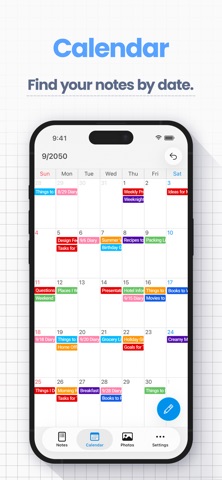
■ Calendar View
- View notes by date using the built-in calendar
- Tap any date to see notes for that date — perfect for locating past entries
■ Photo Album
- Browse all images added to notes in one place
- Tap a photo to jump to its note
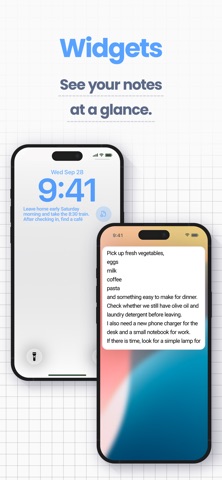
■ Home Screen & Lock Screen Widgets
- Keep a note on your Home Screen like a sticky note — no need to open the app
- Lock Screen widgets let you see a note without unlocking your iPhone
- Choose which note to display and its text size
*Widgets are part of the Premium Service*
■ Sort Notes & Bullet Lists
- Sort by note date, date edited, date created, or title, ascending or descending
- Bullet lists make it easy to write shopping and packing lists
■ Passcode Lock
- Protect your notes with a passcode
- Supports Face ID and Touch ID for quick and secure access
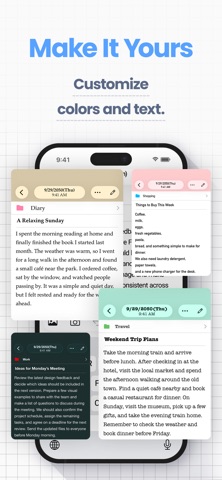
■ Font Styles
- Choose from 12 font styles
- Choose a playful, elegant, or professional look for your notes
■ Themes and App Icons
- Pick from 23 theme colors and matching app icons
- Customize the look of the app and even the Home Screen icon
■ Full-Note Image & PDF
- Turn an entire note, even a long one with photos, into a single image to share
- Export notes as PDFs for work or school
■ Data Backup & Export
- Back up your notes to iCloud or export them to your computer
- Hand exported notes to AI apps for summaries, or save them to Notion or Google Drive
- Export formats: HTML (for Windows), RTFD (for Mac, keeps images), PDF, and TXT
*Data export and iCloud backup are part of the Premium Service; notes are also included in your iPhone’s device backup*
■ iCloud Sync
- Use iCloud to sync notes across your iPhone and iPad (Premium Service)
- Restore your notes on a new device if yours is lost or broken
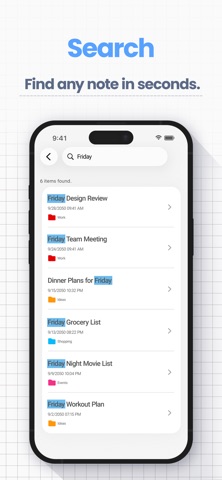
■ Smart Search
- Use the built-in search to quickly find notes
- Add text tags like “#Important” to make key notes easier to locate
■ Character Count
- Check the character count as you write reports, essays, or fiction
- Each note can hold up to 100,000 characters
■ Text Display Settings
- Adjust text size, contrast, and line spacing
- Ideal if you prefer larger text or need better readability
- Dark Mode is supported for nighttime use
■ Remove Ads
- The Premium Service hides all ads
- Enjoy a clean, distraction-free screen for your notes
[Great For]
- Students: class and lecture notes with photos, one folder per course — export notes as PDF or text and hand them to AI apps for exam prep
- Parents: a baby journal with photos, growth records, and family memos in folders
- Work: meeting notes, ideas, and memos in one place — tap the mic on the iOS keyboard to dictate notes, handy for transcripts and meeting minutes
- Writers: novels, blog drafts, and reports — live character count and PDF sharing
[Good to Know]
- Works on iPhone and iPad (iOS/iPadOS 14 or later)
- Works offline — create and view notes even in Airplane Mode
- No handwriting inside notes or audio recording (write on exported images and PDFs)
[Help & Contact]
- For help, go to “Help / FAQ” in the app settings
- If you still have questions, tap “Contact Us” on the help screen
- For faster support, contact us through the app rather than leaving an App Store review
【Terms of Service】
https://komorebi-studio.com/tos_en.html
【Privacy Policy】
https://komorebi-studio.com/policyredirect.html
Safety and technology
Found in the app by AppBrain- Price
- Free
- App size
- 216.0 MB
- Content rating
- Everyone
Technologies used by Simple Notes - Notepad Manager
Releases
Updates seen on the App Store- Version
- 4.2.1
- Launched
- August 2019
No changelog data
Alternatives
Similar apps and more from Komorebi Inc.Alternatives to Simple Notes - Notepad Manager




More from Komorebi Inc.


Rankings
App Store top chartsApp Store Rankings for Simple Notes - Notepad Manager
About the app and developer
About Simple Notes - Notepad Manager
Simple Notes - Notepad Manager is a productivity app developed by Komorebi Inc.
User Ratings
Simple Notes - Notepad Manager is rated 4.74 out of 5 stars. The rating is based on 790 ratings.
App Information
Simple Notes - Notepad Manager is freely available from the App Store. The app size is 216.04 MB. The latest version available is 4.2.1. The last update was on October 6, 2026.
Technical Requirements
The app has a content rating of Everyone. The app has been available on the App Store since August 2019.
Developer information for Komorebi Inc.
Address: