AppBrain
AppBrain
  • Apps
  • Apps being viewed right now Trending apps today Most popular apps All-time most installed apps Top rated apps iPhone and iPad apps
  • Intelligence ▾
    Intelligence overview → Track any Android app or your whole market
    Track & analyze
    Keyword Tracker & OptimizerTrack & improve Play rankings App Performance ReportOne-off PDF for any app StatisticsFree Android & Play market stats
    Promote your app
    Featured Apps App Links
  • Intelligence
  • Pricing
  • Dashboard
  • Sign up
  • Log in
App Store Apps > Productivity > Speaker Tools – Audio Test
App profile & analytics · Productivity · Data updated 2026-10-08
Speaker Tools – Audio Test icon

Speaker Tools – Audio Test

by 家宝 戴 · Free · Version 1.0.3
Availability On the App Store since March 2026 ↗
Rating on App Store
5.00/5
3 ratings
Rating
5.00
3 reviews
Best rank
–
not in the top lists
Last updated
September 30, 2026
1.0.3
AppBrain's verdict

It doesn't have enough ratings yet to judge what users think.

Speaker Tools – Audio Test is made and published by 家宝 戴. AppBrain is an independent app data site and isn't affiliated with 家宝 戴. The app name, icon, screenshots and description belong to 家宝 戴 and are shown as published on the App Store.

About Speaker Tools – Audio Test

Speaker Tools – Audio Test is a productivity app developed by 家宝 戴.

What is the rating of Speaker Tools – Audio Test?

Speaker Tools – Audio Test is rated 5.00 out of 5 stars, based on 3 ratings.

Is Speaker Tools – Audio Test free?

Speaker Tools – Audio Test is free. The app size is 7.30 MB. The latest version available is 1.0.3. The last update was on September 30, 2026.

What are the requirements for Speaker Tools – Audio Test?

The app has a content rating of Everyone. The app has been available on the App Store since March 2026.

Description by 家宝 戴 (from the App Store)
Speaker Tools brings practical audio playback and listening tools together in one place. Generate a tone, compare left and right channel signals, move through a range of frequencies, or view an approximate ambient sound level. An active subscription is required to use the app.

LOW-FREQUENCY PLAYBACK
Play a 165 Hz tone from the home screen. Choose a 10, 30, 60, or 120 second session, start playback with a tap, and stop whenever you want. The animated waveform shows when audio is playing. This is a simple way to listen to low-frequency output and compare how a device sounds in different settings. Output depends on the speaker, volume, audio route, and surrounding environment.

QUICK TONE
Need a short session? Quick Tone plays a 165 Hz low-frequency signal for 10 seconds with a visible countdown and progress ring. You can end the session early. It is a playback shortcut, not a cleaning or hardware repair function.

FREQUENCY GENERATOR
Adjust the frequency slider between 20 Hz and 20 kHz and play a steady tone at your chosen setting. Change the slider while playback is running to hear another frequency. Select a timed session or stop manually. Presets provide a starting point at 60 Hz for bass, 165 Hz for a low tone, 1 kHz for a mid tone, and 18 kHz for a very high tone. The app remembers your last selected frequency. Some frequencies may be inaudible or beyond what your speaker or headphones can reproduce.

LEFT AND RIGHT CHANNELS
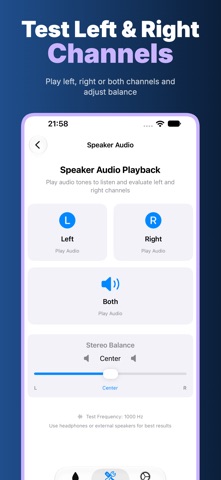
Play a 1 kHz test signal through the left channel, right channel, or both. When both are selected, move the balance control to compare the two sides. Headphones or external stereo speakers are useful for this listening exercise. A phone's built-in speaker layout and audio routing can affect what you hear, so the result is a subjective playback comparison rather than a hardware diagnosis.

LISTEN ACROSS FREQUENCIES
Step through ten tones from 60 Hz to 16 kHz, including bass, midrange, and higher frequencies. Play, stop, move to the previous or next tone, and note what you personally hear. Use a comfortable volume. Hearing differs between people and audio devices; this tool cannot determine your hearing threshold and is not a medical hearing test.

SOUND LEVEL REFERENCE
Allow microphone access to view a live approximate sound-level reading and simple level categories. Start or stop monitoring whenever you choose. Readings vary with the device microphone, case, microphone position, and room conditions. The meter is not professionally calibrated and should not be used for regulatory measurements, occupational exposure decisions, or hearing-safety judgments.

DESIGNED FOR SIMPLE EXPLORATION
The home screen puts low-frequency playback one tap away, while the Tools screen groups the generator, channel playback, frequency listening, quick tone, and sound meter. Clear controls and visible playback states make it easy to repeat a listening comparison. Audio tones are generated on the device. The app does not offer recording, cloud projects, accounts, or automatic speaker diagnosis.

SUBSCRIPTION AND SAFETY
Access requires an active monthly or yearly auto-renewing subscription. Available plans and local prices appear before purchase; manage or cancel in your Apple account settings, and restore an existing purchase in the app. Keep volume comfortable, especially with headphones. Speaker Tools cannot remove water, clean or repair a speaker, inspect hardware, or replace professional service. If a device is damaged, contact an authorized service provider. If you have hearing concerns, seek qualified medical advice.

Privacy Policy: https://5gotogo.github.io/WaterEject-privacy/privacy-policy.html
Terms of Use: https://www.apple.com/legal/internet-services/itunes/dev/stdeula/
Show more Show less

More data about Speaker Tools – Audio Test

Price Free
Rating 5.00 based on 3 ratings
Ranking Not ranked
Version 1.0.3
App size 7.30 MB
Suitable for Everyone

Screenshots

Speaker Tools – Audio Test Screenshot 1 of 6
Speaker Tools – Audio Test Screenshot 2 of 6
Speaker Tools – Audio Test Screenshot 3 of 6
Speaker Tools – Audio Test Screenshot 4 of 6
Speaker Tools – Audio Test Screenshot 5 of 6
Speaker Tools – Audio Test Screenshot 6 of 6
Screenshots by 家宝 戴, from the the App Store listing
Official page on the App Store

Alternatives to Speaker Tools – Audio Test

Repair AI Helper: RepairMate icon Repair AI Helper: RepairMate
Artmvstd SIA
0.0
Free
Katalog icon Katalog
103 NPT DIGITAL TECHNOLOGY PLC.
0.0
Free
Wave: AI Notes for Meetings icon Wave: AI Notes for Meetings
TeamPulse Solutions LLC
4.9
Free
39 ratings
EverEditor icon EverEditor
Ryu Iwasaki
4.4
Free
5 ratings
FireProCare icon FireProCare
Tornatech Inc.
5.0
Free
1 ratings
MTG Sync icon MTG Sync
PLUS Corporation
0.0
Free
AI - Chat With Botinfo icon AI - Chat With Botinfo
Starfish Media
3.0
Free
6 ratings
GEO5 Data Collector icon GEO5 Data Collector
FINE spol. s r.o.
5.0
Free
1 ratings

More from 家宝 戴

QuiltFit: Quilt Design Planner icon QuiltFit: Quilt Design Planner
家宝 戴
4.6
Free
5 ratings
ReceiptMint: Expenses & Tax icon ReceiptMint: Expenses & Tax
家宝 戴
5.0
Free
5 ratings
Atomic Clock – Precision Time icon Atomic Clock – Precision Time
家宝 戴
4.8
Free
5 ratings
ShelfCount - Inventory Scanner icon ShelfCount - Inventory Scanner
家宝 戴
4.2
Free
5 ratings
Labelary - Photo Text Label icon Labelary - Photo Text Label
家宝 戴
5.0
Free
4 ratings
Private Meeting Transcriber icon Private Meeting Transcriber
家宝 戴
4.0
Free
4 ratings
Cadenza: Metronome & Tuner icon Cadenza: Metronome & Tuner
家宝 戴
5.0
Free
4 ratings
Stringer: Stair Layout icon Stringer: Stair Layout
家宝 戴
5.0
Free
4 ratings

Changelog of Speaker Tools – Audio Test

No changelog data

Developer information for 家宝 戴

家宝 戴

Address:

Share Speaker Tools – Audio Test

Comments on Speaker Tools – Audio Test for iOS

We don't have enough comments to show example comments. Please check back later.

App Store Rankings for Speaker Tools – Audio Test

This app is not ranked

Technologies used by Speaker Tools – Audio Test

Popular Productivity Apps Top new apps Price drops on Google Play Today's trending apps Apps other people are watching
Repair AI Helper: RepairMate icon Repair AI Helper: RepairMate
Katalog icon Katalog
Wave: AI Notes for Meetings icon Wave: AI Notes for Meetings
EverEditor icon EverEditor
FireProCare icon FireProCare
MTG Sync icon MTG Sync
AI - Chat With Botinfo icon AI - Chat With Botinfo
GEO5 Data Collector icon GEO5 Data Collector
Overview Alternatives Reviews Rankings Technology
AppBrain Intelligence premium content

Subscribe now to get full and unlimited access to AppBrain Intelligence. You'll have access to:

  • App Intelligence dashboard (performance timeline, competitor comparison, country rankings, insight cards)
  • Detailed ranking data per app
  • Full timeline per developer
  • Device market shares data per country
  • Unlimited keyword tracking
1 Month

$75/mo
(billed every month)

SAVE 0%
Subscribe
3 Months

$65/mo
($195 billed every 3 months)

SAVE 13%
Subscribe
1 Year

$57.50/mo
($690 billed every year)

SAVE 23%
Subscribe
Each subscription will automatically renew 3 days before the expiration date for the same time period. Subscriptions can be cancelled at any time before the renewal.

AppBrain is an app data site, we track rankings, ratings, installs for all apps and games on Google Play and the App Store. AppBrain doesn't host app files or APKs, all install links go directly to the official store. All trademarks are owned by their respective owners.

More apps

  • Top Android apps being viewed
  • NRL Fantasy
  • FizzUp - Fitness Workouts stats
  • Call.com: 2nd Phone Number App

App statistics

  • Android statistics
  • Google Play Developer stats
  • Trending Android Apps
  • Trending iOS apps
  • Top popular Apps
  • Buy the best Android phone
  • Buy & sell app businesses

About AppBrain

  • Contact
  • Privacy
  • Documentation
  • DMCA takedowns
  • Articles
  • Blog
  • Free App-Ads.Txt Validation
© 2010-2026 - AppBrain