

SpeakUp AI
SpeakUp AI is made and published by Oleksandr Yefymov. AppBrain is an independent app data site and isn't affiliated with Oleksandr Yefymov. The app name, icon, screenshots and description belong to Oleksandr Yefymov and are shown as published on the App Store.
AppBrain's verdict
- Rating on App Store
- 3.25
- 4 ratings
- Last updated
- October 9, 2026
It doesn't have enough ratings yet to judge what users think.
Rankings
App Store top chartsApp Store Rankings for SpeakUp AI
Competitors
Similar apps and more from Oleksandr Yefymov








Releases
Updates seen on the App Store- Version
- 1.9.99
- Launched
- July 2023
No changelog data
User feedback
Ratings and reviews on the App StoreComments on SpeakUp AI for iOS
We don't have enough comments to show example comments. Please check back later.
Technology
Found in the app by AppBrain- Price
- Free
- App size
- 119.4 MB
- Content rating
- Everyone
Technologies used by SpeakUp AI
About the app and developer
About SpeakUp AI
SpeakUp AI is a productivity app developed by Oleksandr Yefymov.
User Ratings
SpeakUp AI is rated 3.25 out of 5 stars. The rating is based on 4 ratings.
App Information
SpeakUp AI is freely available from the App Store. The app size is 119.42 MB. The latest version available is 1.9.99. The last update was on October 9, 2026.
Technical Requirements
The app has a content rating of Everyone. The app has been available on the App Store since July 2023.
Developer information for Oleksandr Yefymov
Address:
Frequently asked questions about SpeakUp AI
Is SpeakUp AI free?
Yes. SpeakUp AI is free on the App Store.
Is SpeakUp AI still available?
Yes. SpeakUp AI is on the App Store, and the last update we saw was on October 9, 2026.
How large is SpeakUp AI?
SpeakUp AI is 119.42 MB.
Is SpeakUp AI suitable for children?
App Store rates the content of SpeakUp AI as suitable for everyone.
How do people rate SpeakUp AI?
SpeakUp AI scores 3.25 out of 5 stars, from 4 ratings on the App Store.
Who made SpeakUp AI?
SpeakUp AI was developed by Oleksandr Yefymov. It is listed in the productivity category on the App Store.
What are the best alternatives to SpeakUp AI?
People looking at SpeakUp AI also look at these productivity apps: Read Aloud For Me - AI Tools, Whisper : Speech to Text, Pocket Docs - Document Storage, Speech Jammer°, ChatBot AI Essay Writer.
Store listing
By Oleksandr Yefymov, from the App Store



Description by Oleksandr Yefymov Written by the developer, not by AppBrain. Click to read.
LISTEN TO ANYTHING
• Articles and websites: paste a link, or browse in Discover and listen to the page
• PDF, EPUB and TXT files from Files, iCloud Drive and other cloud storage
• Photos of printed pages: snap a page of a book or a letter and hear it (Latin-alphabet text)
• Your own notes, and text you share from other apps
• Daily News and a random Wikipedia article when you want something new
VOICES THAT SOUND RIGHT
• Natural AI voices in many languages and accents
• Light voices: free voices that run on your phone, with no limits
• Any speed from 0.5× to 2×
• Follow along: the passage being read is highlighted, and you can tap any passage to jump to it
YOUR LIBRARY, ORGANIZED
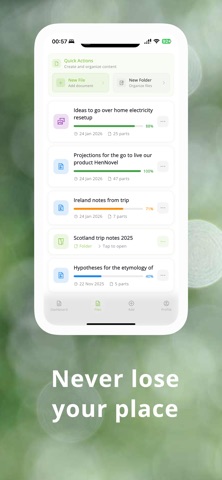
• Folders, search and filters, with your progress saved in every document
• Finished a document? Go straight to the next one in the folder
• Offline mode: your 10 most recent documents stay on your phone and play with Light voices; notes you write offline sync when you're back
STUDY BY EAR
• The Study tab turns your folders into subjects
• Card sets with flashcards, listen-and-choose and match pairs, all spoken aloud
• Make a set with AI in seconds, then practice hands-free: each card is read aloud, front then back
• Hear your new words in a short story
• Reminders to keep your listening streak going
AI CHAT (PREMIUM)
• Ask anything, by typing or speaking, and listen to the answer
• Save a good answer to your library and listen again later
MADE FOR EVERY DAY
• Light and dark themes
• In English, German, Spanish, French, Italian, Portuguese, Japanese and Ukrainian
• No ads
SPEAKUP PREMIUM
• Unlimited listening: no character or document limits
• Every premium voice
• AI Chat
• Listening in the background, with lock-screen controls
• Unlimited stories after every practice session
Some plans include a free trial; the paywall shows whether yours does before you subscribe.
Payment is charged to your Apple ID when you confirm the purchase. Subscriptions renew automatically unless cancelled at least 24 hours before the end of the current period, and your account is charged for the renewal within 24 hours before the period ends. Manage or cancel your subscription in your App Store account settings. Any unused part of a free trial is forfeited when you buy a subscription.
Cloud voices, AI Chat, Discover and syncing need an internet connection. Your documents stay private to your account.
Privacy Policy: https://speakupaiapp.com/privacy-policy
Terms of Use (EULA): https://speakupaiapp.com/terms-and-conditions
Questions? https://speakupaiapp.com/contact-us