

SpinCut DJ is made and published by 株式会社LALAMO. AppBrain is an independent app data site and isn't affiliated with 株式会社LALAMO. The app name, icon, screenshots and description belong to 株式会社LALAMO and are shown as published on the App Store.
AppBrain's verdict
- Last updated
- October 22, 2026
Rankings
App Store top chartsApp Store Rankings for SpinCut DJ
This app is not ranked
Competitors
Similar apps and more from 株式会社LALAMOAlternatives to SpinCut DJ


Releases
Updates seen on the App Store- Version
- 3.0.3
- Launched
- September 2026
No changelog data
User feedback
Ratings and reviews on the App StoreComments on SpinCut DJ for iOS
We don't have enough comments to show example comments. Please check back later.
Technology
Found in the app by AppBrain- Price
- Free
- App size
- 66.3 MB
- Content rating
- Everyone
Technologies used by SpinCut DJ
About the app and developer
About SpinCut DJ
SpinCut DJ is a music app developed by 株式会社LALAMO.
What is the rating of SpinCut DJ?
SpinCut DJ has no ratings yet.
Is SpinCut DJ free?
SpinCut DJ is free. The app size is 66.33 MB. The latest version available is 3.0.3. The last update was on October 22, 2026.
What are the requirements for SpinCut DJ?
The app has a content rating of Everyone. The app has been available on the App Store since September 2026.
Developer information for 株式会社LALAMO
Address:
Store listing
By 株式会社LALAMO, from the App Store


Screenshots by 株式会社LALAMO, from the the App Store listing
Description by 株式会社LALAMO Written by the developer, not by AppBrain. Click to read.
YOUR TRACKS. YOUR MIX.
SpinCut DJ brings two-deck mixing, expressive scratching and creative performance tools to iPhone and iPad. Load your own audio files and build your mix with touch controls or a DDJ-FLX4 controller.
YOUR MAC LIBRARY, AWAY FROM HOME
Sign in with the same SpinCut account to browse tracks and folders from your Mac. Select LOAD to fetch a track over the internet. Once its opening audio is ready, playback can begin while the rest continues downloading. Separate tabs keep your device tracks and Mac library organized.
GO LIVE IN SPINCUT WORLD
Stream your DJ performance to your Personal Room in SpinCut World and share music in a virtual space. Show or hide the live broadcast area in Settings.
MIX WITH CONFIDENCE
Blend two tracks with channel and crossfader controls. Shape your sound with EQ, filters and FX, and add variety with performance pads. Organize device tracks in folders, move tracks and change their order.
EXPLORE VOCALS AND INSTRUMENTALS
Use vocal and instrumental controls to explore new combinations. Stem processing is required before separated audio is available.
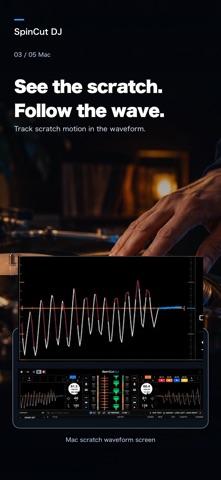
SCRATCH YOUR WAY
Scratch directly on the screen, or use the jog wheels of a connected DDJ-FLX4 for hands-on performance.
SEE MORE OF YOUR MUSIC
Switch to the large waveform view to see track structure and playback position clearly as you mix.
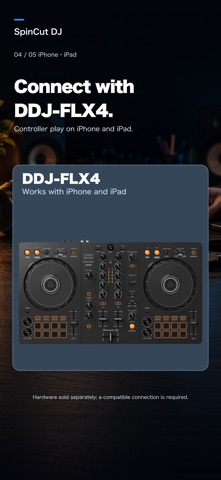
DDJ-FLX4 CONTROLLER SUPPORT
Connect a DDJ-FLX4 via USB to control playback, cues, jog wheels, mixer controls and more. DDJ-FLX4 is sold separately. A compatible USB connection and appropriate power supply are required.
Remote library access requires a compatible Mac version of SpinCut DJ, the same account on both devices, your Mac running and awake with sharing enabled, and an internet connection on both devices. Playback start time depends on the connection. Fetched audio uses temporary storage on your device. This feature does not provide a subscription music catalog.
Feature availability may depend on your account and plan.
Use supported audio files you have the necessary rights to use. Ensure you also have the necessary rights for live broadcasting.
SpinCut DJ brings two-deck mixing, expressive scratching and creative performance tools to iPhone and iPad. Load your own audio files and build your mix with touch controls or a DDJ-FLX4 controller.
YOUR MAC LIBRARY, AWAY FROM HOME
Sign in with the same SpinCut account to browse tracks and folders from your Mac. Select LOAD to fetch a track over the internet. Once its opening audio is ready, playback can begin while the rest continues downloading. Separate tabs keep your device tracks and Mac library organized.
GO LIVE IN SPINCUT WORLD
Stream your DJ performance to your Personal Room in SpinCut World and share music in a virtual space. Show or hide the live broadcast area in Settings.
MIX WITH CONFIDENCE
Blend two tracks with channel and crossfader controls. Shape your sound with EQ, filters and FX, and add variety with performance pads. Organize device tracks in folders, move tracks and change their order.
EXPLORE VOCALS AND INSTRUMENTALS
Use vocal and instrumental controls to explore new combinations. Stem processing is required before separated audio is available.
SCRATCH YOUR WAY
Scratch directly on the screen, or use the jog wheels of a connected DDJ-FLX4 for hands-on performance.
SEE MORE OF YOUR MUSIC
Switch to the large waveform view to see track structure and playback position clearly as you mix.
DDJ-FLX4 CONTROLLER SUPPORT
Connect a DDJ-FLX4 via USB to control playback, cues, jog wheels, mixer controls and more. DDJ-FLX4 is sold separately. A compatible USB connection and appropriate power supply are required.
Remote library access requires a compatible Mac version of SpinCut DJ, the same account on both devices, your Mac running and awake with sharing enabled, and an internet connection on both devices. Playback start time depends on the connection. Fetched audio uses temporary storage on your device. This feature does not provide a subscription music catalog.
Feature availability may depend on your account and plan.
Use supported audio files you have the necessary rights to use. Ensure you also have the necessary rights for live broadcasting.