
Time Clock Helper
Time Clock Helper is made and published by Ducky Planet LLC. AppBrain is an independent app data site and isn't affiliated with Ducky Planet LLC. The app name, icon, screenshots and description belong to Ducky Planet LLC and are shown as published on the App Store.
AppBrain's verdict
EstablishedLoved by users- Rating on App Store
- 4.52
- 233 ratings
- Last updated
- September 28, 2023
Users love it: 4.5 stars from 233 ratings.
Rankings
App Store top chartsApp Store Rankings for Time Clock Helper
Competitors
Similar apps and more from Ducky Planet LLCAlternatives to Time Clock Helper





More from Ducky Planet LLC


Releases
Updates seen on the App Store- Version
- 5.9
- Launched
- April 2012
No changelog data
User feedback
Ratings and reviews on the App StoreComments on Time Clock Helper for iOS
We don't have enough comments to show example comments. Please check back later.
Technology
Found in the app by AppBrain- Price
- $0.99
- App size
- 1.69 MB
- Content rating
- Everyone
Technologies used by Time Clock Helper
About the app and developer
About Time Clock Helper
Time Clock Helper is a productivity app developed by Ducky Planet LLC.
User Ratings
Time Clock Helper is rated 4.52 out of 5 stars. The rating is based on 230 ratings.
App Information
Time Clock Helper costs $0.99. The app size is 1.69 MB. The latest version available is 5.9. The last update was on September 28, 2023.
Technical Requirements
The app has a content rating of Everyone. The app has been available on the App Store since April 2012.
Developer information for Ducky Planet LLC
Address:
Frequently asked questions about Time Clock Helper
Is Time Clock Helper free?
No. Time Clock Helper costs $0.99 on the App Store.
Is Time Clock Helper still available?
Yes. Time Clock Helper is on the App Store, and the last update we saw was on September 28, 2023.
How large is Time Clock Helper?
Time Clock Helper is 1.69 MB.
Is Time Clock Helper suitable for children?
App Store rates the content of Time Clock Helper as suitable for everyone.
How do people rate Time Clock Helper?
Time Clock Helper scores 4.52 out of 5 stars, from 233 ratings on the App Store.
Who made Time Clock Helper?
Time Clock Helper was developed by Ducky Planet LLC. It is listed in the productivity category on the App Store.
What are the best alternatives to Time Clock Helper?
People looking at Time Clock Helper also look at these productivity apps: HVAC RefCharge, Ruler Pro - Measuring Tape, Punchio Kiosk, Timezone Assistant, Keeping – Easy Time Tracker.
Store listing
By Ducky Planet LLC, from the App Store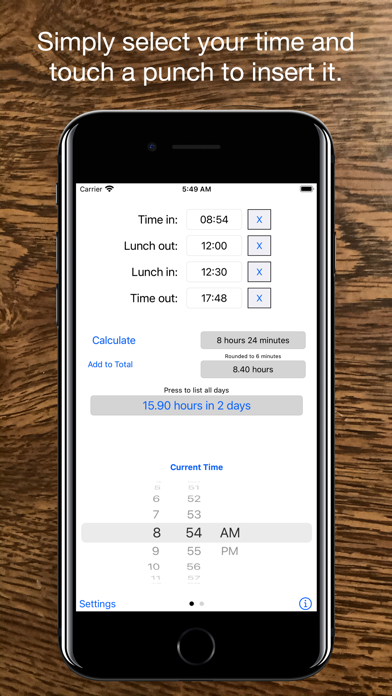


Description by Ducky Planet LLC Written by the developer, not by AppBrain. Click to read.
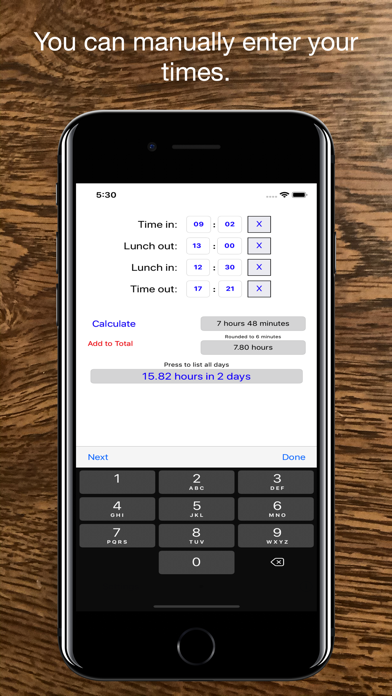
There are two ways to input values. The first view allows you to pick a time using a scroll wheel and then press the location you want that time to go into. If you swipe left or right you can change to a manual entry mode. In this mode, you simply press the number you want to change and then use the keyboard to enter a new time. You can press next to go to the next field, or done to finish.
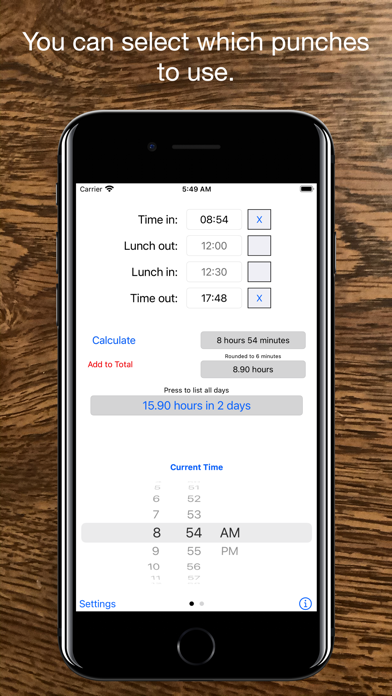
If you don't need certain punches, such as a lunch, use the checkboxes next to the times you don't want.
It now allows you to record the total hours for more than one day. You can also view all the recorded days - up to 400 at the current time.
Recording a time couldn't get easier. Simply press the add to total button and it's done. To view the days press on the label showing the current total hours and a new view will open. The add to total button will turn red whenever a change has been made to one of your punches.
In the days box you can scroll up and down to view all the days recorded. You can also delete days by pressing on them and answering the prompt. If you want to clear them all press the clear all button on the bottom. If you would like to e-mail the times to someone press the e-mail button. Press done when you are finished to return to the entry screen.
This app also allows the option to select different rounding options. Many work places round to the nearest 6 minutes, or 15 minute increment and this app now allows that in it's calculations. To change options, simply press the setting button and change the settings, or go into the device settings and change it for the app.
You may also show the date the time was added to the total by going into setting and changing the show date option. You can also change it back to show just the day numbers.
You can also show the total time recorded in a decimal format or in an hours and minutes format by going into setting and setting the show as decimal option.
The app is pretty straight forward and simple. If you have any problems, or additions you would like to see send me an e-mail and I will attempt to fix them in the next version.
Please take the time to review the app if you find it useful.