

TraceNote - Life planner app
TraceNote - Life planner app is made and published by Hideki Yanagisawa. AppBrain is an independent app data site and isn't affiliated with Hideki Yanagisawa. The app name, icon, screenshots and description belong to Hideki Yanagisawa and are shown as published on the App Store.
AppBrain's verdict
- Last updated
- March 18, 2024
Rankings
App Store top chartsApp Store Rankings for TraceNote - Life planner app
Competitors
Similar apps and more from Hideki YanagisawaAlternatives to TraceNote - Life planner app








Releases
Updates seen on the App Store- Version
- 2.9.0
- Launched
- March 2024
No changelog data
User feedback
Ratings and reviews on the App StoreComments on TraceNote - Life planner app for iOS
We don't have enough comments to show example comments. Please check back later.
Technology
Found in the app by AppBrain- Price
- Free
- App size
- 7.77 MB
- Content rating
- Everyone
Technologies used by TraceNote - Life planner app
About the app and developer
About TraceNote - Life planner app
TraceNote - Life planner app is a productivity app developed by Hideki Yanagisawa.
What is the rating of TraceNote - Life planner app?
TraceNote - Life planner app has no ratings yet.
Is TraceNote - Life planner app free?
TraceNote - Life planner app is free. The app size is 7.77 MB. The latest version available is 2.9.0. The last update was on March 18, 2024.
What are the requirements for TraceNote - Life planner app?
The app has a content rating of Everyone. The app has been available on the App Store since March 2024.
Developer information for Hideki Yanagisawa
Address:
Frequently asked questions about TraceNote - Life planner app
Is TraceNote - Life planner app free?
Yes. TraceNote - Life planner app is free on the App Store.
Is TraceNote - Life planner app still available?
Yes. TraceNote - Life planner app is on the App Store, and the last update we saw was on March 18, 2024.
How large is TraceNote - Life planner app?
TraceNote - Life planner app is 7.77 MB.
Is TraceNote - Life planner app suitable for children?
App Store rates the content of TraceNote - Life planner app as suitable for everyone.
Who made TraceNote - Life planner app?
TraceNote - Life planner app was developed by Hideki Yanagisawa. It is listed in the productivity category on the App Store.
What are the best alternatives to TraceNote - Life planner app?
People looking at TraceNote - Life planner app also look at these productivity apps: OneTapNote, Tangrid: personal database, Kantt Organizer, Handwriting Book - Note taking, Picket - Your life organiser.
Store listing
By Hideki Yanagisawa, from the App Store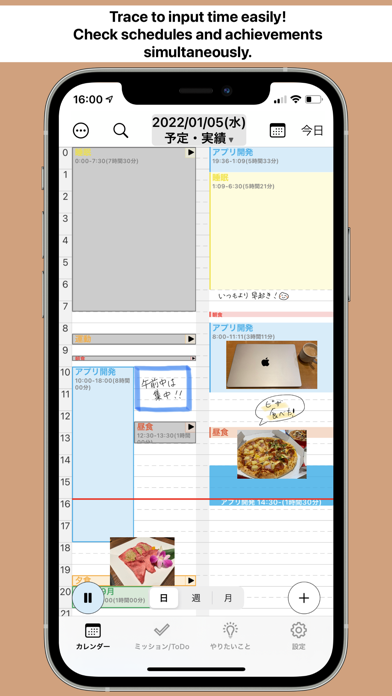


Description by Hideki Yanagisawa Written by the developer, not by AppBrain. Click to read.
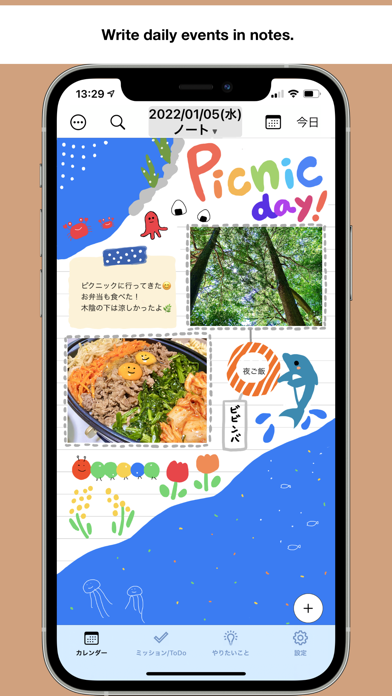
Just like with a traditional paper planner, you can paste text and images to create original notes for each day. Plus, if you're using an iPad, you can even draw handwritten text and illustrations. With our Standard Plan, you can sync handwritten content to your iPhone as well.
Easily input schedule times by simply tracing on the screen. Not only can you record schedules, but you can also track your achievements, allowing for easy comparison between plans and accomplishments. By setting your "Goals" task management becomes even more convenient. Let's turn those goals into routines and achieve what you desire!
【Have you ever experienced these?】
- Wanted to write daily records in a paper planner but couldn't keep it up.
- Using a smartphone app for planning but wishing for the ability to write by hand.
- Set various goals but struggled to make progress or got too focused on one thing.
- Wanted to create an enjoyable planner to look back on but struggled to organize it neatly.
【Features】
Easy Calendar Input by Tracing
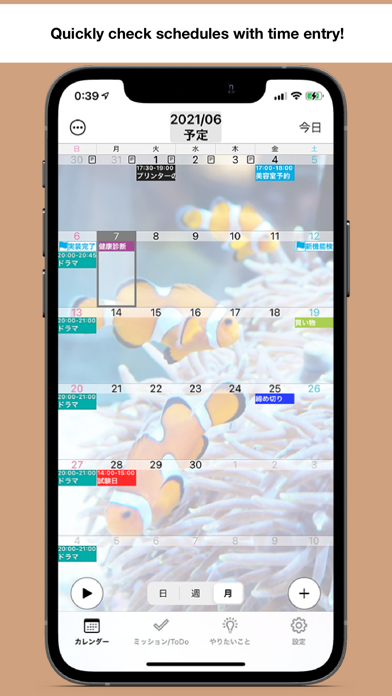
- Choose from daily, weekly, or monthly calendar views.
- Trace the timeline on daily or weekly calendars to input schedule times easily.
- Record your achievements to visualize how you spend your time, including work hours, study time, and sleep time.
- Compare schedules and achievements side by side on the daily calendar.
- Customize the background of the monthly calendar with your favorite photos.
- Use graphs to visualize recorded time.
- Write down the achievement level of desired goals and daily recorded values on the calendar.
- Export recorded schedules and achievements.
- Record daily mood and weather.
Goals
- Register things you want to do, such as hobbies, studying, or daily routines, as "Goals."
- Set daily time goals to achieve what you desire.
- Set deadlines for ToDo tasks.
- Tap the start button to automatically record the time spent on your Goals.
- View achievements for each desired goal.
Pomodoro Timer
- Receive notifications at regular intervals during work recording sessions.
- By dividing time, you can concentrate more effectively.
Note
- Paste text and images freely on the page to create your own notes.
- Record daily events just like in a paper planner.
- Create original handwritten notes on iPad.
Tasks
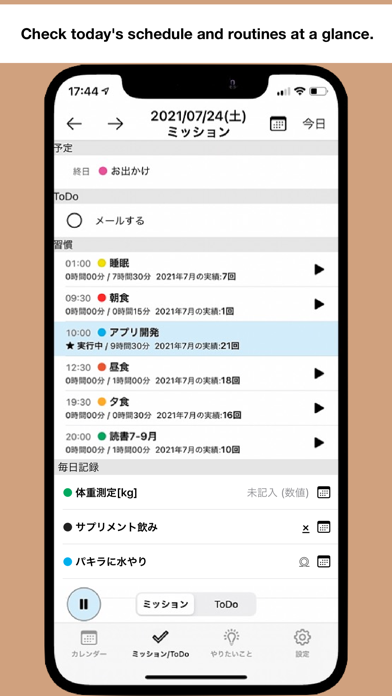
- Display today's schedule, ToDo, and routines in a list format for easy reference of tasks to be done today.
ToDo List
- A simple ToDo list.
- Create ToDo tasks linked to your Goals.
iCloud Backup & Sync
- Backup your data to the cloud.
【About the Standard Plan】
With the Standard Plan, ads are removed, and the number of "Goals" you can register becomes unlimited. You can use the note feature without any restrictions. You can try it free for one week, and this offer is valid for first-time users only.
Auto-Renewable Subscription
- Payment will be charged to your Apple ID account.
- Subscription management can be done by users and can be turned off from the account settings.
- Subscription renewal is made within 24 hours before the expiration date.
- Unless canceled at least 24 hours before the next subscription, it will be automatically renewed.
Terms of Use
https://note.com/hyanagisawa/n/n46d2adcbb7e2
Privacy Policy
https://note.com/hyanagisawa/n/nb5eef4574ade