

Tracer: Trace Drawing Camera
Tracer: Trace Drawing Camera is made and published by Pull Apps. AppBrain is an independent app data site and isn't affiliated with Pull Apps. The app name, icon, screenshots and description belong to Pull Apps and are shown as published on the App Store.
AppBrain's verdict
Loved by users- Rating on App Store
- 4.56
- 103 ratings
- Last updated
- October 9, 2026
Users love it: 4.6 stars from 103 ratings.
Rankings
App Store top chartsApp Store Rankings for Tracer: Trace Drawing Camera
Competitors
Similar apps and more from Pull AppsAlternatives to Tracer: Trace Drawing Camera


More from Pull Apps


Releases
Updates seen on the App Store- Version
- 1.4.1
- Launched
- March 2026
No changelog data
User feedback
Ratings and reviews on the App StoreComments on Tracer: Trace Drawing Camera for iOS
We don't have enough comments to show example comments. Please check back later.
Technology
Found in the app by AppBrain- Price
- Free
- App size
- 47.1 MB
- Content rating
- Everyone
Technologies used by Tracer: Trace Drawing Camera
About the app and developer
About Tracer: Trace Drawing Camera
Tracer: Trace Drawing Camera is a graphics & design app developed by Pull Apps.
User Ratings
Tracer: Trace Drawing Camera is rated 4.56 out of 5 stars. The rating is based on 100 ratings.
App Information
Tracer: Trace Drawing Camera is freely available from the App Store. The app size is 47.12 MB. The latest version available is 1.4.1. The last update was on October 9, 2026.
Technical Requirements
The app has a content rating of Everyone. The app has been available on the App Store since March 2026.
Developer information for Pull Apps
Address:
Frequently asked questions about Tracer: Trace Drawing Camera
Is Tracer: Trace Drawing Camera free?
Yes. Tracer: Trace Drawing Camera is free on the App Store.
Is Tracer: Trace Drawing Camera still available?
Yes. Tracer: Trace Drawing Camera is on the App Store, and the last update we saw was on October 9, 2026.
How large is Tracer: Trace Drawing Camera?
Tracer: Trace Drawing Camera is 47.12 MB.
Is Tracer: Trace Drawing Camera suitable for children?
App Store rates the content of Tracer: Trace Drawing Camera as suitable for everyone.
How do people rate Tracer: Trace Drawing Camera?
Tracer: Trace Drawing Camera scores 4.56 out of 5 stars, from 103 ratings on the App Store.
Who made Tracer: Trace Drawing Camera?
Tracer: Trace Drawing Camera was developed by Pull Apps. It is listed in the graphics & design category on the App Store.
What are the best alternatives to Tracer: Trace Drawing Camera?
People looking at Tracer: Trace Drawing Camera also look at these graphics & design apps: Trace Drawing - DrawLens, Trace Studio: Draw & Sketch, Trace Camera, EchoDraw: AR Drawing & Sketch, AR Draw: Trace & Sketch Master.
Store listing
By Pull Apps, from the App Store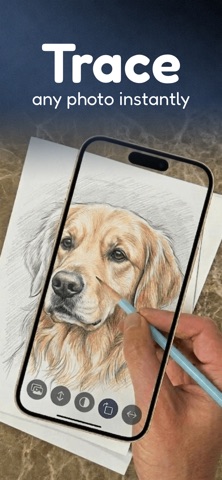


Description by Pull Apps Written by the developer, not by AppBrain. Click to read.
Import any image, adjust its opacity, place your phone over paper, and trace the lines to create your own drawings.
Whether you're a beginner or just want to improve your sketching skills, Tracer makes drawing easier and more fun.
Create Your Own Projects
Import any image from your photo library or capture one with your camera.
Adjust the image opacity and trace it directly on paper to recreate drawings.
Tracer includes built-in project management to organize and manage your work:
• Create and manage multiple drawing projects
• Keep your imported images and sketches organized per project
• Easily switch between ongoing projects without losing progress
Tracer also includes two modes to fit different workflows:
• Classic Mode – a simple and focused tracing experience
• AR Mode – overlay images in real-world space for more accurate tracing
Advanced tools to improve your tracing sessions:
• Zoom to focus on details and extend image reach
• 0.5x zoom for a wider field of view
• Flashlight option for low-light drawing sessions
• Smart alignment for better positioning accuracy
• Grid overlays to help structure and align your drawings
Perfect for tracing:
• Characters
• Illustrations
• Logos
• Tattoos
• Sketches
• Any image you want to learn to draw
Learn With Step-by-Step Guides
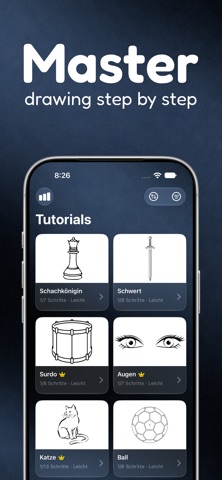
Use the Learn tab to follow ready-made tutorials.
Each guide breaks down drawings into simple steps so you can understand how they are built from basic shapes to finished sketches.
Great for beginners who want to start drawing.
Support: support@pullapps.app
Privacy Policy: https://pullapps.app/privacy-policy-tracer
Terms of Use (EULA): https://www.apple.com/legal/internet-services/itunes/dev/stdeula/