

TripScout: Travel Map Tracker
TripScout: Travel Map Tracker is made and published by Nataliia Litvinova. AppBrain is an independent app data site and isn't affiliated with Nataliia Litvinova. The app name, icon, screenshots and description belong to Nataliia Litvinova and are shown as published on the App Store.
AppBrain's verdict
- Last updated
- October 17, 2026
Rankings
App Store top chartsApp Store Rankings for TripScout: Travel Map Tracker
Competitors
Similar apps and more from Nataliia LitvinovaMore from Nataliia Litvinova


Releases
Updates seen on the App Store- Version
- 1.43
- Launched
- May 2026
No changelog data
User feedback
Ratings and reviews on the App StoreComments on TripScout: Travel Map Tracker for iOS
We don't have enough comments to show example comments. Please check back later.
Technology
Found in the app by AppBrain- Price
- Free
- App size
- 197.6 MB
- Content rating
- Everyone
Technologies used by TripScout: Travel Map Tracker
About the app and developer
About TripScout: Travel Map Tracker
TripScout: Travel Map Tracker is a travel app developed by Nataliia Litvinova.
What is the rating of TripScout: Travel Map Tracker?
TripScout: Travel Map Tracker has no ratings yet.
Is TripScout: Travel Map Tracker free?
TripScout: Travel Map Tracker is free. The app size is 197.63 MB. The latest version available is 1.43. The last update was on October 17, 2026.
What are the requirements for TripScout: Travel Map Tracker?
The app has a content rating of Everyone. The app has been available on the App Store since May 2026.
Developer information for Nataliia Litvinova
Address:
Store listing
By Nataliia Litvinova, from the App Store


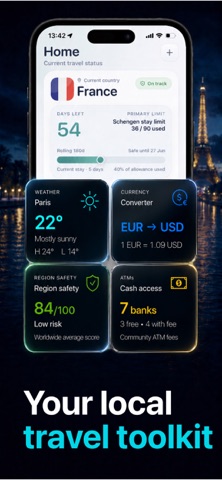
Description by Nataliia Litvinova Written by the developer, not by AppBrain. Click to read.
Automatically see the countries and U.S. states you've visited, how many days you spent in each place, and what to watch before your next trip. Add stays manually, restore recent travel from photos with location data, and keep every journey organized.
Use TripScout to:
• View visited countries and U.S. states on a clean world map
• Track country stays, visa days, and supported stay limits
• Review past and upcoming trips in a calendar and timeline
• Monitor Schengen 90/180 and other supported rolling stay rules
• Restore recent travel history from geotagged photos
• Create route videos from your travel map
• See visa information based on your passport
• Check weather, currency, regional safety, airports, and nearby ATMs
• Use flight tools and country reports for upcoming travel
Whether you travel often, live between countries, or simply want a reliable record of places you've been, TripScout keeps your travel history, map, and important stay-day information together.
Your trips. Your countries. Your days — all in one place.
PRIVACY
Your travel data is personal. TripScout helps you manage your trips clearly while keeping you in control of your information.
SUBSCRIPTION DETAILS
• Subscribe for unlimited access to all features.
• Payment will be charged to your Apple Account at confirmation of purchase.
• Your subscription automatically renews unless auto-renewal is turned off at least 24 hours before the end of the current period.
• Renewal will be charged within 24 hours before the end of the current period.
• You can cancel your subscription at any time through Account Settings.
• You can use your subscription on devices registered with the same Apple ID.
Support
[islapixelstudio@gmail.com](mailto:islapixelstudio@gmail.com)
Privacy Policy
https://islapixelstudio.github.io/tripscout-legal/privacy/
Terms of Use (Apple Standard EULA)
https://www.apple.com/legal/internet-services/itunes/dev/stdeula