Download Android Apps and Games
AppBrain
  • Apps
  • Apps being viewed right now Trending apps today Most popular apps All-time most downloaded apps Top rated apps
  • Intelligence ▾
    Intelligence overview → Track any Android app or your whole market
    Track & analyze
    Keyword Tracker & OptimizerTrack & improve Play rankings App Performance ReportOne-off PDF for any app StatisticsFree Android & Play market stats
    Promote your app
    Featured Apps App Links
  • Intelligence
  • Pricing
  • Dashboard
  • Sign up
  • Log in
Last updated on: 2026-06-15
App Store Apps > Productivity > Video Maker+
Video Maker+ icon

Video Maker+

1.5
Janek Soomets
0.00
0 reviews
Free

Video Maker+ Screenshot 1 of 4
Video Maker+ Screenshot 2 of 4
Video Maker+ Screenshot 3 of 4
Video Maker+ Screenshot 4 of 4
Download from the App Store

About Video Maker+

Video Maker+ is an overall app developed by Janek Soomets.

How many times has Video Maker+ been downloaded?

What is the rating of Video Maker+?

Video Maker+ has no ratings yet.

Is Video Maker+ free?

Video Maker+ is free to download. The APK download size is 534.00 kB. The latest version available is 1.5. The last update was on January 2, 2026.

What are the requirements for Video Maker+?

The app has a content rating of Everyone. The app has been available on Google Play July 2019.

Description
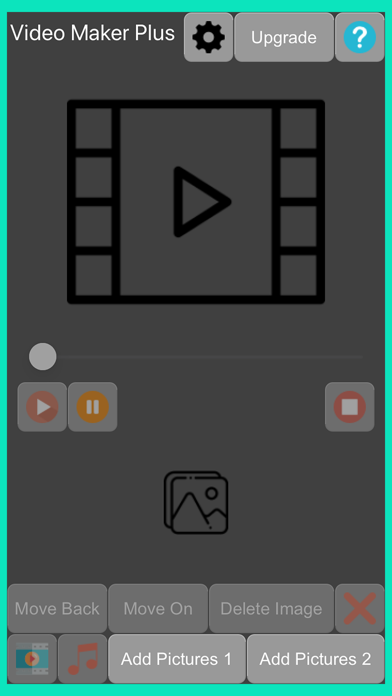
Video Maker Plus is a video-making program. The video is made of images added to the program. Music can also be added to the finished video. You can add up to 40 images to a video without upgrading.


Add pictures
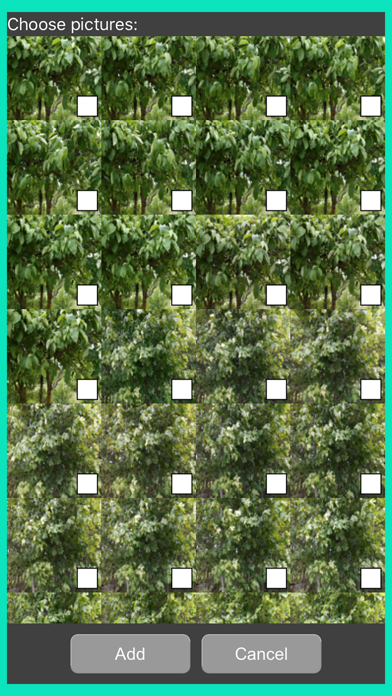
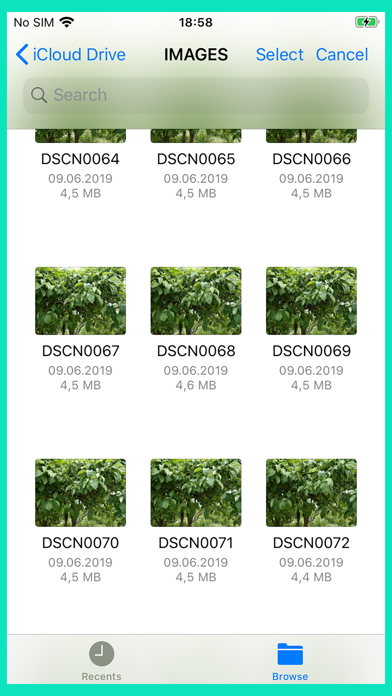
Press the “Add Pictures1” or “Add Pictures 2” button to add pictures. You will then be presented with a file picker. Whether the images are in the cloud or on the phone media, you can add them to the images in the application.
In the “Add Pictures 1” window, you can select all pictures by double-clicking on the window. And by clicking the window three times with your finger, you will delete all the selected images.

Edit Added Pictures
You can delete inserted images one at a time or all at a time. To delete a single image, press the image in the Image bar. When a blue box appears around the image, then the image is selected. To delete, press the “Delete Image” button in the bottom row of buttons. To delete all images, press the 4th button in the bottom row of buttons.
You can move the image left or right in the list. Press the "Move Back" button to move left and press the "Move On" button to move right.
Press the image twice with your finger to move to the beginning of the image list. Pressing the image 3 times in a row moves to the end of the image list.

Make a video
When the bottom strip of images contains images, a video can be made. To make a video, press the first button in the bottom row of buttons.

Edit video size and multiple frames per second
To do this, press the first button in the top row of buttons the “Video Settings” box is displayed. In this box, you can change the width and height of the video. Also, the video setting about several frames per second can be adjusted. In addition, there is a box where you can choose to save the video to the library of images (“Save video to library”) or not.

Add audio to a video
You can add audio to a ready-made video. To do this, press the 2rd button in the bottom row of buttons. Then the music library opens. From there, you can select music for the video.

Edit Video
You can watch the ready-made video from the location you want. To do this, move the video slide to the desired location.
To play the video, press the first button in the average row of buttons. The second button in this row is a pause, putting the video in pause status. And if you no longer want to watch the video, press the third button in the average row of buttons - that's a stop.
The numbers are visible, in the average row of buttons which show the position of playing the video, and the length of the entire video.

Watch a video
You can import video from Apple Finder->Phone->Files Video Maker Plus folder. The phone must be connected to a computer.
Show more Show less

More data about Video Maker+

Price Free to download
Rating No ratings
Ranking Not ranked
Version 1.5
App download size 534.0 KB
Suitable for Everyone

Alternative downloads for the Video Maker+ app

Higher rated
Transcribe Best icon Transcribe Best
JP Software
4.5
$11.99
6 ratings
Juristi Online icon Juristi Online
FONDACIONI SHOQERIA E HAPUR PER SHQIPERINE
0.0
Free
Higher rated
AI Chatbot - InteliChat icon AI Chatbot - InteliChat
Quntm Technology Group LLC
5.0
Free
1 ratings
Car Rental Booking Planner Pro icon Car Rental Booking Planner Pro
FUGA BAR LTD
0.0
Free
Higher rated
AI Chatbot: Paragraph Writer icon AI Chatbot: Paragraph Writer
Devworks Solutions SRL
5.0
Free
2 ratings
Higher rated
Currents - Ownership Companion icon Currents - Ownership Companion
Currents Systems Inc.
5.0
Free
16 ratings
Higher rated
Document Expiration - RemindMe icon Document Expiration - RemindMe
Nelson Cruz
4.3
Free
3 ratings
Digital Samba icon Digital Samba
Digital Samba, SL
0.0
Free

More from Janek Soomets

My Diary Plus icon My Diary Plus
Janek Soomets
1.0
Free
1 ratings
Formula Conversion icon Formula Conversion
Janek Soomets
0.0
Free
Maths Problems icon Maths Problems
Janek Soomets
0.0
Free
Music Maker S icon Music Maker S
Janek Soomets
0.0
Free
Retro Rally: Computer Opponent icon Retro Rally: Computer Opponent
Janek Soomets
0.0
Free
Stone Crusher icon Stone Crusher
Janek Soomets
0.0
Free
Security Camera 1 icon Security Camera 1
Janek Soomets
0.0
Free
Facts From Space icon Facts From Space
Janek Soomets
0.0
Free

Changelog of Video Maker+

No changelog data

Developer information for Janek Soomets

Janek Soomets

Address:

Share Video Maker+

Comments on Video Maker+ for iOS

We don't have enough comments to show example comments. Please check back later.

App Store Rankings for Video Maker+

This app is not ranked

Technologies used by Video Maker+

Transcribe Best icon Transcribe Best
Juristi Online icon Juristi Online
AI Chatbot - InteliChat icon AI Chatbot - InteliChat
Car Rental Booking Planner Pro icon Car Rental Booking Planner Pro
AI Chatbot: Paragraph Writer icon AI Chatbot: Paragraph Writer
Currents - Ownership Companion icon Currents - Ownership Companion
Document Expiration - RemindMe icon Document Expiration - RemindMe
Digital Samba icon Digital Samba

Back to top
AppBrain Intelligence premium content

Subscribe now to get full and unlimited access to AppBrain Intelligence. You'll have access to:

  • App Intelligence dashboard (performance timeline, competitor comparison, country rankings, insight cards)
  • Detailed ranking data per app
  • Full timeline per developer
  • Device market shares data per country
1 Month

$75/mo
(billed every month)

SAVE 0%
Subscribe
3 Months

$65/mo
($195 billed every 3 months)

SAVE 13%
Subscribe
1 Year

$57.50/mo
($690 billed every year)

SAVE 23%
Subscribe
Each subscription will automatically renew 3 days before the expiration date for the same time period. Subscriptions can be cancelled at any time before the renewal.

AppBrain is a directory focused on discovering great apps and games. We give statistics, rankings and search options that Google Play and the App Store don't have. All trademarks are owned by their respective owners. AppBrain doesn't offer APKs or binaries, and always lets users install the official version from Google Play or the App Store.

More apps

  • Top Android apps being viewed
  • iFunny-video memes, meme maker
  • View ImageMeter - photo measure
  • Esso Pay

Android Statistics

  • Android statistics
  • Google Play Developer stats
  • Trending Android Apps
  • Top popular Apps
  • Buy the best Android phone

About AppBrain

  • Contact
  • Privacy
  • Documentation
  • DMCA takedowns
  • Articles
  • Blog
  • Monetization tips: Understanding your eCPM
© 2010-2026 - AppBrain