AppBrain
AppBrain
  • Apps
  • Apps being viewed right now Trending apps today Most popular apps All-time most installed apps Top rated apps iPhone and iPad apps
  • Intelligence ▾
    Intelligence overview → Track any Android app or your whole market
    Track & analyze
    Keyword Tracker & OptimizerTrack & improve Play rankings App Performance ReportOne-off PDF for any app StatisticsFree Android & Play market stats
    Promote your app
    Featured Apps App Links
  • Intelligence
  • Pricing
  • Dashboard
  • Sign up
  • Log in
App Store Apps > Photo & Video > Video Sound Remover Pro
Video Sound Remover Pro icon

Video Sound Remover Pro

1.0
Sreenu Kistapuneni
0.00
0 reviews
Free

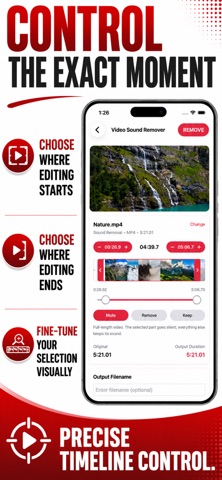
Video Sound Remover Pro Screenshot 1 of 10
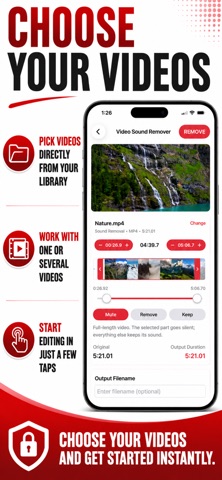
Video Sound Remover Pro Screenshot 2 of 10
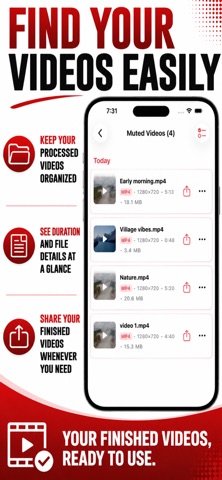
Video Sound Remover Pro Screenshot 3 of 10
Video Sound Remover Pro Screenshot 4 of 10
Video Sound Remover Pro Screenshot 5 of 10
Video Sound Remover Pro Screenshot 6 of 10
Video Sound Remover Pro Screenshot 7 of 10
Video Sound Remover Pro Screenshot 8 of 10
Video Sound Remover Pro Screenshot 9 of 10
Video Sound Remover Pro Screenshot 10 of 10
Screenshots by Sreenu Kistapuneni, from the the App Store listing
View on the App Store

About Video Sound Remover Pro

Video Sound Remover Pro is a photo & video app developed by Sreenu Kistapuneni.

User Ratings

The app has no ratings yet.

App Information

Video Sound Remover Pro is freely available from the App Store. The app size is 38.96 MB. The latest version available is 1.0. The last update was on September 1, 2026.

Technical Requirements

The app has a content rating of Everyone. The app has been available on the App Store since September 2026.

Video Sound Remover Pro is made and published by Sreenu Kistapuneni. AppBrain is an independent app data site and isn't affiliated with Sreenu Kistapuneni. The app name, icon, screenshots and description belong to Sreenu Kistapuneni and are shown as published on the App Store.

Description by Sreenu Kistapuneni (from the App Store)
Remove or mute audio from any video directly on your iPhone or iPad with fast, on-device processing. Video Sound Remover makes it easy to strip the sound track from a video, silence just one part of it, cut a noisy section out entirely, or keep only a single clip — all without uploading anything to a server.

Whether you need to remove background noise, mute a video before adding your own voiceover or music, silence a copyrighted soundtrack, or create a silent video for a slideshow or presentation, this video sound remover gives you four ways to work — one file, or a whole batch.

Mute All
Strip the audio from the entire video in one tap. The video stream is copied without re-encoding, so processing is fast and quality stays untouched.

Mute Part
Keep the whole video, but silence only a selected time range — the rest of the audio plays normally. Perfect for cutting out one loud or unwanted moment without losing the rest of the soundtrack.

Remove Part
Cut a selected time range out of the video entirely. The video is trimmed around that section and the result has no audio at all — useful for removing a section with bad audio along with its video.

Keep Part
Keep only a selected time range from the video, muted, discarding everything else. A quick way to pull a single silent clip out of a longer recording.

Features
• Four sound-removal modes: Mute All, Mute Part, Remove Part, Keep Part
• Batch processing — import several videos and pick a mode for each, one workflow
• Frame-thumbnail timeline with drag handles for precise segment selection
• Manual time entry for exact start and end points
• Live video preview of your selection before processing
• Video stream copied without re-encoding — fast, no quality loss
• Built-in output list for quick access, share after export
• Offline processing — files never leave your device
• Premium upgrade removes ads

Supported formats
Import MP4, MOV, MKV, and other common video formats from the Files app. Output keeps the original container format with the audio track removed or silenced.

Use Video Sound Remover to:
• Mute a video before adding your own voiceover, music, or dub
• Remove background noise, wind, or unwanted talking from a clip
• Silence a copyrighted soundtrack before sharing a video on TikTok or Instagram
• Cut out a section with bad audio, along with its video
• Create a silent video for a slideshow, presentation, or GIF-style clip
• Pull a single silent segment out of a longer recording
• Batch-mute a folder of meeting or lecture recordings

Not included: audio format conversion, merging videos together, and multitrack music production or DAW-style recording. Use a dedicated app for those.

Why choose Video Sound Remover
Built around privacy-conscious, offline processing — your files never leave your device, useful for personal recordings, screen recordings, downloaded clips, and footage you already own. The four modes let you strip audio from a whole file in one tap, or take precise, segment-level control.

The frame-thumbnail timeline shows exactly what's selected as you drag, with a live preview before committing. Because the video stream is copied rather than re-encoded, most videos process in seconds with no loss of picture quality.

How to use
Open Video Sound Remover, select a video, choose Mute All, Mute Part, Remove Part, or Keep Part, adjust the segment range if needed, then tap Remove. Your finished video is saved to the Output Files list, ready to review and share.

Perfect for content creators muting clips before adding narration, students and professionals removing noisy audio from recordings, and anyone who needs a quick, reliable way to remove or mute sound from a video — all processed privately, offline, on your iPhone or iPad.

Terms of Use: https://www.apple.com/legal/internet-services/itunes/dev/stdeula/
Privacy Policy: https://modern-tools-privacy.netlify.app/?id=f7c4a9e2
Show more Show less

More data about Video Sound Remover Pro

Price Free
Rating No ratings
Ranking Not ranked
Version 1.0
App size 39.0 MB
Suitable for Everyone

Alternatives to Video Sound Remover Pro

Mute Video Before Share icon Mute Video Before Share
ZEC Inc.
0.0
Free
Audio Cleaner AI: Denoise icon Audio Cleaner AI: Denoise
Evgenii Lugovoi
4.2
Free
10 ratings
JoinCut - Video Merge & Trim icon JoinCut - Video Merge & Trim
mongdaewon
4.8
Free
4 ratings
BIG SHOW icon BIG SHOW
bbcddc
2.2
Free
5 ratings
QuickVideo - Cam & Edit icon QuickVideo - Cam & Edit
KAZUHIRO KAKIMOTO
3.0
Free
2 ratings
Glitch FX: Glitch Video Editor icon Glitch FX: Glitch Video Editor
宇 叶
4.4
Free
212 ratings
Simple Photo Folder icon Simple Photo Folder
Ken Mayumi
4.7
Free
56 ratings
ArtsBreak: Photo effect editor icon ArtsBreak: Photo effect editor
LYSS Consulting AB
4.7
Free
94 ratings

More from Sreenu Kistapuneni

YT Thumbnail Downloader icon YT Thumbnail Downloader
Sreenu Kistapuneni
1.0
Free
1 ratings
Video to Text Converter AI icon Video to Text Converter AI
Sreenu Kistapuneni
1.0
Free
1 ratings
Audio to Video Converter Easy icon Audio to Video Converter Easy
Sreenu Kistapuneni
5.0
Free
1 ratings
Video to Audio Converter Total icon Video to Audio Converter Total
Sreenu Kistapuneni
5.0
Free
1 ratings
Mp3 to Video Converter icon Mp3 to Video Converter
Sreenu Kistapuneni
5.0
Free
1 ratings
Video to PDF Converter Pro icon Video to PDF Converter Pro
Sreenu Kistapuneni
0.0
Free
Video Cutter and Merger Pro icon Video Cutter and Merger Pro
Sreenu Kistapuneni
0.0
Free
Image to PDF Converter - Pro icon Image to PDF Converter - Pro
Sreenu Kistapuneni
0.0
Free

Changelog of Video Sound Remover Pro

No changelog data

Developer information for Sreenu Kistapuneni

Sreenu Kistapuneni

Address:

Share Video Sound Remover Pro

Comments on Video Sound Remover Pro for iOS

We don't have enough comments to show example comments. Please check back later.

App Store Rankings for Video Sound Remover Pro

This app is not ranked

Technologies used by Video Sound Remover Pro

Apps other people are watching Popular Photo & Video Apps Top new apps Today's trending apps Price drops on Google Play
Mute Video Before Share icon Mute Video Before Share
Audio Cleaner AI: Denoise icon Audio Cleaner AI: Denoise
JoinCut - Video Merge & Trim icon JoinCut - Video Merge & Trim
BIG SHOW icon BIG SHOW
QuickVideo - Cam & Edit icon QuickVideo - Cam & Edit
Glitch FX: Glitch Video Editor icon Glitch FX: Glitch Video Editor
Simple Photo Folder icon Simple Photo Folder
ArtsBreak: Photo effect editor icon ArtsBreak: Photo effect editor
AppBrain Intelligence premium content

Subscribe now to get full and unlimited access to AppBrain Intelligence. You'll have access to:

  • App Intelligence dashboard (performance timeline, competitor comparison, country rankings, insight cards)
  • Detailed ranking data per app
  • Full timeline per developer
  • Device market shares data per country
  • Unlimited keyword tracking
1 Month

$75/mo
(billed every month)

SAVE 0%
Subscribe
3 Months

$65/mo
($195 billed every 3 months)

SAVE 13%
Subscribe
1 Year

$57.50/mo
($690 billed every year)

SAVE 23%
Subscribe
Each subscription will automatically renew 3 days before the expiration date for the same time period. Subscriptions can be cancelled at any time before the renewal.

AppBrain is an app data site, we track rankings, ratings, installs for all apps and games on Google Play and the App Store. AppBrain doesn't host app files or APKs, all install links go directly to the official store. All trademarks are owned by their respective owners.

More apps

  • Top Android apps being viewed
  • View Desire Girls: Mahjong Match
  • RISK: Global Domination
  • Nova Launcher Lifetime Prime

App statistics

  • Android statistics
  • Google Play Developer stats
  • Trending Android Apps
  • Trending iOS apps
  • Top popular Apps
  • Buy the best Android phone
  • Buy & sell app businesses

About AppBrain

  • Contact
  • Privacy
  • Documentation
  • DMCA takedowns
  • Blog
  • Monetization tips: Understanding your eCPM
© 2010-2026 - AppBrain