

Image to PDF Converter - Pro
Image to PDF Converter - Pro is made and published by Sreenu Kistapuneni. AppBrain is an independent app data site and isn't affiliated with Sreenu Kistapuneni. The app name, icon, screenshots and description belong to Sreenu Kistapuneni and are shown as published on the App Store.
AppBrain's verdict
- Last updated
- April 16, 2026
- Size
- 15.1 MB
User feedback
Ratings and reviews on the App StoreComments on Image to PDF Converter - Pro for iOS
We don't have enough comments to show example comments. Please check back later.
Store listing
By Sreenu Kistapuneni, from the App Store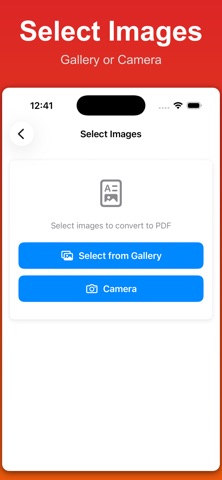




Description by Sreenu Kistapuneni Written by the developer, not by AppBrain. Click to read.
Convert image to PDF from gallery, camera, or files. Use it as a gallery to PDF or camera to PDF tool to convert photos to PDF, convert pictures to PDF, or convert screenshots to PDF. This PDF converter supports batch convert features, allowing you to convert multiple images to PDF in one go.
Supports all major formats including JPG to PDF, JPEG photos, PNG to PDF, HEIC to PDF, WebP to PDF, and BMP to PDF. Convert image to PDF while preserving high quality and original resolution for professional results.
Merge multiple images into a single PDF document. Combine photos, merge images, and arrange pictures in your preferred order. The multiple images to PDF feature makes it easy to create one document from many files.
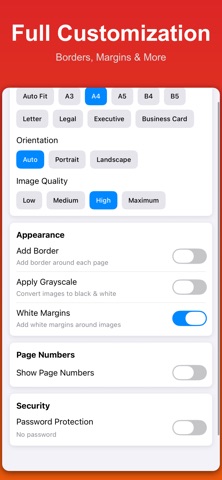
Create PDF from images with full control. Create PDF files from pictures, create PDF from photographs, and customize layouts with page sizes like A4, Letter, and Legal. Adjust margins, choose orientation, and design your PDF exactly the way you need.
Use the built-in document scanner to scan to PDF instantly. Scan documents, scan receipts, ID cards, lecture notes, and important papers. The document scanner detects edges and enhances clarity for clean PDF output.
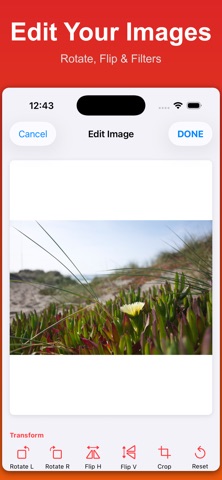
Edit images before converting. Crop image, rotate photos, flip images, and use photo editing tools. Crop image to PDF with precision and ensure every page looks perfect.
Compress images to PDF with flexible settings. Use PDF compression to reduce file size while maintaining quality. Create small file size PDFs in KB or MB for easy sharing.
This image to PDF converter works offline. No internet required. It is a fully offline PDF converter where your files never leave your device. With privacy first design, your images are never uploaded and always processed locally.
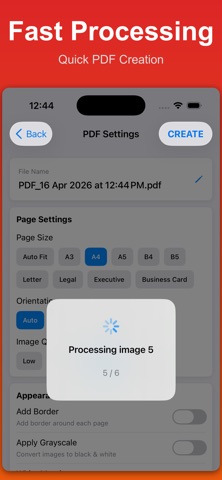
Select images, arrange photos, and share or save your PDF instantly. The workflow lets you convert image to PDF, merge photos, and create PDF files in seconds.
Perfect for students, professionals, business owners, travelers, and photographers. Convert lecture notes, PDF reports, receipts, tickets, ID cards, and documents into PDF files.
Includes a built-in PDF viewer and PDF reader. Use night mode for reading and thumbnail navigation for quick access.
This app is also optimized for searches like image to pdf converter, image to pdf converter free, image to pdf maker, image to pdf free, and image to pdf converter & merge. It works as a complete image to pdf scanner and image to pdf pdf maker. If you are searching for image to pdf convertor or a reliable image to pdf tool, this app delivers fast results.
It also covers photo to pdf converter, photo to pdf converter free, photo to pdf maker, and photo to pdf free. Use it as a photo to pdf converter scanner, photo to pdf file converter, or a complete photo to pdf maker & converter. Whether you need a simple photo to pdf scanner or a powerful photo to pdf maker, everything is designed for speed.
You can also create pdf from photo and generate pdf from image files instantly. Convert photos into documents, combine pictures, and create clean PDFs for sharing or storage.
Convert image to PDF converter free with fast performance. Use this image to PDF maker to scan to PDF, merge photos, and create PDF files from pictures instantly with a reliable PDF converter and PDF creator.
Convert image to PDF, photo to PDF, pics to PDF, and scan to PDF with one powerful app. Create PDF from images, combine multiple photos, and use it as a fast PDF creator.
Terms of Use: https://www.apple.com/legal/internet-services/itunes/dev/stdeula/
Privacy Policy: https://modern-tools-privacy.netlify.app/?id=c9f4a3e8
Safety and technology
Found in the app by AppBrain- Price
- Free
- App size
- 15.1 MB
- Content rating
- Everyone
Technologies used by Image to PDF Converter - Pro
Releases
Updates seen on the App Store- Version
- 1.0.1
- Launched
- April 2026
No changelog data
Alternatives
Similar apps and more from Sreenu KistapuneniAlternatives to Image to PDF Converter - Pro


More from Sreenu Kistapuneni





Also available on Google Play

Rankings
App Store top chartsApp Store Rankings for Image to PDF Converter - Pro
About the app and developer
About Image to PDF Converter - Pro
Image to PDF Converter - Pro is a productivity app developed by Sreenu Kistapuneni.
What is the rating of Image to PDF Converter - Pro?
Image to PDF Converter - Pro has no ratings yet.
Is Image to PDF Converter - Pro free?
Image to PDF Converter - Pro is free. The app size is 15.11 MB. The latest version available is 1.0.1. The last update was on April 16, 2026.
What are the requirements for Image to PDF Converter - Pro?
The app has a content rating of Everyone. The app has been available on the App Store since April 2026.
Developer information for Sreenu Kistapuneni
Address: