AppBrain
AppBrain
  • Apps
  • Apps being viewed right now Trending apps today Most popular apps All-time most installed apps Top rated apps iPhone and iPad apps
  • Intelligence ▾
    Intelligence overview → Track any Android app or your whole market
    Track & analyze
    Keyword Tracker & OptimizerTrack & improve Play rankings App Performance ReportOne-off PDF for any app StatisticsFree Android & Play market stats
    Promote your app
    Featured Apps App Links
  • Intelligence
  • Pricing
  • Dashboard
  • Sign up
  • Log in
App Store Apps > Photo & Video > Videogram: Edit & Export
Videogram: Edit & Export icon

Videogram: Edit & Export

1.2
Francesco Bertocci
0.00
0 reviews
Free

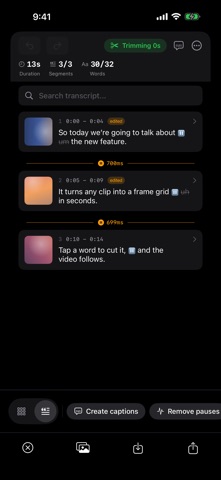
Videogram: Edit & Export Screenshot 1 of 5
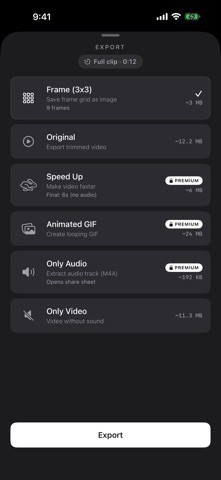
Videogram: Edit & Export Screenshot 2 of 5
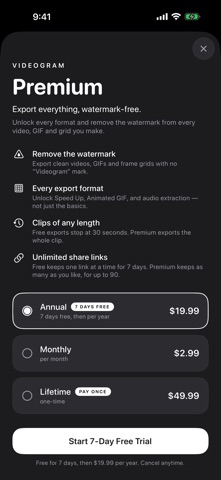
Videogram: Edit & Export Screenshot 3 of 5
Videogram: Edit & Export Screenshot 4 of 5
Videogram: Edit & Export Screenshot 5 of 5
Screenshots by Francesco Bertocci, from the the App Store listing
View on the App Store

About Videogram: Edit & Export

Videogram: Edit & Export is a photo & video app developed by Francesco Bertocci.

User Ratings

The app has no ratings yet.

App Information

Videogram: Edit & Export is freely available from the App Store. The app size is 13.73 MB. The latest version available is 1.2. The last update was on October 15, 2026.

Technical Requirements

The app has a content rating of Everyone. The app has been available on the App Store since September 2026.

Description by Francesco Bertocci (from the App Store)
Film with both cameras at once, or talk over any video — then decide where your face goes, afterwards.

Videogram records you and the scene as separate layers, so nothing has to be decided while you shoot. Pick a layout later, edit the video by tapping words in its transcript, drop the pauses, and export or share the exact cut you want. It all happens on your iPhone.

FILM WITH YOU IN IT
• Record the front and back cameras at the same time — you and what you're showing
• Nothing to set up while shooting: just record, pause and stop
• Pause as often as you like; each take can be trimmed, sped up or removed later
• Use the 0.5× ultra-wide where your iPhone has one

TALK OVER ANY VIDEO
• Pick a video — a screen recording, a clip from your trip — and record your face and voice while it plays
• Turn the video's own sound off while you talk, or keep it dipped under your voice
• Pause and pick up again; your voice and the video stay in step

PICK THE LAYOUT AFTERWARDS
• Face bubble, split (either way round), picture-in-picture, face only, scene only, audio only
• Switch layouts at any moment with a quick cut or a smooth glide
• Let the layout follow your speech: face forward while you talk, the scene in the quiet parts
• Reframe each camera and blur the background behind you
• Works for 9:16, square and 16:9

EDIT BY TRANSCRIPT
• Your whole clip becomes text. Tap a word to remove it and the video cuts to match
• Remove pauses in one tap — or speed them up, so hands-busy footage still reads
• Fix a misheard word by retyping it — captions and exports follow
• Transcribes English, Italian, Spanish and French, entirely on your device

CAPTIONS
• Auto-generated captions that highlight one word at a time, in sync with your voice
• Choose words per caption, style, color, size and position — and restyle at any time

FRAME GRIDS AND EXPORTS
• Turn a video, Live Photos or a set of images into a frame grid, with face-aware cropping
• Stitch several videos and photos together
• Export the original or trimmed video, Speed Up (2× to 8×), Animated GIF, video without sound, audio only (M4A), the text transcript or the grid image

SHARE BY LINK
• Turn an export into a web link anyone can open — no app or account needed
• Links expire on their own (7 days free; 7, 30 or 90 days with Premium), and you can end one early

PRIVATE BY DESIGN
• Recording, editing, transcription and background blur all run on your device — no accounts, no tracking
• A video leaves your device only when you create a share link, and it's deleted when the link expires
• Camera and microphone are used only while you record; photo access only for the items you pick

FREE AND PREMIUM
Videogram is free to download and every tool is included. Free exports carry a small Videogram watermark, video, GIF and audio exports are limited to 30 seconds, and you can keep one live share link at a time; frame grids and transcripts have no limit. Videogram Premium removes the watermark, exports clips of any length, unlocks Speed Up, Animated GIF and audio extraction, and lets you keep unlimited share links for up to 90 days. Premium is available as a monthly or annual subscription, or as a one-time lifetime purchase. The annual plan includes a 7-day free trial for new subscribers. Subscriptions renew automatically unless cancelled at least 24 hours before the end of the period and can be managed in your App Store account settings.

Terms of Use: https://videogramapp.com/terms.html
Privacy Policy: https://videogramapp.com/privacy.html
Show more Show less

More data about Videogram: Edit & Export

Price Free
Rating No ratings
Ranking Not ranked
Version 1.2
App size 13.7 MB
Suitable for Everyone

Alternatives to Videogram: Edit & Export

AI Upscale & Enhance - Sharpix icon AI Upscale & Enhance - Sharpix
Huseyin Asan
3.0
Free
2 ratings
Neopix: AI Video Upscaler icon Neopix: AI Video Upscaler
Starii Tech Pty Ltd
5.0
Free
15 ratings
Photo Booth & Collage: PixUp icon Photo Booth & Collage: PixUp
Romain Sion
3.7
Free
11 ratings
Video Slow Fast Speed Editor icon Video Slow Fast Speed Editor
Appwallet Technologies Private Limited
4.6
Free
8 ratings
StickerShow - Sticker Maker icon StickerShow - Sticker Maker
Dehui Chengzhen
5.0
Free
4 ratings
RECO - 4K VIDEO & FILM FILTER icon RECO - 4K VIDEO & FILM FILTER
Cheol Kim
1.6
$3.99
7 ratings
Photo Vault & Locker: iLockBox icon Photo Vault & Locker: iLockBox
Nitin Gohel
4.8
Free
20 ratings
Grab HD Video Frames - VidGrab icon Grab HD Video Frames - VidGrab
Jordan Zeleny
4.3
Free
100 ratings

Changelog of Videogram: Edit & Export

No changelog data

Developer information for Francesco Bertocci

Francesco Bertocci

Address:

Share Videogram: Edit & Export

Comments on Videogram: Edit & Export for iOS

We don't have enough comments to show example comments. Please check back later.

App Store Rankings for Videogram: Edit & Export

This app is not ranked

Technologies used by Videogram: Edit & Export

Frequently asked questions about Videogram: Edit & Export

Is Videogram: Edit & Export free?

Yes. Videogram: Edit & Export is free on the App Store.

Is Videogram: Edit & Export still available?

Yes. Videogram: Edit & Export is on the App Store, and the last update we saw was on October 15, 2026.

How large is Videogram: Edit & Export?

Videogram: Edit & Export is 13.73 MB.

Is Videogram: Edit & Export suitable for children?

App Store rates the content of Videogram: Edit & Export as suitable for everyone.

Who made Videogram: Edit & Export?

Videogram: Edit & Export was developed by Francesco Bertocci. It is listed in the photo & video category on the App Store.

What are the best alternatives to Videogram: Edit & Export?

People looking at Videogram: Edit & Export also look at these photo & video apps: AI Upscale & Enhance - Sharpix, Neopix: AI Video Upscaler, Photo Booth & Collage: PixUp, Video Slow Fast Speed Editor, StickerShow - Sticker Maker.

Price drops on Google Play Popular Photo & Video Apps Apps other people are watching Top new apps Today's trending apps
AI Upscale & Enhance - Sharpix icon AI Upscale & Enhance - Sharpix
Neopix: AI Video Upscaler icon Neopix: AI Video Upscaler
Photo Booth & Collage: PixUp icon Photo Booth & Collage: PixUp
Video Slow Fast Speed Editor icon Video Slow Fast Speed Editor
StickerShow - Sticker Maker icon StickerShow - Sticker Maker
RECO - 4K VIDEO & FILM FILTER icon RECO - 4K VIDEO & FILM FILTER
Photo Vault & Locker: iLockBox icon Photo Vault & Locker: iLockBox
Grab HD Video Frames - VidGrab icon Grab HD Video Frames - VidGrab
AppBrain Intelligence premium content

Subscribe now to get full and unlimited access to AppBrain Intelligence. You'll have access to:

  • App Intelligence dashboard (performance timeline, competitor comparison, country rankings, insight cards)
  • Detailed ranking data per app
  • Full timeline per developer
  • Device market shares data per country
  • Unlimited keyword tracking
1 Month

$75/mo
(billed every month)

SAVE 0%
Subscribe
3 Months

$65/mo
($195 billed every 3 months)

SAVE 13%
Subscribe
1 Year

$57.50/mo
($690 billed every year)

SAVE 23%
Subscribe
Each subscription will automatically renew 3 days before the expiration date for the same time period. Subscriptions can be cancelled at any time before the renewal.

AppBrain is an app data site, we track rankings, ratings, installs for all apps and games on Google Play and the App Store. AppBrain doesn't host app files or APKs, all install links go directly to the official store. All trademarks are owned by their respective owners.

More apps

  • Top Android apps being viewed
  • View Live Hub - Live Video Chat
  • SoundboardGuys: Meme Sounds for Android
  • MeshChat

App statistics

  • Android statistics
  • Google Play Developer stats
  • Trending Android Apps
  • Trending iOS apps
  • Top popular Apps
  • Buy the best Android phone
  • Buy & sell app businesses

About AppBrain

  • Contact
  • Privacy
  • Documentation
  • DMCA takedowns
  • Blog
  • Android App Marketing: Learn how to better market your Android app
© 2010-2026 - AppBrain