

ViewChanger – PC Sites Mobile
ViewChanger – PC Sites Mobile is made and published by Seiya.k. AppBrain is an independent app data site and isn't affiliated with Seiya.k. The app name, icon, screenshots and description belong to Seiya.k and are shown as published on the App Store.
AppBrain's verdict
- Last updated
- October 25, 2026
- Size
- 32.8 MB
User feedback
Ratings and reviews on the App StoreComments on ViewChanger – PC Sites Mobile for iOS
We don't have enough comments to show example comments. Please check back later.
Store listing
By Seiya.k, from the App Store

Description by Seiya.k Written by the developer, not by AppBrain. Click to read.
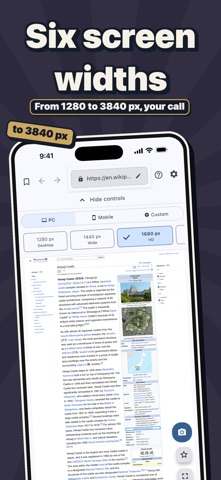
ViewChanger is a browser app that lets you view any website in full PC layout from your phone. Fields and columns that mobile view hides in admin panels and business systems stay visible once you switch to PC layout — and the change happens instantly, with no page reload.
■ When This Helps
• Checking or operating an admin panel while you're out
• Mobile view hides key fields, making work difficult
• Safari's "Request Desktop Website" isn't enough
• No PC on hand, but you need to handle something right now
• Checking a business site or internal company tool from your phone
■ Great For Checking
• CMS and WordPress admin panels
• E-commerce admin panels
• Ad manager dashboards, booking and sales dashboards
• Internal business systems and dashboards
■ Key Features
• Change viewport width instantly with no page reload (390px–3840px)
• Check how sites respond to 74 different User-Agent strings
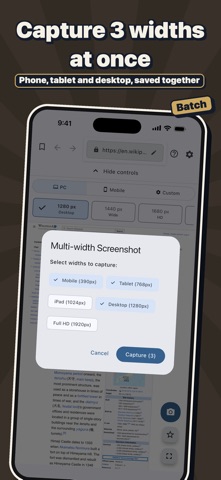
• Switch between iPhone, iPad, and desktop resolutions with one tap
• Save up to 10 custom presets for settings you use often
• Share results instantly with the built-in screenshot feature
• Bookmark favorite sites for one-tap access
■ Also Great For Web Creators
ViewChanger also helps web designers who spend too much time on responsive design checks, frontend engineers who want to streamline cross-browser checks, and QA engineers who need to verify layouts across multiple devices.
■ How To Use
1. Enter a URL to load the site
2. Choose PC, Mobile, or Custom mode
3. Adjust the viewport width with the slider
4. Change the User-Agent if needed
■ Privacy & Security
Your browsing data and personal information are never sent externally. All settings are stored locally on your device only.
The browser that's most useful the moment you don't have a PC.
Safety and technology
Found in the app by AppBrain- Price
- $1.99
- App size
- 32.8 MB
- Content rating
- High
Technologies used by ViewChanger – PC Sites Mobile
Releases
Updates seen on the App Store- Version
- 1.2.10
- Launched
- July 2025
No changelog data
Alternatives
Similar apps and more from Seiya.kAlternatives to ViewChanger – PC Sites Mobile





More from Seiya.k


Rankings
App Store top chartsApp Store Rankings for ViewChanger – PC Sites Mobile
About the app and developer
About ViewChanger – PC Sites Mobile
ViewChanger – PC Sites Mobile is an overall app developed by Seiya.k.
User Ratings
The app has no ratings yet.
App Information
ViewChanger – PC Sites Mobile costs $1.99. The app size is 32.83 MB. The latest version available is 1.2.10. The last update was on October 25, 2026.
Technical Requirements
The app has a content rating of High Maturity. The app has been available on the App Store since July 2025.
Developer information for Seiya.k
Address: