

Voice Remote for Samsung TV
Voice Remote for Samsung TV is made and published by QUAN MAI THE. AppBrain is an independent app data site and isn't affiliated with QUAN MAI THE. The app name, icon, screenshots and description belong to QUAN MAI THE and are shown as published on the App Store.
AppBrain's verdict
- Last updated
- October 13, 2026
Rankings
App Store top chartsApp Store Rankings for Voice Remote for Samsung TV
Competitors
Similar apps and more from QUAN MAI THE


Releases
Updates seen on the App Store- Version
- 2.9.3
- Launched
- September 2026
No changelog data
User feedback
Ratings and reviews on the App StoreComments on Voice Remote for Samsung TV for iOS
We don't have enough comments to show example comments. Please check back later.
Technology
Found in the app by AppBrain- Price
- Free
- App size
- 92.0 MB
- Content rating
- Everyone
Technologies used by Voice Remote for Samsung TV
About the app and developer
About Voice Remote for Samsung TV
Voice Remote for Samsung TV is an utilities app developed by QUAN MAI THE.
What is the rating of Voice Remote for Samsung TV?
Voice Remote for Samsung TV has no ratings yet.
Is Voice Remote for Samsung TV free?
Voice Remote for Samsung TV is free. The app size is 92.04 MB. The latest version available is 2.9.3. The last update was on October 13, 2026.
What are the requirements for Voice Remote for Samsung TV?
The app has a content rating of Everyone. The app has been available on the App Store since September 2026.
Developer information for QUAN MAI THE
Address:
Store listing
By QUAN MAI THE, from the App Store


Description by QUAN MAI THE Written by the developer, not by AppBrain. Click to read.
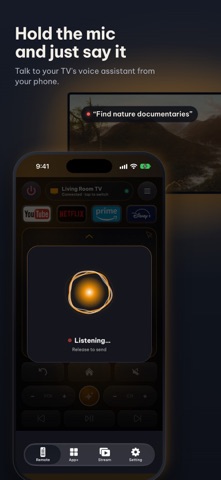
The all-in-one AI voice remote for your Smart TV. Talk to your TV, tap the buttons you already know, or use your phone as a mouse — whichever is fastest.
- AI Voice Control — speak to your TV's built-in voice assistant from your phone instead of digging through menus.
- Fly Mouse & keyboard — point, click and type with your phone instead of pecking out letters one by one.
- Cast photos, videos and music from your phone straight to the big screen.
- One-tap streaming — Netflix, Prime Video, YouTube, Disney+ and more.
- Themes — a modern look, or a classic skin that matches your physical remote.
Getting started takes seconds: put your phone and your TV on the same Wi-Fi network (5 GHz recommended). No infrared required, and your TV reconnects automatically every time you open the app.
No new batteries, and no more hunting for the remote down the back of the sofa.
Download it now!
It gives you everything your physical remote does, plus the smart features it never had.
Buttons:
- Turn ON and OFF the TV
- All classic and modern remote buttons
- Numbers keyboard buttons(Enter a channel number for jumping right to it)
- Colors buttons (red, yellow, green, blue)
- Change channels (next and previous )
- Increase or decrease the volume
- Mute the sound (silent mode)
- Change TV source (HDMI, PC, AV...)
- Access the 4 favorite buttons - Up / Down / Left / Right Navigation + center button “OK”
- Play / pause / Reverse / Fast Forward.
- Launch your favorite streaming apps with one tap
Features list:
- No infrared equipment required, just Wi-Fi connection.
- Every time you open the app, your TV will be auto-connected for quick and easy access.
- Talk to your TV's built-in voice assistant using your phone's microphone.
- Realistic and user-friendly app design with huge of themes including modern & classic same as your physical remote.
- Vibration when pressing.
- Input text on TV using your phone.
- Use your phone as Fly Mouse.
For people who want easy & fast access to control their TV right from their mobile device! Give it a try!
Compatibility:
Works with Samsung Smart TVs from 2016 and newer. Your phone and TV must be on the same Wi-Fi network, and you approve the connection on the TV the first time you pair.
Disclaimer:
This is an independent app. It is not affiliated with, endorsed by, or sponsored by Samsung Electronics. Samsung is a trademark of its owner and is used here only to describe compatibility.
Sate offers an optional auto-renewing Premium subscription. Payment is charged to your Apple Account at confirmation of purchase. It renews automatically unless cancelled at least 24 hours before the end of the current period. Manage or cancel it in your Apple Account settings.
Terms of Use (EULA): https://www.apple.com/legal/internet-services/itunes/dev/stdeula/
Privacy Policy: https://sites.google.com/view/samsung-remote-tv-privacy