Wall Stud Detector Finder is an overall app developed by Marouane Baid.
Download Statistics
User Ratings
Wall Stud Detector Finder is rated 3.00 out of 5 stars. The rating is based on 2 ratings.
App Information
Wall Stud Detector Finder is FREE to download. The APK download size is 41.78 MB. The latest version available is 2.0.0. The last update was on April 6, 2026.
Technical Requirements
The app has a content rating of Everyone. The app has been available on Google Play February 2026.
Description
Are you planning to hang a new flat-screen TV, mount heavy shelving, or take on a major home improvement project? The first and most crucial step for any DIY endeavor is finding a secure anchor point. That is exactly where our reliable wall stud detector comes in. Turn your smartphone into the ultimate studfinder tool, designed to help you locate structural supports behind your drywall with absolute precision. Whether you are looking for a wood stud finder or a dependable stud finder wall detector, our app is packed with user-friendly features focused entirely on saving you time, eliminating guesswork, and making your home projects much safer.
Finding the perfect spot to drill shouldn't involve knocking on the wall and just hoping for the best. With our advanced stud finder wall wood detector capabilities, you can approach any mounting task with confidence. We built this wall stud detector entirely around practical user benefits, ensuring you have exactly what you need to get the job done right.
Find Studs with Complete Confidence
Live scanner: Move your phone along the wall and instantly see a visual "Target Proximity" gauge (0–100%). This lets you tell exactly when you are hovering right over a stud or a screw.
Peak reading: Never miss the strongest anchoring spot. The app clearly displays both your current reading and the highest recorded reading side-by-side.
Calibrate: Use our one-tap calibration so the scanner instantly adapts to the room you are in, giving you much more accurate results for your specific environment.
Record and Organize Your Measurements
When using a standard studfinder, it is incredibly easy to forget where the hidden supports actually are. Our app solves this completely:
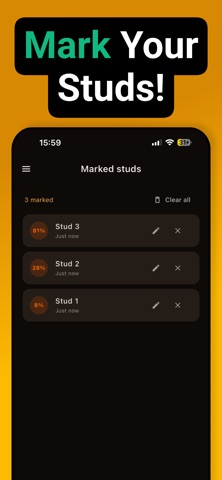
Mark stud: Tap to save a stud when the proximity gauge is high. It is instantly added to your personalized list along with its signal strength.
Marked studs list: View all the structural supports you’ve marked in one highly convenient place.
Rename studs: Stay organized by giving each marked stud a custom name (e.g., “Left of window”, “Stud 1”). You can edit these names anytime your plans change.
Clear list: Remove all marked studs with a single tap when you are done or starting a completely new wall.
Designed for Maximum Ease of Use
Home repairs often happen in less-than-ideal conditions, which is why we made this stud finder wall detector incredibly accessible:
Flashlight: Turn the phone’s torch on directly from the scanner screen so you can clearly see the wall in low-light situations.
Vibration alerts: Feel a light buzz when you are getting close (around 50% proximity) and a much stronger vibration when you are right on a stud (90%+).
Optional sound: Turn on audio alerts when you are near a stud, allowing you to focus your eyes on the wall instead of constantly watching your screen.
Total Control and Expert Guidance
Every home is built differently, so your studfinder tool must be highly adaptable:
Sensitivity control: Adjust how sensitive the scanner is to perfectly account for different wall thicknesses or varying signal strengths.
How to use: Access a short, simple guide anytime. Just slide the phone slowly, and watch the scanner light up when it detects hardware.
Spacing guide: Learn standard construction spacing (like 16" and 24"). View a simple diagram, follow step-by-step instructions, and get pro tips (like how to measure center-to-center or find the first stud from a corner).
A Seamless, Comfortable App Experience
Unified Menu: Find one convenient place to quickly open your Scanner, Marked studs, Spacing guide, Settings, How to use, and About sections.
Dark theme: Enjoy a sleek dark background with vibrant orange highlights. The gauge is easy to read, and the app is highly comfortable to use in dark rooms.
- Terms of use EULA: https://sites.google.com/view/xmleula/home - Privacy Policy: https://sites.google.com/view/odtconverterreader/home
Each subscription will automatically renew 3 days before the expiration date for
the same time period. Subscriptions can be cancelled at any time before the renewal.