



AppBrain's verdict
- Rating on App Store
- 4.29
- 28 ratings
- Last updated
- November 24, 2026
- Size
- 510.1 MB
It doesn't have enough ratings yet to judge what users think.
User feedback
Ratings and reviews on the App StoreComments on Wordpad+: Word Documents & PDF for iOS
We don't have enough comments to show example comments. Please check back later.
Store listing
By Kairoos Solutions SL, from the App StoreDescription by Kairoos Solutions SL Written by the developer, not by AppBrain. Click to read.
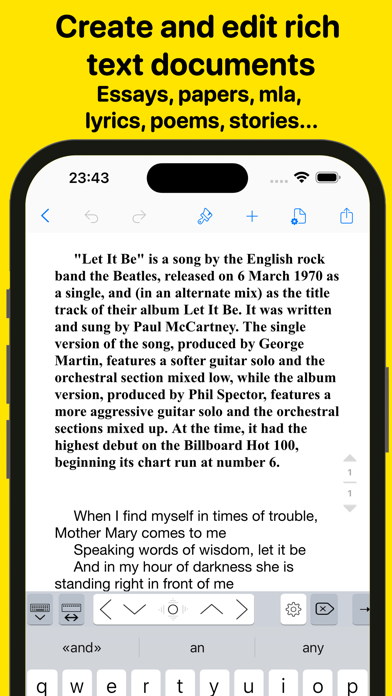
Whether you're a student, educator, writer, medical professional, journalist, scholar, or business professional, you can use Wordpad+ every day to create and edit notes, annotations, memos, signed PDFs, papers, highlighted PDF textbooks, and more.
Powerful document editor
- Create and edit Microsoft Word-compatible DOCX documents.
- Edit Microsoft RTF, plain-text, and Markdown files.
- Format your text with tables, lists, fonts, styles, and colors.
- Use templates to create professional resumes, reports, and other documents.
- Save your work automatically and access it across multiple devices.
PDF editing and annotation
- Highlight, sketch, add text boxes and pictures, and sign PDF documents.
- Write and sketch with seven ink tools: Marker, Pen, Pencil, Monoline, Fountain Pen, Watercolor, and Crayon.
- Fill out PDF forms.
- Sign documents directly on your device.
- Verify digital signatures to confirm their authenticity.
Write and format your way
- Keep writing wherever you are, including when you're offline or don't have your laptop.
- Customize margins, headers, and other layout options.
- Track statistics such as word and sentence counts.
- Proofread your work with text-to-speech.
- Dictate text for hands-free writing.
- Use Focus Mode to reduce distractions.
- Type in more than 30 languages.
Multiformat reader
- Read ePub and PDF files, view PowerPoint and Excel documents, play MP3 audio, and open many other formats.
- Import and export files through iCloud Drive, Google Drive, Dropbox, and other cloud services.
- Choose from dark, light, and sepia reading themes, adjust the font size, and use text-to-speech with ePub and PDF files.
- Work with large documents, including fillable forms, using the PDF engine.
- Annotate and highlight eBooks, or add text and images to them.
Organize and multitask
- Keep several documents open in the multitabbed interface and switch between them quickly.
- View documents side by side with multiple windows and multitasking.
- Keep all your notes, ideas, and projects in one place with unlimited space.
- Create folders and subfolders that suit the way you work.
- Customize notebook covers.
- Find your files quickly with search.
- Manage DOCX, RTF, PDF, TXT, Markdown, ePub, PowerPoint, Excel, Apple iWork, MP3, MP4, PNG, JPG, GIF, TIFF, ZIP, and other file formats.
Share and export
- Open email attachments directly in Wordpad+.
- Sync your files with iCloud, Dropbox, and other services.
- Convert your work to PDF, ePub, HTML, and other formats.
- Compress folders into ZIP files and send them by email.
Scan and convert to PDF
- Scan notes, books, tickets, recipes, and other items directly to PDF.
- Convert documents, images, photos, scans, and other files to PDF on your device.
- Open PowerPoint, Word, and Excel files, convert them to PDF, and annotate them.
Back up and protect your work
- Protect your content with a passcode.
- Lock individual folders or projects for added security.
- Keep your data safe with automatic backups.
Use Wordpad+ to organize your thoughts, lectures, books, sketches, notes, documents, and projects in one place. Download it for free and start writing, editing, reading, and organizing your work.
Privacy Policy
http://www.noteswriter.com/Kairoos_Privacy_Policy.html
EULA
https://www.apple.com/legal/internet-services/itunes/dev/stdeula/
Safety and technology
Found in the app by AppBrain- Price
- Free
- App size
- 510.1 MB
- Content rating
- Everyone
Technologies used by Wordpad+: Word Documents & PDF
Releases
Updates seen on the App Store- Version
- 2.1.9
- Launched
- July 2024
No changelog data
Alternatives
Similar apps and more from Kairoos Solutions SLAlternatives to Wordpad+: Word Documents & PDF







More from Kairoos Solutions SL


Rankings
App Store top chartsApp Store Rankings for Wordpad+: Word Documents & PDF
About the app and developer
About Wordpad+: Word Documents & PDF
Wordpad+: Word Documents & PDF is a business app developed by Kairoos Solutions SL.
User Ratings
Wordpad+: Word Documents & PDF is rated 4.29 out of 5 stars. The rating is based on 28 ratings.
App Information
Wordpad+: Word Documents & PDF is freely available from the App Store. The app size is 510.13 MB. The latest version available is 2.1.9. The last update was on November 24, 2026.
Technical Requirements
The app has a content rating of Everyone. The app has been available on the App Store since July 2024.
Wordpad+: Word Documents & PDF is made and published by Kairoos Solutions SL. AppBrain is an independent app data site and isn't affiliated with Kairoos Solutions SL. The app name, icon, screenshots and description belong to Kairoos Solutions SL and are shown as published on the App Store.
Developer information for Kairoos Solutions SL
Address:
Frequently asked questions about Wordpad+: Word Documents & PDF
Is Wordpad+: Word Documents & PDF free?
Yes. Wordpad+: Word Documents & PDF is free on the App Store.
Is Wordpad+: Word Documents & PDF still available?
Yes. Wordpad+: Word Documents & PDF is on the App Store, and the last update we saw was on November 24, 2026.
How large is Wordpad+: Word Documents & PDF?
Wordpad+: Word Documents & PDF is 510.13 MB.
Is Wordpad+: Word Documents & PDF suitable for children?
App Store rates the content of Wordpad+: Word Documents & PDF as suitable for everyone.
How do people rate Wordpad+: Word Documents & PDF?
Wordpad+: Word Documents & PDF scores 4.29 out of 5 stars, from 28 ratings on the App Store.
Who made Wordpad+: Word Documents & PDF?
Wordpad+: Word Documents & PDF was developed by Kairoos Solutions SL. It is listed in the business category on the App Store.
What are the best alternatives to Wordpad+: Word Documents & PDF?
People looking at Wordpad+: Word Documents & PDF also look at these business apps: iNotePad PRO, TextCrafter 2 ~ Craft & Share, Clipster - Universal Clipboard, Text Editor App, StudioDB.