

Workflow Console
Workflow Console is made and published by Alessandro Cacciagrano. AppBrain is an independent app data site and isn't affiliated with Alessandro Cacciagrano. The app name, icon, screenshots and description belong to Alessandro Cacciagrano and are shown as published on the App Store.
AppBrain's verdict
- Last updated
- March 25, 2026
- Size
- 17.4 MB
User feedback
Ratings and reviews on the App StoreComments on Workflow Console for iOS
We don't have enough comments to show example comments. Please check back later.
Store listing
By Alessandro Cacciagrano, from the App Store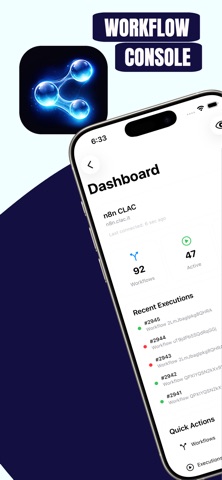

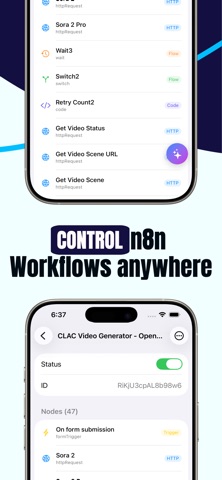
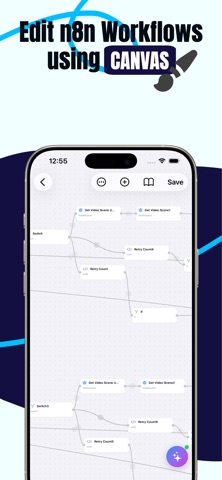


Description by Alessandro Cacciagrano Written by the developer, not by AppBrain. Click to read.
Visual Workflow Canvas
Edit workflows with a full drag-and-drop canvas. Add, move, connect, and configure nodes with an intuitive touch interface. Supports 263+ node types including AI nodes, with bezier-curve connections and snap-to-grid positioning.
AI Assistant
Get intelligent help powered by GPT-4o or Claude. Attach workflow context and let the assistant explain logic, debug execution errors, suggest configurations, and analyze HTTP requests — all with real-time streaming responses.
Home Screen Widgets
Launch workflows, trigger webhooks, check server health, and open n8n chats or forms — all without opening the app. The Dashboard widget gives you a live overview of server status, active workflows, and recent failures at a glance.
Execution Monitoring
Track workflow executions in real time. Inspect node-by-node run data, identify failure points, and review error payloads. Live Activities support keeps execution status visible on your Lock Screen and Dynamic Island.
HTTP Call Builder
Create, save, and execute webhook calls with full authentication support (Basic, API Key, Bearer, custom headers). Pin frequently used calls, export as curl commands, and trigger them from widgets or the Share Sheet.
Chains
Build multi-step sequences that combine workflows and HTTP calls into reusable automation chains. Execute them with a single tap.
Multi-Server Support
Connect to multiple n8n instances and switch between them seamlessly. Each server maintains its own credentials, workflows, and node catalog.
Enterprise-Grade Security
Protect access with Face ID or Touch ID. Configure per-action or per-session authentication. All credentials and API keys are stored in the iOS Keychain.
Background Sync & Notifications
Stay up to date with automatic background refresh. Receive alerts for execution successes and failures.
Additional Features
Full node parameter editor with schema-driven forms
Credential management for n8n nodes
Workflow and webhook search and filtering
Workflow import/export (JSON)
Share Sheet extension for triggering workflows from other apps
Siri integration via App Intents
Dark mode support
Workflow Console Premium unlocks the AI Assistant and removes ads. A separate ad-removal option is also available.
Requires an n8n account (self-hosted or n8n Cloud) to connect to. AI features require your own OpenAI or Anthropic API key.
Safety and technology
Found in the app by AppBrain- Price
- Free
- App size
- 17.4 MB
- Content rating
- Everyone
Technologies used by Workflow Console
Releases
Updates seen on the App Store- Version
- 1.0.2
- Launched
- March 2026
No changelog data
Alternatives
Similar apps and more from Alessandro CacciagranoAlternatives to Workflow Console


Rankings
App Store top chartsApp Store Rankings for Workflow Console
About the app and developer
About Workflow Console
Workflow Console is a productivity app developed by Alessandro Cacciagrano.
User Ratings
The app has no ratings yet.
App Information
Workflow Console is freely available from the App Store. The app size is 17.41 MB. The latest version available is 1.0.2. The last update was on March 25, 2026.
Technical Requirements
The app has a content rating of Everyone. The app has been available on the App Store since March 2026.
Developer information for Alessandro Cacciagrano
Address:
Frequently asked questions about Workflow Console
Is Workflow Console free?
Yes. Workflow Console is free on the App Store.
Is Workflow Console still available?
Yes. Workflow Console is on the App Store, and the last update we saw was on March 25, 2026.
How large is Workflow Console?
Workflow Console is 17.41 MB.
Is Workflow Console suitable for children?
App Store rates the content of Workflow Console as suitable for everyone.
Who made Workflow Console?
Workflow Console was developed by Alessandro Cacciagrano. It is listed in the productivity category on the App Store.
What are the best alternatives to Workflow Console?
People looking at Workflow Console also look at these productivity apps: ShellX, Lumina: your second brain, Fluxurize n8n, Universal Launcher, Readeck.