

WorkHours: Time Tracker
WorkHours: Time Tracker is made and published by DEVAPPS d.o.o. AppBrain is an independent app data site and isn't affiliated with DEVAPPS d.o.o. The app name, icon, screenshots and description belong to DEVAPPS d.o.o. and are shown as published on the App Store.
AppBrain's verdict
EstablishedLoved by users- Rating on App Store
- 4.72
- 1,217 ratings
- Last updated
- August 8, 2026
- Size
- 83.0 MB
Users love it: 4.7 stars from 1,217 ratings. Its best ranking is #60 in Top Grossing, Business in Belgium.
User feedback
Ratings and reviews on the App StoreComments on WorkHours: Time Tracker for iOS
We don't have enough comments to show example comments. Please check back later.
Store listing
By DEVAPPS d.o.o., from the App Store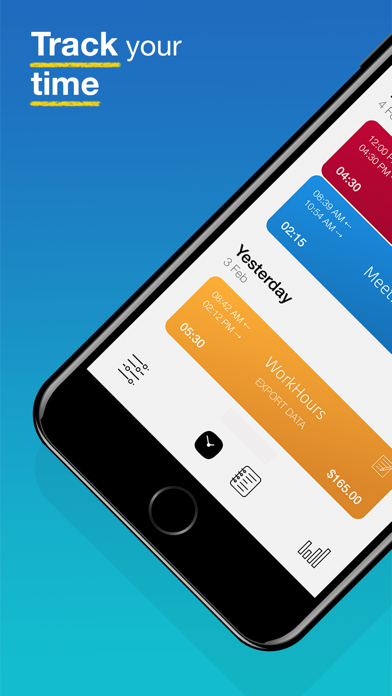




Description by DEVAPPS d.o.o. Written by the developer, not by AppBrain. Click to read.
WorkHours is an application for tracking working hours, overtimes, and earnings. Try it today, and find out why it's the best time tracker on the App Store!
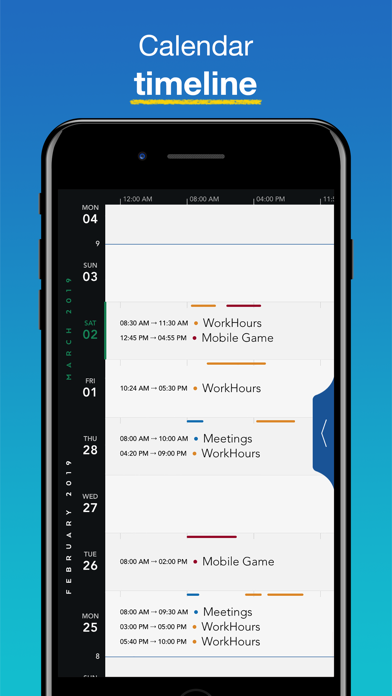
Keeping track of time can be difficult if you're not well organized and this is where WorkHours can help. WorkHours is an app that helps you track working hours, overtimes and earnings. All in a well-designed user interface that presents all the data in a clear and meaningful way, and allows you to quickly track time with minimal effort. It's perfect for anyone who works hourly jobs or random hours.
App features intuitive user interface which supports many swipe gestures enabling you to quickly execute actions and complete tasks. It supports a very rich set of features and personalisation options you can choose that best fit your needs. Included hints and tips enable anyone to quickly understand how to use and navigate the app.
Use WorkHours Cloud for cross device synchronization and cloud backup. All data is synchronized in real time and backed up on cloud. This allows you to easily restore all your data to a new device or use several devices to work seamlessly on the same projects.
KEY FEATURES
• Record work time using timers
• Pick any time to start, stop
• Track your earnings
• Overtime Rates (Automatic daily, weekly, and monthly overtime earnings calculations)
• Reminder notifications, so you never forget to clock in or out
• Cross device synchronization
• Cloud backup & manual backups
• Start and stop activities with simple gestures
• Manually enter time entries with minimal effort thanks to well-designed user interface
• Control timers, view, manage and add Entries using your Apple Watch
• Complications for Apple Watch to make full use of the faces on the Series 4
• Set job locations
• Add notes to your time entries
• Add tasks to jobs for a more detailed overview of your work
• Add expenses or additional amounts to time entries
• Built-in reports by Day, Week, and Month
• Easily copy an existing time entry to save time and effort
• Today Widget to quickly clock in & out
• Well designed, easy to use, intuitive interface
• Navigate and control the app using gestures
• Assign different colors to jobs to further personalize your time tracking system
• Light or Dark color theme of the app.
• Export data to PDF, CSV or Text format via e-mail or the iOS Share Sheet
• Password lock (with Touch and Face ID support) will help you keep your WorkHours data private
Premium subscription:
WorkHours offers free 3-day trial with an auto-renewing yearly subscription for $18,99/year or an auto-renewing monthly subscription for $3,49/month to provide you with full access to all premium features.
• Payment will be charged to iTunes Account at confirmation of purchase
• Subscription automatically renews unless auto-renew is turned off at least 24-hours before the end of the current period
• Account will be charged for renewal within 24-hours prior to the end of the current period, and identify the cost of the renewal
• Subscriptions may be managed by the user and auto-renewal may be turned off by going to the user's Account Settings after purchase
• Any unused portion of a free trial period, if offered, will be forfeited when the user purchases a subscription to that publication, where applicable
• Terms of service: https://www.whtracker.com/tos
WorkHours is designed for people who work random hours, remote workers, freelancers, students or anyone who spends time working on personal or professional projects.
"Free Edition" stores up to 15 entries and 3 jobs. For unlimited entries, upgrade to the "Personal" (up to 5 jobs) or "Pro" (unlimited jobs) edition.
Please email us if you have any questions or suggestions to improve the app: support@whtracker.com
Safety and technology
Found in the app by AppBrain- Price
- Free
- App size
- 83.0 MB
- Content rating
- Everyone
Technologies used by WorkHours: Time Tracker
Releases
Updates seen on the App Store- Version
- 1.50
- Launched
- December 2019
No changelog data
Alternatives
Similar apps and more from DEVAPPS d.o.o.Alternatives to WorkHours: Time Tracker







Rankings
App Store top charts- Highest rank
- #60
- Chart
- Top Grossing
- Business
- Country
- Belgium
App Store Rankings for WorkHours: Time Tracker
Top rankings
| Rank | Country | Category | List |
|---|---|---|---|
| 60 | Belgium | Business | Top Grossing |
Ranking history in Belgium
About the app and developer
About WorkHours: Time Tracker
WorkHours: Time Tracker is a business app developed by DEVAPPS d.o.o.
What is the rating of WorkHours: Time Tracker?
WorkHours: Time Tracker is rated 4.72 out of 5 stars, based on 1.2 thousand ratings.
Is WorkHours: Time Tracker free?
WorkHours: Time Tracker is free. The app size is 83.00 MB. The latest version available is 1.50. The last update was on August 8, 2026.
What are the requirements for WorkHours: Time Tracker?
The app has a content rating of Everyone. The app has been available on the App Store since December 2019.
Developer information for DEVAPPS d.o.o.
Address:
Frequently asked questions about WorkHours: Time Tracker
Is WorkHours: Time Tracker free?
Yes. WorkHours: Time Tracker is free on the App Store.
Is WorkHours: Time Tracker still available?
Yes. WorkHours: Time Tracker is on the App Store, and the last update we saw was on August 8, 2026.
How large is WorkHours: Time Tracker?
WorkHours: Time Tracker is 83.00 MB.
Is WorkHours: Time Tracker suitable for children?
App Store rates the content of WorkHours: Time Tracker as suitable for everyone.
How do people rate WorkHours: Time Tracker?
WorkHours: Time Tracker scores 4.72 out of 5 stars, from 1,217 ratings on the App Store.
Who made WorkHours: Time Tracker?
WorkHours: Time Tracker was developed by DEVAPPS d.o.o. It is listed in the business category on the App Store.
What are the best alternatives to WorkHours: Time Tracker?
People looking at WorkHours: Time Tracker also look at these business apps: Clocket: Time Clock Work Hours, Hours - Tracker & Time Clock, Time Squared: Hours Tracker, Work Hours & Pay Calculator, Hours Time Tracking.