




AppBrain's verdict
- Last updated
- August 8, 2026
- Size
- 2.39 MB
User feedback
Ratings and reviews on the App StoreComments on Zone Meter for iOS
We don't have enough comments to show example comments. Please check back later.
Store listing
By Greg Anderson, from the App StoreDescription by Greg Anderson Written by the developer, not by AppBrain. Click to read.
Point your iPhone at a scene and Zone Meter instantly reads the light from the camera sensor, calculating exposure values in real time. Scroll the drum wheels to set your aperture, shutter speed, or ISO, and Zone Meter works out the third value for you.
LIGHT METER
- Live EV reading from the iPhone camera sensor
- Four metering modes: Aperture Priority (Av), Shutter Priority (Tv), ISO Priority, and Manual (M)
- Classic drum-roller wheel pickers for aperture, shutter speed, and ISO
- Tap anywhere on the live preview to spot-meter a specific area of the scene
- Switch between lenses (0.5x, 1x, 2x, 5x) to meter a distant subject with the telephoto
- Live colour temperature reading with descriptive label (Tungsten, Daylight, Cloudy, Shade)
- EV condition display from Very Dark to Very Bright
HISTOGRAM
- Live luminance histogram overlaid on the camera preview - tap the chart icon to show or hide
- Shadows on the left, highlights on the right - just like every other histogram you know
- Colour-coded bars: blue for shadows, white for midtones, amber for highlights
- Clip indicators warn when shadows or highlights are being lost
- In Manual mode, the histogram shifts left or right to predict how your chosen settings will affect the tonal distribution
MANUAL MODE
- Set aperture, shutter speed, and ISO independently - nothing is computed or locked
- Exposure delta bar shows how far your settings deviate from the metered value
- Bar shifts left for underexposure, right for overexposure - consistent with the histogram
- Contextual label: Correct exposure, Overexposed by 1.3 stops, Underexposed by 2 stops
- Use with the histogram to dial in exposure before you shoot
ND FILTER CALCULATOR
- Calculates long-exposure shutter speed for any ND filter
- Presets for all standard filters: ND2 through ND32000, Little Stopper, Big Stopper, Super Stopper
- Custom stop input
- Uses the live meter reading or a manually chosen base shutter speed
- Warns when exposure exceeds 30 seconds (Bulb mode required)
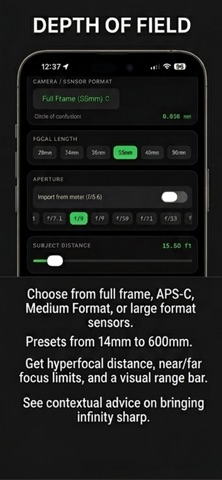
DEPTH OF FIELD CALCULATOR
- Hyperfocal distance calculator for any lens and sensor format
- 8 sensor formats: Full Frame, APS-C (Canon and Nikon/Sony), Micro 4/3, 1-inch, Medium Format, 4x5, 8x10
- 18 focal length presets from 14mm to 600mm
- Shows near focus limit, far focus limit, and total depth of field
- Visual range bar showing subject position relative to hyperfocal distance
- Contextual advice: tells you exactly how far to refocus to bring infinity sharp
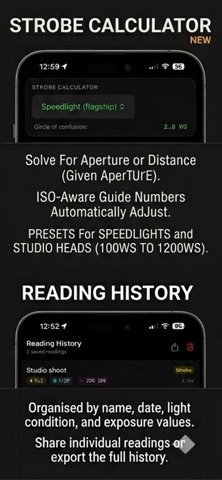
STROBE CALCULATOR
- Guide number calculator for flash and studio strobes
- Presets for speedlights and studio heads from 100Ws to 1200Ws
- 8 power settings from Full to 1/128
- Solve for aperture (given distance) or distance (given aperture)
- ISO-aware: guide numbers automatically adjust for any ISO
- Fill light ratio calculator: instantly shows the aperture difference for 1:1 through 16:1 ratios
READING HISTORY
- Save and name any meter or strobe reading
- Add notes to any saved reading
- Share individual readings or export the full history
- Organised by name, date, light condition, and exposure values
DESIGNED FOR PHOTOGRAPHERS
- Clean dark interface designed for use in any light
- Metric or imperial measurements (set in Help)
- Available in English, Japanese, German, French, Spanish, Italian, and Korean
- Full help documentation built in: explains EV, hyperfocal distance, guide numbers, and more
- No ads. No subscription. No account required.
Zone Meter is the meter you always have with you.
Safety and technology
Found in the app by AppBrain- Price
- Free
- App size
- 2.39 MB
- Content rating
- Everyone
Technologies used by Zone Meter
Releases
Updates seen on the App Store- Version
- 1.2.1
- Launched
- April 2026
No changelog data
Alternatives
Similar apps and more from Greg AndersonMore from Greg Anderson


Rankings
App Store top chartsApp Store Rankings for Zone Meter
About the app and developer
About Zone Meter
Zone Meter is a photo & video app developed by Greg Anderson.
User Ratings
The app has no ratings yet.
App Information
Zone Meter is freely available from the App Store. The app size is 2.39 MB. The latest version available is 1.2.1. The last update was on August 8, 2026.
Technical Requirements
The app has a content rating of Everyone. The app has been available on the App Store since April 2026.
Zone Meter is made and published by Greg Anderson. AppBrain is an independent app data site and isn't affiliated with Greg Anderson. The app name, icon, screenshots and description belong to Greg Anderson and are shown as published on the App Store.
Developer information for Greg Anderson
Address:
Frequently asked questions about Zone Meter
Is Zone Meter free?
Yes. Zone Meter is free on the App Store.
Is Zone Meter still available?
Yes. Zone Meter is on the App Store, and the last update we saw was on August 8, 2026.
How large is Zone Meter?
Zone Meter is 2.39 MB.
Is Zone Meter suitable for children?
App Store rates the content of Zone Meter as suitable for everyone.
Who made Zone Meter?
Zone Meter was developed by Greg Anderson. It is listed in the photo & video category on the App Store.