
Integration with MoPub
The banners and interstitial of the AppBrain SDK can easily be integrated in the MoPub mediation solution.
Setting up your app for mediation
First make sure you added the AppBrain SDK to your app, follow the general installation instructions on the setup page.
Then add the AppBrain MoPub library to your project. If you use Gradle to build your project, and you have already added the AppBrain repository as described in setup, you can simply add the dependency:
dependencies {
    implementation 'com.appbrain:appbrain-sdk:+'
    implementation 'com.appbrain:appbrain-sdk-mopub:+'
}
If you don’t use Gradle, you can add the appbrain-mopub.jar file to your project’s libs/ folder
manually. This file can be downloaded from the
AppBrain SDK GitHub page.
MoPub SDK initialization
In the initialization for the MoPub SDK the AppBrain SDK needs to be registered. For example like this:
SdkConfiguration sdkConfiguration = new SdkConfiguration.Builder("<your ad id>")
    .withAdditionalNetwork(AppBrainMoPubConfiguration.class.getName())
    .withMediatedNetworkConfiguration(AppBrainMoPubConfiguration.class.getName(), Collections.emptyMap())
    .build();

    MoPub.initializeSdk(this, sdkConfiguration, initSdkListener());
More information about the MoPub SDK initialization is in the Initialize Custom Ad Networks section of the MoPub SDK documentation.
Mediating the AppBrain ads (Banner & Interstitial)
To set up your mediation placement for showing AppBrain banners, go to the MoPub Orders section and click the “Create Order” button.
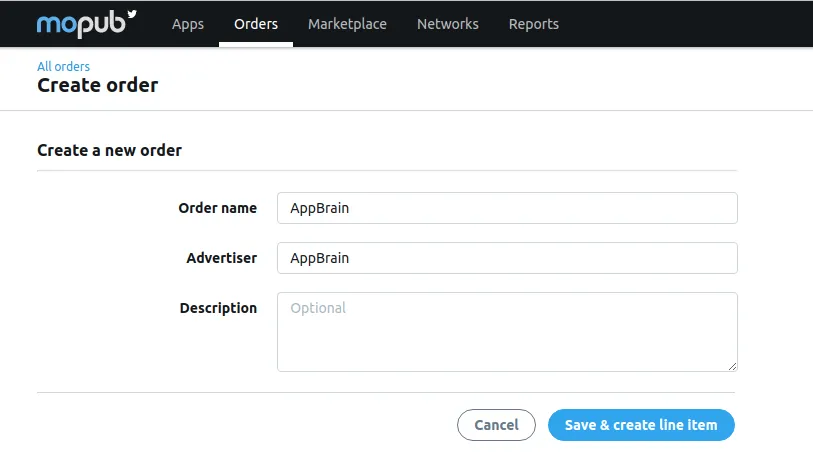
Proceed with “Save & create line item”.
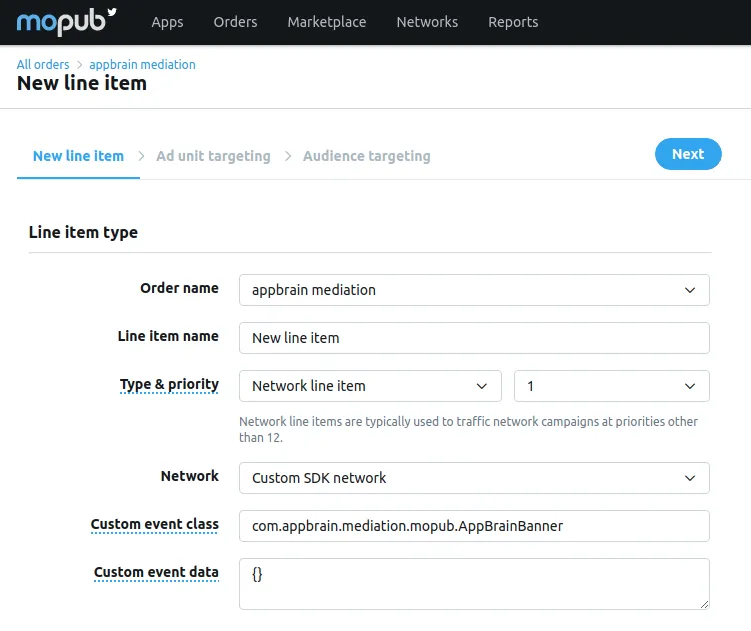
- In “Type & priority” select “Network line item”. Set priority to 1.
- In “Network” select “Custom SDK Network”.
For the banner mediation fill in
- Custom event class:
com.appbrain.mediation.mopub.AppBrainBannerfor banner orcom.appbrain.mediation.mopub.AppBrainInterstitialfor interstitial - Custom event data: Enter
{}as empty JSON data object. Optional: you can add the AppBrain “Ad ID” for this placement with the key"adid". One example is for instance{"adid":"LEVEL_COMPLETE"}. - In “Rate” you can set your CPM, eg $1 as default.
- In “Schedule” activate “Start immediately”
Then click “Next”, the next page will allow you to enable these mediation settings for you apps and adunits.
Please contact AppBrain support if you have any problems setting up MoPub Mediation with AppBrain.