

AI PDF Scanner: Doc to PDF
AI PDF Scanner: Doc to PDF is made and published by CALEB JAMES RAYMOND KRANTZ. AppBrain is an independent app data site and isn't affiliated with CALEB JAMES RAYMOND KRANTZ. The app name, icon, screenshots and description belong to CALEB JAMES RAYMOND KRANTZ and are shown as published on the App Store.
AppBrain's verdict
- Last updated
- August 3, 2026
- Size
- 35.8 MB
User feedback
Ratings and reviews on the App StoreComments on AI PDF Scanner: Doc to PDF for iOS
We don't have enough comments to show example comments. Please check back later.
Store listing
By CALEB JAMES RAYMOND KRANTZ, from the App Store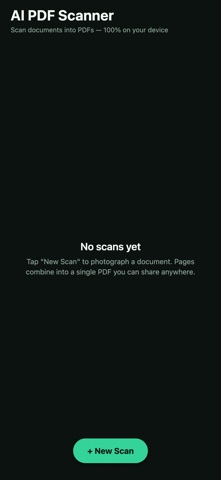
Description by CALEB JAMES RAYMOND KRANTZ Written by the developer, not by AppBrain. Click to read.
No account. No ads. No subscription. No internet required.
SCAN IN SECONDS
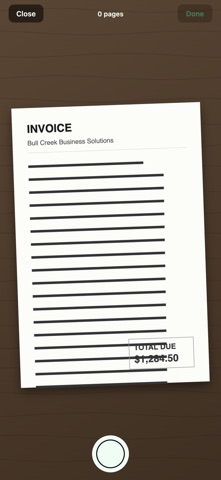
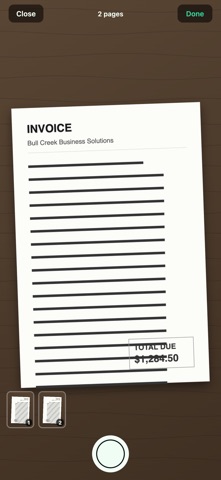
• Capture page after page in one smooth camera flow
• Live thumbnail strip shows every page you've taken
• Retake or remove any page before you save — no do-overs needed
• Great for receipts, contracts, notes, homework, whiteboards, IDs, and letters
ORGANIZE YOUR PAGES
• Rotate pages 90° with one tap
• Reorder pages so the PDF reads exactly right
• Delete pages you don't need
• Add more pages to any scan later — documents grow with you
EXPORT BEAUTIFUL PDFS
• Combine every page into a single, standard US Letter PDF
• Each scan is centered and aspect-fit on its own page
• Share instantly by AirDrop, Messages, Mail, Files, or any app on your phone
• Re-export any time — your scans stay saved in the app
YOUR DOCUMENT LIBRARY
• All scans saved right on your device, organized newest first
• Rename scans so you can find them fast
• Open any scan to keep editing, add pages, or export again
• Delete a scan and it's gone — completely
PRIVATE BY DESIGN
• 100% offline — the app makes no network calls at all
• Your documents are processed entirely on your device
• No account, no sign-up, no analytics, no ads
• Nothing is ever uploaded, anywhere
Whether you're digitizing receipts for expenses, sending a signed contract, archiving school papers, or clearing off a desk full of documents, AI PDF Scanner gets paper into a PDF in seconds — and keeps it private.
Download it free and scan your first document today.
Safety and technology
Found in the app by AppBrain- Price
- Free
- App size
- 35.8 MB
- Content rating
- Everyone
Technologies used by AI PDF Scanner: Doc to PDF
Releases
Updates seen on the App Store- Version
- 1.0
- Launched
- August 2026
No changelog data
Alternatives
Similar apps and more from CALEB JAMES RAYMOND KRANTZAlternatives to AI PDF Scanner: Doc to PDF


More from CALEB JAMES RAYMOND KRANTZ


Rankings
App Store top chartsApp Store Rankings for AI PDF Scanner: Doc to PDF
About the app and developer
About AI PDF Scanner: Doc to PDF
AI PDF Scanner: Doc to PDF is a productivity app developed by CALEB JAMES RAYMOND KRANTZ.
User Ratings
The app has no ratings yet.
App Information
AI PDF Scanner: Doc to PDF is freely available from the App Store. The app size is 35.81 MB. The latest version available is 1.0. The last update was on August 3, 2026.
Technical Requirements
The app has a content rating of Everyone. The app has been available on the App Store since August 2026.
Developer information for CALEB JAMES RAYMOND KRANTZ
Address:
Frequently asked questions about AI PDF Scanner: Doc to PDF
Is AI PDF Scanner: Doc to PDF free?
Yes. AI PDF Scanner: Doc to PDF is free on the App Store.
Is AI PDF Scanner: Doc to PDF still available?
Yes. AI PDF Scanner: Doc to PDF is on the App Store, and the last update we saw was on August 3, 2026.
How large is AI PDF Scanner: Doc to PDF?
AI PDF Scanner: Doc to PDF is 35.81 MB.
Is AI PDF Scanner: Doc to PDF suitable for children?
App Store rates the content of AI PDF Scanner: Doc to PDF as suitable for everyone.
Who made AI PDF Scanner: Doc to PDF?
AI PDF Scanner: Doc to PDF was developed by CALEB JAMES RAYMOND KRANTZ. It is listed in the productivity category on the App Store.
What are the best alternatives to AI PDF Scanner: Doc to PDF?
People looking at AI PDF Scanner: Doc to PDF also look at these productivity apps: Document Lens - OCR Scanner, Scanling – PDF Scanner & OCR, Paperlane: Scan to PDF, Clearcan: PDF Scanner, GetMyInvoices.