

AVPlayer is made and published by EPLAYWORKS. AppBrain is an independent app data site and isn't affiliated with EPLAYWORKS. The app name, icon, screenshots and description belong to EPLAYWORKS and are shown as published on the App Store.
AppBrain's verdict
EstablishedWell ratedTop 10- Rating on App Store
- 4.21
- 282 ratings
- Last updated
- December 30, 2020
- Size
- 52.4 MB
Users rate it well: 4.2 stars from 282 ratings. Its best ranking is #6 in Top Paid, Entertainment in South Korea.
User feedback
Ratings and reviews on the App StoreComments on AVPlayer for iOS
We don't have enough comments to show example comments. Please check back later.
Store listing
By EPLAYWORKS, from the App Store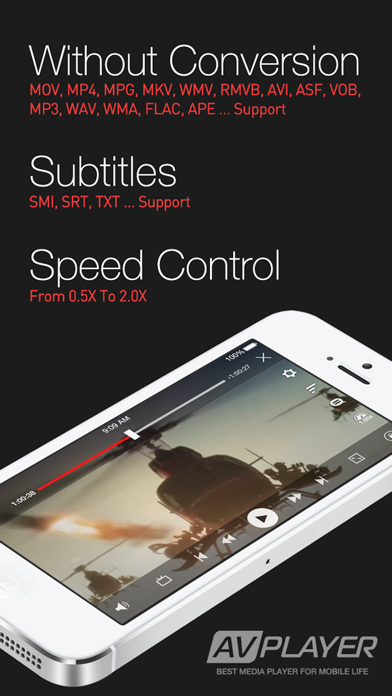

Description by EPLAYWORKS Written by the developer, not by AppBrain. Click to read.
This is why the AVPlayer was created. The AVPlayer can play almost any computer video file format such as AVI, Xvid, WMV and much more clearly and effortlessly. No converting hassles. Just copy files via USB and just drag and drop into the AVPlayer’s Media Explorer.
The AVPlayer can also support external subtitle files such as SMI and SRT. So if you enjoy watching videos on your iPad, then the AVPlayer is an absolute necessity.
• Support Formats
- Dolby Digital (AC3), Dolby Digital Plus (EAC3)
- Support High quality video clips ( 720P, 1080P )
- MP4,MOV,M4V
- XVID,AVI,WMV,RMVB,ASF,H264,MKV… most of all movie file formats.
- SMI, SRT, TXT, SubStationAlpha Subtitles
• Post Processing
- High quality video processing
- Contrast,Saturation,Brightness
- TV-Out
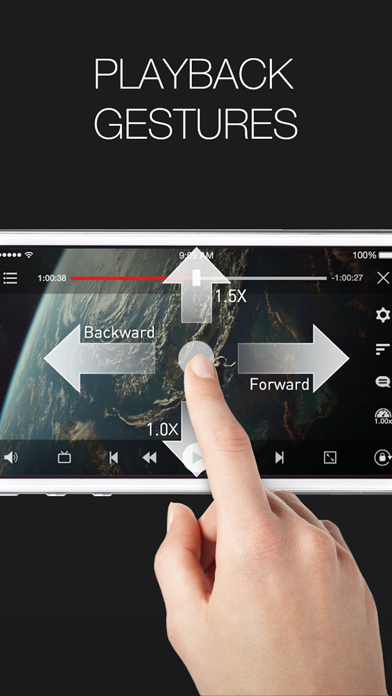
• Control the playback speed (From 0.5X to 2.0X)
- User setting support
- Sweep to the left : move to backword 10 sec
- Sweep to the right : move to forward 10 sec
- Sweep to the top : 1.5X speed
- Sweep to the down : normal speed
• Additional features
- Rotation Lock / Aspect ratio:auto/16:9/4:3/Full screen
- Folder Management:Pass code/Move/Rename/Create
- Resume play from last position
- Scrubbing search
- supports e-mail attachment by "Open In" feature
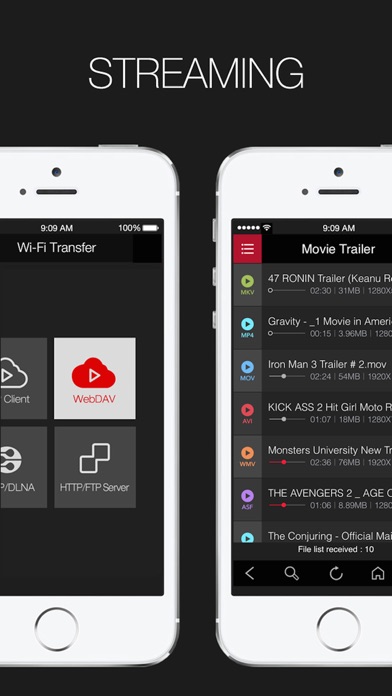
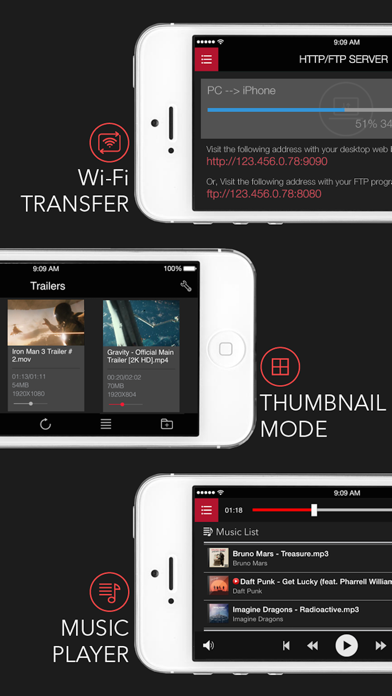
• USB/WIFI Transfer
• Note
1. How to add video with USB
- Run iTunes 9.1 or above
- Device->My Device(My iPad)->Apps, drag and drop files to the AVplayer's documents
2. Support High quality video clips ( 720P, 1080P )
- High quality video clips of 720P (1280 x 720) or more are recommended for MP4 format.
- MP4, MOV, M4V formats that QuickTime supports can be played up to 1080P by using H/W Decoder but, Post Processing function isn’t provided.
- Support H/W decoding for MKV and AVI (720P supported on iPad1, 1080P supported on iPad2 / The New iPad)
- Hybrid decoding mode is added and now it is able to play high resolution videos by using hardware accelerator feature embedded in iPhone/iPad even for mkv or avi in h264. Also battery use time has extended.
- Application may crash in iPhone 3GS / iPod Touch due to heavy use of memory in Hybrid decoding. Try turning off all application running in background and reboot the device by holding down sleep mode button for long time.
- If screen shakes it means hardware decoding is not supported. Try turning off hybrid decoding.
- When the file formats are available for MKV or AVI the player supports hardware decoding.
- If you cannot choose audio in mp4 or avi, change the extension to mkv temporarily and chosen audio channel will be applied.
3. The optimal speed when advancing its playing speed can differ depending on the way it’s compressed and the size.
Video clips of XVID (AVI) 720 x 480 can be fast played up to 1.3-1.5 times faster than normal.
Safety and technology
Found in the app by AppBrain- Price
- $2.99
- App size
- 52.4 MB
- Content rating
- High
Technologies used by AVPlayer
Releases
Updates seen on the App Store- Version
- 2.95
- Launched
- November 2010
No changelog data
Alternatives
Similar apps and more from EPLAYWORKSAlternatives to AVPlayer





More from EPLAYWORKS


Rankings
App Store top charts- Highest rank
- #6
- Chart
- Top Paid
- Entertainment
- Country
- South Korea
App Store Rankings for AVPlayer
Top rankings
| Rank | Country | Category | List |
|---|---|---|---|
| 6 | South Korea | Entertainment | Top Paid |
| 8 | Slovakia | Entertainment | Top Paid |
| 11 | Indonesia | Entertainment | Top Paid |
| 12 | Russia | Entertainment | Top Paid |
| 16 | Portugal | Entertainment | Top Paid |
| 18 | Poland | Entertainment | Top Paid |
| 22 | Finland | Entertainment | Top Paid |
| 24 | Saudi Arabia | Entertainment | Top Paid |
| 26 | Belgium | Entertainment | Top Paid |
| 27 | Czech Republic | Entertainment | Top Paid |
Ranking history in South Korea
About the app and developer
About AVPlayer
AVPlayer is an entertainment app developed by EPLAYWORKS.
User Ratings
AVPlayer is rated 4.21 out of 5 stars. The rating is based on 280 ratings.
App Information
AVPlayer costs $2.99. The app size is 52.44 MB. The latest version available is 2.95. The last update was on December 30, 2020.
Technical Requirements
The app has a content rating of High Maturity. The app has been available on the App Store since November 2010.
Developer information for EPLAYWORKS
Address:
Frequently asked questions about AVPlayer
Is AVPlayer free?
No. AVPlayer costs $2.99 on the App Store.
Is AVPlayer still available?
Yes. AVPlayer is on the App Store, and the last update we saw was on December 30, 2020.
How large is AVPlayer?
AVPlayer is 52.44 MB.
Is AVPlayer suitable for children?
App Store gives AVPlayer a high maturity rating. It is meant for adults.
How do people rate AVPlayer?
AVPlayer scores 4.21 out of 5 stars, from 282 ratings on the App Store.
Who made AVPlayer?
AVPlayer was developed by EPLAYWORKS. It is listed in the entertainment category on the App Store.
What are the best alternatives to AVPlayer?
People looking at AVPlayer also look at these entertainment apps: nPlayer, nPlayer Plus, KMPlayer+ Divx Codec, zFuse - Video Player, nPlayer Lite.