

Cameranaglyph
Cameranaglyph is made and published by Limit Point Software. AppBrain is an independent app data site and isn't affiliated with Limit Point Software. The app name, icon, screenshots and description belong to Limit Point Software and are shown as published on the App Store.
AppBrain's verdict
- Rating on App Store
- 5.00
- 1 ratings
- Last updated
- December 17, 2025
It doesn't have enough ratings yet to judge what users think.
Rankings
App Store top chartsApp Store Rankings for Cameranaglyph
Competitors
Similar apps and more from Limit Point SoftwareMore from Limit Point Software




Releases
Updates seen on the App Store- Version
- 1.0.5
- Launched
- November 2024
No changelog data
User feedback
Ratings and reviews on the App StoreComments on Cameranaglyph for iOS
We don't have enough comments to show example comments. Please check back later.
Technology
Found in the app by AppBrain- Price
- Free
- App size
- 102.6 MB
- Content rating
- Everyone
Technologies used by Cameranaglyph
About the app and developer
About Cameranaglyph
Cameranaglyph is a photo & video app developed by Limit Point Software.
What is the rating of Cameranaglyph?
Cameranaglyph is rated 5.00 out of 5 stars, based on one rating ratings.
Is Cameranaglyph free?
Cameranaglyph is free. The app size is 102.58 MB. The latest version available is 1.0.5. The last update was on December 17, 2025.
What are the requirements for Cameranaglyph?
The app has a content rating of Everyone. The app has been available on the App Store since November 2024.
Developer information for Limit Point Software
Address:
Store listing
By Limit Point Software, from the App Store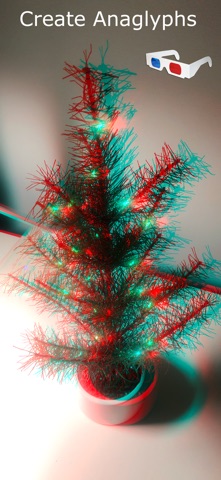




Description by Limit Point Software Written by the developer, not by AppBrain. Click to read.
After saving the stereo image pair to the photos library or files you can reload them later to generate the anaglyph again. When processing arbitrary image pairs loaded this way the right image is resized by scaling to match the size of the left image.
Taking Photos
1. Tap the Take Photos button to open the camera.
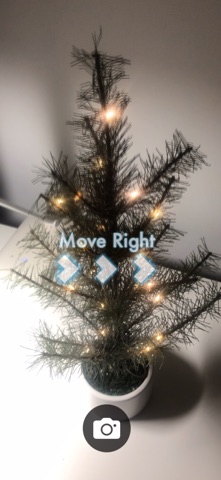
2. Capture two images — the second slightly to the right of the first — the app will present a cue and guide to aid in aligning the second shot with the first.
3. After capturing both images, the app will automatically create an anaglyph image.
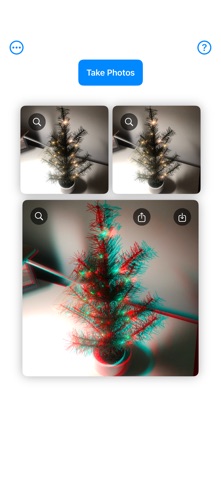
4. Captured images appear below the Take Photos button. Retake photos by tapping the button again. Tap the image zoom button for a closer view. To save the anaglyph image, tap the save button. To save all images use the menu in the upper left side of the main veiw.
5. Repeat: Experiment with different right shift offsets. Save and compare.
The menu in the upper left corner of the main view has the following menu items.
Action items:
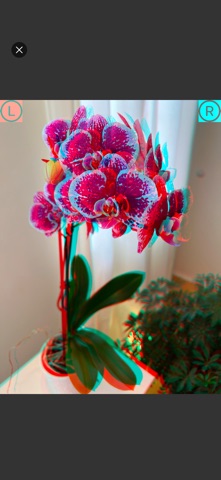
•Save All - Save the left and right images as well as the anaglyph to the photos library. (An option will presented to badge the left and right images with an icon to indicate which is left (L) and right (R); helpful, despite that in a true stereo pair objects in one are offset horizontally relative to the other.)
•Share All - Share the left and right images as well as the anaglyph to other apps, such as sending them to another user with AirDrop. (An option will presented to badge the left and right images with an icon to indicate which is Left (L) and Right (R))
•Delete All - Clears the left and right images as well as the anaglyph.
• Pick Stereo Pair - navigate the photos library or file system to load previously captured stereo pairs (or any other image pair).
• Flip Stereo Pair - enables you to exchange the order of the stereo images if need be (L ⇔ R)
• Double View Mode - enables you to TOGGLE stereo pair to see how they change from left to right, as a valid stereo pair would show objects move to the LEFT when switching to the right image.
Option items:
•Badge Anaglyph - Select to toggle whether or not the anaglyph will be badged with a 3D glasses icon in its upper left corner, a hint to view it with 3D glasses.
•Fit Images - Select to toggle whether or not all images in the main view and camera view will be displayed to fit on screen. This option does not affect the actual size of any images, it only enables the whole image to be seen on screen if the aspect ratio of the image view and image are not the same.
•Camera - Select the front or back camera.
Enjoy!