

Lab Channels
Lab Channels is made and published by Greg Anderson. AppBrain is an independent app data site and isn't affiliated with Greg Anderson. The app name, icon, screenshots and description belong to Greg Anderson and are shown as published on the App Store.
AppBrain's verdict
- Last updated
- September 2, 2026
- Size
- 655.0 KB
User feedback
Ratings and reviews on the App StoreComments on Lab Channels for iOS
We don't have enough comments to show example comments. Please check back later.
Store listing
By Greg Anderson, from the App Store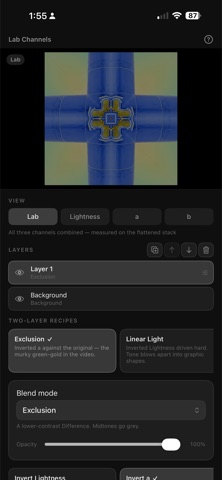

Description by Greg Anderson Written by the developer, not by AppBrain. Click to read.
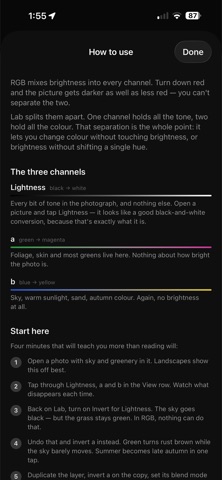
In RGB, brightness is baked into every channel. Turn down red and the picture gets darker as well as less red — the two cannot be separated. Lab splits them apart. One channel carries all the tone. Two carry all the colour: one running green to magenta, the other blue to yellow. That separation is the point. It lets you change colour without touching brightness, or brightness without shifting a single hue.
WHAT YOU CAN DO
• View any channel on its own as greyscale
• Invert, brighten, or add contrast to each channel independently
• Swap the two colour channels to rotate every hue at once
• Threshold the tone channel down to pure black and white
• Stack copies of the photo and blend them together
• Choose how colour that falls outside your screen's range is handled
WORKING WITH CHANNELS
Invert the tone channel and light and dark flip while hue stays put — clouds go black, grass stays green. Invert the green–magenta channel and summer foliage turns rust brown while a blue sky barely moves, because sky lives on the other axis. Knowing which channel a colour sits on is most of the skill, and the built-in help page walks through it with real before-and-after swatches.
LAYERS AND BLENDING
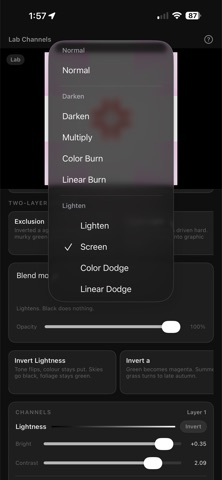
Duplicate the photo, edit the copy's channels, then choose how the two meet. All 24 blend modes are here, from Multiply and Screen through the contrast group to Luminosity and Colour. Luminosity takes tone from one layer and colour from the other, which is the cleanest way to change contrast without shifting a hue anywhere in the frame.
COLOUR THAT FALLS OUT OF RANGE
The colour channels have no limits but your screen does, so pushing one sends many colours outside what can be displayed. What happens to them is a real choice, so it is yours to make. Preserve eases saturation back toward neutral until the colour fits, holding its brightness and hue, which keeps gradation in skies and foliage. Clip cuts at the boundary instead, which flattens detail into solid blocks and is the right answer when you want that.
BUILT TO BE ACCURATE
Conversion uses the D50 white point, so channel values line up with what other professional tools report for the same pixel. Editing happens on a downscaled preview so adjustments stay immediate, and saving re-runs everything against your original full-size photo.
PRIVACY
No account, no sign-in, no network access of any kind. Your photos are read when you pick them and written back only when you ask. Nothing is collected, and nothing leaves your device.
Safety and technology
Found in the app by AppBrain- Price
- $0.99
- App size
- 655.0 KB
- Content rating
- Everyone
Technologies used by Lab Channels
Releases
Updates seen on the App Store- Version
- 1.0
- Launched
- September 2026
No changelog data
Alternatives
Similar apps and more from Greg AndersonMore from Greg Anderson


Rankings
App Store top chartsApp Store Rankings for Lab Channels
About the app and developer
About Lab Channels
Lab Channels is a photo & video app developed by Greg Anderson.
User Ratings
The app has no ratings yet.
App Information
Lab Channels costs $0.99. The app size is 655.00 kB. The latest version available is 1.0. The last update was on September 2, 2026.
Technical Requirements
The app has a content rating of Everyone. The app has been available on the App Store since September 2026.
Developer information for Greg Anderson
Address: