AppBrain
AppBrain
  • Apps
  • Apps being viewed right now Trending apps today Most popular apps All-time most installed apps Top rated apps iPhone and iPad apps
  • Intelligence ▾
    Intelligence overview → Track any Android app or your whole market
    Track & analyze
    Keyword Tracker & OptimizerTrack & improve Play rankings App Performance ReportOne-off PDF for any app StatisticsFree Android & Play market stats
    Promote your app
    Featured Apps App Links
  • Intelligence
  • Pricing
  • Dashboard
  • Sign up
  • Log in
App Store Apps > Utilities > Miracast・Screen Mirroring
Miracast・Screen Mirroring icon

Miracast・Screen Mirroring

1.1.2
Silver Elm Systems LLC
4.29
58 reviews
Free

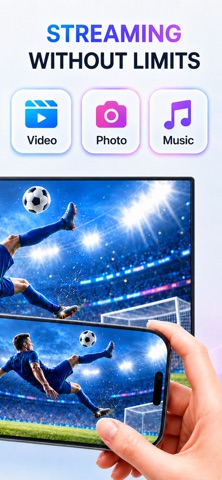
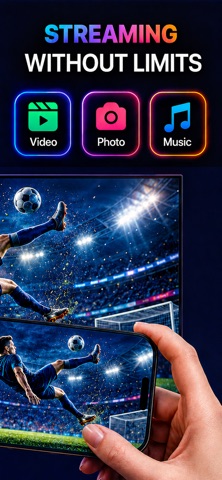
Miracast・Screen Mirroring Screenshot 1 of 10
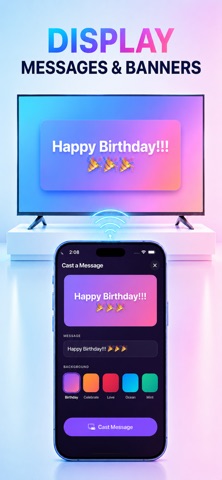
Miracast・Screen Mirroring Screenshot 2 of 10
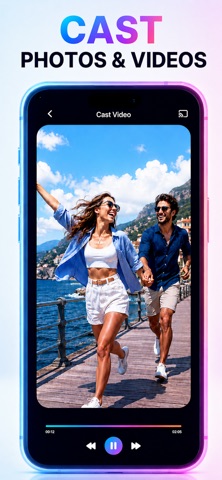
Miracast・Screen Mirroring Screenshot 3 of 10
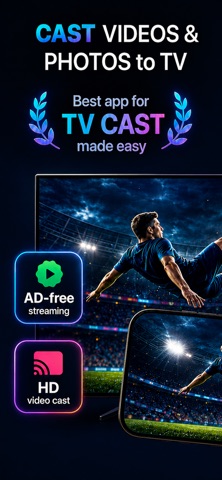
Miracast・Screen Mirroring Screenshot 4 of 10
Miracast・Screen Mirroring Screenshot 5 of 10
Miracast・Screen Mirroring Screenshot 6 of 10
Miracast・Screen Mirroring Screenshot 7 of 10
Miracast・Screen Mirroring Screenshot 8 of 10
Miracast・Screen Mirroring Screenshot 9 of 10
Miracast・Screen Mirroring Screenshot 10 of 10
Screenshots by Silver Elm Systems LLC, from the the App Store listing
View on the App Store

AppBrain's verdict

Rating on App Store
4.29
58 ratings
Last updated
October 9, 2026
Size
31.8 MB

It doesn't have enough ratings yet to judge what users think.

Official page on the App Store

User feedback

Ratings and reviews on the App Store

Comments on Miracast・Screen Mirroring for iOS

We don't have enough comments to show example comments. Please check back later.

Store listing

By Silver Elm Systems LLC, from the App Store
Description by Silver Elm Systems LLC Written by the developer, not by AppBrain. Click to read.
Cast photos, videos, and more from your iPhone to your TV in seconds with the Miracast App.

Miracast helps you enjoy your favorite media on the big screen without complicated setup. Share photo albums, watch personal videos, play music, and stream and control your casting session directly from your iPhone. Whether you are sharing vacation memories, watching home videos, or playing music at home, the Miracast App makes it easy to connect, choose your content, and start casting.

MAIN FEATURES

- Cast Videos
Stream videos from your iPhone to your TV with simple playback controls. Great for home videos, saved clips, family moments, and personal media.

- Cast Photos
View your favorite photos on your TV instead of passing your phone around. Browse your photo library, select what you want to share, and enjoy your memories on a bigger screen. Wireless display to your TV made easy!

- Cast Messages
Cast custom banner messages to the TV like Happy Birthday and Congratulations, with text and emojis and backgrounds, great for parties and events.

- Screen Mirroring
Cast screen in landscape mode and portrait mode to TV using live streaming technology.

- Stream Music
Play songs and playlists on compatible devices and control playback from your phone.

- Fast Device Discovery
Find compatible casting devices on your Wi-Fi network and connect quickly.

- Simple Playback Controls
Control your media from one clean interface. Pause, skip, adjust volume, manage playback, and keep the experience simple.

- Auto-Connect Support
Reconnect to your last used device faster, so you can spend less time setting up and more time watching.

- Clean, Modern Design
Miracast is built to feel simple, polished, and easy to use. No cluttered menus. No confusing setup. Just open the app, connect, and cast.

HOW IT WORKS

1. Connect your iPhone and casting device to the same Wi-Fi network.
2. Open Miracast App and select an available device.
3. Choose photos, videos, or music from your iPhone.
4. Start casting to your TV.

Safety and technology

Found in the app by AppBrain
Price
Free
App size
31.8 MB
Content rating
Everyone

Technologies used by Miracast・Screen Mirroring

Releases

Updates seen on the App Store
Version
1.1.2
Launched
August 2026

No changelog data

Alternatives

Similar apps and more from Silver Elm Systems LLC

Alternatives to Miracast・Screen Mirroring

Cast to TV + Screen Mirroring icon Cast to TV + Screen Mirroring
LOUBNA MOUFARAJ
3.3
Free
3 ratings
Miracast‍ icon Miracast‍
Haruto Nakamura
5.0
Free
1 ratings
Screen Mirroring+ ™ icon Screen Mirroring+ ™
怡君 林
4.0
Free
3 ratings
Screen Mirroring: View TV icon Screen Mirroring: View TV
Valerian Kokhreidze
5.0
Free
2 ratings
Cast to TV & Screen Mirror icon Cast to TV & Screen Mirror
Matan Yamin
4.3
Free
15 ratings
Miracast ®ᅠ icon Miracast ®ᅠ
Truong Thi Kha Tam
4.0
Free
125 ratings
AirMirror: Screen Mirroring TV icon AirMirror: Screen Mirroring TV
BoostVision Software
3.6
Free
11 ratings
Multicast - Screen Mirroring icon Multicast - Screen Mirroring
正福 邹
4.0
Free
3 ratings

More from Silver Elm Systems LLC

Robin Hood · icon Robin Hood ·
Silver Elm Systems LLC
4.3
Free
849 ratings
EasyScan: Document Scanner icon EasyScan: Document Scanner
Silver Elm Systems LLC
4.7
Free
249 ratings
Authenticator App ⋆ icon Authenticator App ⋆
Silver Elm Systems LLC
4.0
Free
47 ratings
TV Cast for Chromecast · icon TV Cast for Chromecast ·
Silver Elm Systems LLC
4.5
Free
42 ratings
TV Cast for Samsung TVs icon TV Cast for Samsung TVs
Silver Elm Systems LLC
4.1
Free
32 ratings
Chatbot AI icon Chatbot AI
Silver Elm Systems LLC
5.0
Free
27 ratings
Chromecast TV Caster icon Chromecast TV Caster
Silver Elm Systems LLC
4.8
Free
18 ratings
PDF Editor + icon PDF Editor +
Silver Elm Systems LLC
4.9
Free
17 ratings

Rankings

App Store top charts

App Store Rankings for Miracast・Screen Mirroring

This app is not ranked

About the app and developer

About Miracast・Screen Mirroring

Miracast・Screen Mirroring is an utilities app developed by Silver Elm Systems LLC.

User Ratings

Miracast・Screen Mirroring is rated 4.29 out of 5 stars. The rating is based on 58 ratings.

App Information

Miracast・Screen Mirroring is freely available from the App Store. The app size is 31.81 MB. The latest version available is 1.1.2. The last update was on October 9, 2026.

Technical Requirements

The app has a content rating of Everyone. The app has been available on the App Store since August 2026.

Miracast・Screen Mirroring is made and published by Silver Elm Systems LLC. AppBrain is an independent app data site and isn't affiliated with Silver Elm Systems LLC. The app name, icon, screenshots and description belong to Silver Elm Systems LLC and are shown as published on the App Store.

Developer information for Silver Elm Systems LLC

Silver Elm Systems LLC

Address:

Frequently asked questions about Miracast・Screen Mirroring

Is Miracast・Screen Mirroring free?

Yes. Miracast・Screen Mirroring is free on the App Store.

Is Miracast・Screen Mirroring still available?

Yes. Miracast・Screen Mirroring is on the App Store, and the last update we saw was on October 9, 2026.

How large is Miracast・Screen Mirroring?

Miracast・Screen Mirroring is 31.81 MB.

Is Miracast・Screen Mirroring suitable for children?

App Store rates the content of Miracast・Screen Mirroring as suitable for everyone.

How do people rate Miracast・Screen Mirroring?

Miracast・Screen Mirroring scores 4.29 out of 5 stars, from 58 ratings on the App Store.

Who made Miracast・Screen Mirroring?

Miracast・Screen Mirroring was developed by Silver Elm Systems LLC. It is listed in the utilities category on the App Store.

What are the best alternatives to Miracast・Screen Mirroring?

People looking at Miracast・Screen Mirroring also look at these utilities apps: Cast to TV + Screen Mirroring, Miracast‍, Screen Mirroring+ ™, Screen Mirroring: View TV, Cast to TV & Screen Mirror.

Share Miracast・Screen Mirroring

Apps other people are watching Popular Utilities Apps Price drops on Google Play Top new apps Today's trending apps
Cast to TV + Screen Mirroring icon Cast to TV + Screen Mirroring
Miracast‍ icon Miracast‍
Screen Mirroring+ ™ icon Screen Mirroring+ ™
Screen Mirroring: View TV icon Screen Mirroring: View TV
Cast to TV & Screen Mirror icon Cast to TV & Screen Mirror
Miracast ®ᅠ icon Miracast ®ᅠ
AirMirror: Screen Mirroring TV icon AirMirror: Screen Mirroring TV
Multicast - Screen Mirroring icon Multicast - Screen Mirroring
Overview Alternatives Reviews Rankings Technology
AppBrain Intelligence premium content

Subscribe now to get full and unlimited access to AppBrain Intelligence. You'll have access to:

  • App Intelligence dashboard (performance timeline, competitor comparison, country rankings, insight cards)
  • Detailed ranking data per app
  • Full timeline per developer
  • Device market shares data per country
  • Unlimited keyword tracking
  • AI assistant access via MCP (Claude, Cursor or any MCP client)
1 Month

$75/mo
(billed every month)

SAVE 0%
Subscribe
3 Months

$65/mo
($195 billed every 3 months)

SAVE 13%
Subscribe
1 Year

$57.50/mo
($690 billed every year)

SAVE 23%
Subscribe
Each subscription will automatically renew 3 days before the expiration date for the same time period. Subscriptions can be cancelled at any time before the renewal.

AppBrain is an app data site, we track rankings, ratings, installs for all apps and games on Google Play and the App Store. AppBrain doesn't host app files or APKs, all install links go directly to the official store. All trademarks are owned by their respective owners.

More apps

  • Top Android apps being viewed
  • View Voltarian
  • View Federa Home
  • View MR Stunt Mania - Android TV

App statistics

  • Android statistics
  • Google Play Developer stats
  • Trending Android Apps
  • Trending iOS apps
  • Top popular Apps
  • Buy the best Android phone
  • Buy & sell app businesses

About AppBrain

  • Contact
  • Privacy
  • Documentation
  • DMCA takedowns
  • Blog
  • Discover trending web games
© 2010-2026 - AppBrain