Music Ear Ready is made and published by
Martin Tabak.
AppBrain is an independent app data site and isn't affiliated with Martin Tabak.
The app name, icon, screenshots and description belong to Martin Tabak and are shown as
published on the App Store.
About Music Ear Ready
Music Ear Ready is a music app developed by Martin Tabak.
What is the rating of Music Ear Ready?
Music Ear Ready has no ratings yet.
Is Music Ear Ready free?
Music Ear Ready is free. The app size is 10.48 MB. The latest version available is 1.3. The last update was on October 8, 2026.
What are the requirements for Music Ear Ready?
The app has a content rating of Everyone. The app has been available on the App Store since October 2026.
Description by Martin Tabak(from the App Store)
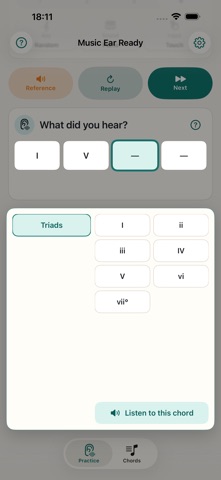
Music Ear Ready helps you train your harmonic ear: set up an exercise, listen to the chords and identify their function within the key.
In Practice, choose exercises with one to four chords, a fixed or random key, piano or strings, and touch or MIDI input. The key selector places fixed keys around a circle of fifths, with a random-key choice in the center. Listen to the reference to establish the key, play the exercise and replay it whenever you need to.
In Chords, build a free selection by adding families from Add more chords. Enable an entire family or choose individual chords, expand each family and preview its chords in the current key. For exercises with two to four chords, pin chords and choose whether each exercise must include all pinned chords or at least one.
You can also explore modes from Try Modes. Choosing a variant starts a modal practice with a preset chord selection that cannot be edited while that mode is active. Exit the mode to return to your previous free selection, including pins that remain compatible with the selected exercise length.
To answer, tap a slot, choose a family in the panel, then choose a chord. Before completing your answer, you can change a selection or listen to the original exercise chord from the same panel. After answering, listen to your answer and the exercise chord to compare them. Gesture selection is also available as a shortcut on iPhone. If you have a compatible MIDI keyboard connected, you can answer by playing.
In Settings, adjust chord speed and hear a sample. Your preference is saved, and changing it preserves your current exercise and answers.
The guide explains setup, listening, answering and MIDI. Open it again whenever you need help using the help button.
The app supports Spanish and English and follows your device's language preference. Audio samples are included, so you can practice offline without creating an account. Your settings are saved locally. There are no ads or analytics services.
Available for iPhone and iPad running iOS or iPadOS 16.4 or later. MIDI is optional and requires a compatible connected source; touch input lets you practice without external hardware.
Each subscription will automatically renew 3 days before the expiration date for
the same time period. Subscriptions can be cancelled at any time before the renewal.