

Nepsis: Screen Time Control
Nepsis: Screen Time Control is made and published by Nartai Aitmukashev. AppBrain is an independent app data site and isn't affiliated with Nartai Aitmukashev. The app name, icon, screenshots and description belong to Nartai Aitmukashev and are shown as published on the App Store.
AppBrain's verdict
- Last updated
- August 4, 2026
- Size
- 11.8 MB
User feedback
Ratings and reviews on the App StoreComments on Nepsis: Screen Time Control for iOS
We don't have enough comments to show example comments. Please check back later.
Store listing
By Nartai Aitmukashev, from the App Store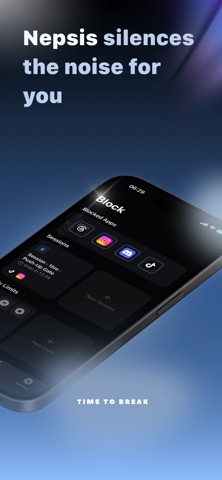


Description by Nartai Aitmukashev Written by the developer, not by AppBrain. Click to read.
You already know what pulls you away from your day: the feed you didn't mean to open, the "just five minutes" that becomes forty. Nepsis helps you block it — using Apple Screen Time to enforce rules you set for yourself.
This isn't a parental control app. There's no monitoring, no family sharing, no dashboard for someone else to check. Nepsis is built for one person: you, versus your own impulses.
HOW IT WORKS
Nepsis uses Apple Screen Time to actually restrict access to the apps and categories you choose — not just track them. Grant Screen Time permission once, then set your rules.
THREE WAYS TO BLOCK
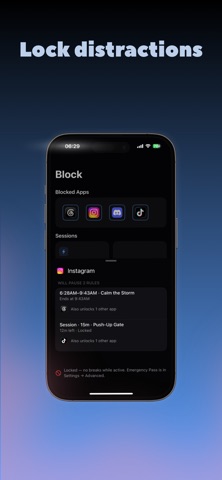
- Just Block — flip a switch and block chosen apps right now, on demand.
- Daily Limits — allow a set amount of time per app or category, then block once you hit it.
- Focus Schedules — automatically block during windows you define: work hours, sleep, deep focus, mornings, whatever your day needs.
FRICTION THAT ACTUALLY WORKS
Timers are easy to ignore. So when you try to pause, disable, or weaken a rule, Nepsis can ask you to earn it first:
- Physical challenges — shake your phone, do squats or push-ups
- Mindful challenges — a breathing exercise, a calm-down pause, a mirror check
- Cognitive challenges — type a phrase, solve simple math
- Reflective challenges — speak a short justification out loud
FOUR PROTECTION LEVELS
Choose how hard it should be to talk yourself out of your own rules:
Easy → Focused → Committed → Strict (a passcode is required to turn off, edit, or weaken any rule)
The stricter the level, the harder it is for future-you to undo what present-you decided.
SEE YOUR PROGRESS
Weekly reports and a simple focus score show your habits over time — how often you followed your rules, where you slipped, and how your patterns shift week to week. It's a lightweight companion to your discipline, not a full analytics suite.
MINDFUL OPEN
Add a short pause or challenge before opening a specific app, anywhere on your phone, using Shortcuts — a moment of friction right when you need it most.
MAKE IT YOURS
Customize how your block screen looks, so the moment you're stopped feels like your own reminder, not a generic system alert.
NEPSIS PREMIUM
Core features require a Nepsis Premium subscription to unlock fully. Pricing and terms are shown in the app and on the App Store before you subscribe.
PRIVACY
No Nepsis account or login is required to get started. Your usage insights and focus events are processed on your device. If you're signed into iCloud, your rules and block-screen look settings can sync across your own devices — the specific apps you've selected are not synced, so you'll reselect them on a new device. Subscription status is handled through Apple, not a Nepsis account.
Nepsis works with Apple Screen Time to enforce rules you create; it doesn't replace or duplicate Apple's own Screen Time settings.
Nepsis is designed for adults managing their own device and their own habits. It is not intended for monitoring another person's device or for parental or family control.
Terms of Use: https://nepsisapp.site/terms/
Safety and technology
Found in the app by AppBrain- Price
- Free
- App size
- 11.8 MB
- Content rating
- Everyone
Technologies used by Nepsis: Screen Time Control
Releases
Updates seen on the App Store- Version
- 1.1
- Launched
- August 2026
No changelog data
Alternatives
Similar apps and more from Nartai AitmukashevAlternatives to Nepsis: Screen Time Control


Rankings
App Store top chartsApp Store Rankings for Nepsis: Screen Time Control
About the app and developer
About Nepsis: Screen Time Control
Nepsis: Screen Time Control is a productivity app developed by Nartai Aitmukashev.
What is the rating of Nepsis: Screen Time Control?
Nepsis: Screen Time Control has no ratings yet.
Is Nepsis: Screen Time Control free?
Nepsis: Screen Time Control is free. The app size is 11.82 MB. The latest version available is 1.1. The last update was on August 4, 2026.
What are the requirements for Nepsis: Screen Time Control?
The app has a content rating of Everyone. The app has been available on the App Store since August 2026.
Developer information for Nartai Aitmukashev
Address:
Frequently asked questions about Nepsis: Screen Time Control
Is Nepsis: Screen Time Control free?
Yes. Nepsis: Screen Time Control is free on the App Store.
Is Nepsis: Screen Time Control still available?
Yes. Nepsis: Screen Time Control is on the App Store, and the last update we saw was on August 4, 2026.
How large is Nepsis: Screen Time Control?
Nepsis: Screen Time Control is 11.82 MB.
Is Nepsis: Screen Time Control suitable for children?
App Store rates the content of Nepsis: Screen Time Control as suitable for everyone.
Who made Nepsis: Screen Time Control?
Nepsis: Screen Time Control was developed by Nartai Aitmukashev. It is listed in the productivity category on the App Store.
What are the best alternatives to Nepsis: Screen Time Control?
People looking at Nepsis: Screen Time Control also look at these productivity apps: Screen Time Control: ScrollCat, Shadow: Block Apps & Focus, UNDOOMED: Reels & Feed Blocker, XLocker - Screen Time Control, aLock - App Lock.