

Paste Keyboard - Quick Paste
Paste Keyboard - Quick Paste is made and published by Mahaveer Gill. AppBrain is an independent app data site and isn't affiliated with Mahaveer Gill. The app name, icon, screenshots and description belong to Mahaveer Gill and are shown as published on the App Store.
AppBrain's verdict
- Last updated
- December 4, 2025
- Size
- 6.68 MB
User feedback
Ratings and reviews on the App StoreComments on Paste Keyboard - Quick Paste for iOS
We don't have enough comments to show example comments. Please check back later.
Store listing
By Mahaveer Gill, from the App Store
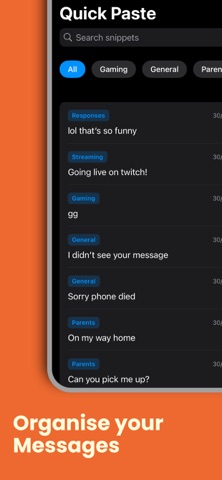
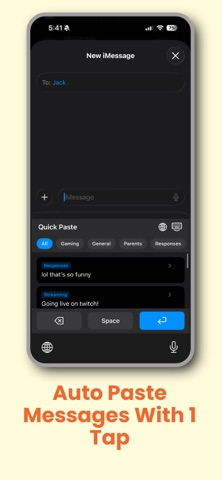
Description by Mahaveer Gill Written by the developer, not by AppBrain. Click to read.
Paste Keyboard - Quick Paste is the fastest way to save and reuse your frequently typed text. Whether it's your email signature, address, common responses, or any text you type repeatedly - our paste keyboard puts it all at your fingertips.
HOW IT WORKS
Save your frequently used text as snippets in the app
Organize them into categories (Responses, Signatures, Addresses, etc.)
Enable the Paste Keyboard in Settings
Access your snippets from ANY app - Messages, Mail, Safari, and more!
WHY PASTE KEYBOARD?
Traditional copy-paste is slow and tedious. Our paste keyboard lets you access all your saved text with just a tap - no more switching apps, no more searching through notes. It's the paste keyboard you've been waiting for.
KEY FEATURES
• Custom Paste Keyboard Extension Access your snippets from anywhere on your iPhone without switching apps. Your text is always just a tap away with our paste keyboard.
• Smart Organization Organize snippets into categories for quick access. Built-in categories include General, Responses, Signatures, Addresses, and Phrases - or create your own custom categories.
• Lightning Fast Search Find the right snippet instantly with powerful search functionality. Our paste keyboard makes finding and pasting text effortless.
• Privacy First Your snippets are stored securely on your device. The paste keyboard doesn't require full access, protecting your privacy.
• Simple & Intuitive Clean, modern interface designed for speed and ease of use. Add, edit, and organize snippets in seconds.
FREE FEATURES
• Save up to 5 text snippets • Custom paste keyboard extension • Category organization • Search functionality • iCloud sync ready
PREMIUM FEATURES
Upgrade to Premium and unlock the full potential of your paste keyboard:
• Unlimited snippets - save as many as you need • Completely ad-free experience • Priority support • All future features included
TRY PREMIUM FREE FOR 3 DAYS
Start your free trial today - no commitment required. Cancel anytime.
PERFECT FOR
• Customer service reps who send similar responses → Sales professionals with email templates → Anyone who types their address or phone number frequently → Social media managers with common replies → Students with standard email signatures → Anyone who wants to type less and do more
WHY CHOOSE OUR PASTE KEYBOARD?
Unlike traditional copy-paste or text replacement, our paste keyboard gives you instant access to unlimited text snippets. No more copying from notes apps, no more remembering complicated shortcuts. Just tap and paste - it's that simple.
PRIVACY & SECURITY
• All data stored locally on your device • No full keyboard access required • We don't collect or sell your data • Your snippets stay private
SUPPORT
We're here to help! Contact us at support@gigapixelsapps.com for any questions or feedback.
SUBSCRIPTION INFORMATION
• Subscription Duration: Weekly or Yearly
• Price: Prices shown in the app (varies by region)
• Free Trial: 3-day free trial available on first subscription
• Payment charged to Apple ID at purchase confirmation
• Auto-renews unless cancelled 24 hours before period ends
• Manage subscriptions in App Store account settings
Privacy Policy: https://gigapixelsapps.netlify.app/quick-paste/privacy-policy
Terms of Use: https://gigapixelsapps.netlify.app/quick-paste/terms-of-service
Safety and technology
Found in the app by AppBrain- Price
- Free
- App size
- 6.68 MB
- Content rating
- Everyone
Technologies used by Paste Keyboard - Quick Paste
Releases
Updates seen on the App Store- Version
- 1.0
- Launched
- December 2025
No changelog data
Alternatives
Similar apps and more from Mahaveer GillAlternatives to Paste Keyboard - Quick Paste


More from Mahaveer Gill


Rankings
App Store top chartsApp Store Rankings for Paste Keyboard - Quick Paste
About the app and developer
About Paste Keyboard - Quick Paste
Paste Keyboard - Quick Paste is an utilities app developed by Mahaveer Gill.
User Ratings
The app has no ratings yet.
App Information
Paste Keyboard - Quick Paste is freely available from the App Store. The app size is 6.68 MB. The latest version available is 1.0. The last update was on December 4, 2025.
Technical Requirements
The app has a content rating of Everyone. The app has been available on the App Store since December 2025.
Developer information for Mahaveer Gill
Address:
Frequently asked questions about Paste Keyboard - Quick Paste
Is Paste Keyboard - Quick Paste free?
Yes. Paste Keyboard - Quick Paste is free on the App Store.
Is Paste Keyboard - Quick Paste still available?
Yes. Paste Keyboard - Quick Paste is on the App Store, and the last update we saw was on December 4, 2025.
How large is Paste Keyboard - Quick Paste?
Paste Keyboard - Quick Paste is 6.68 MB.
Is Paste Keyboard - Quick Paste suitable for children?
App Store rates the content of Paste Keyboard - Quick Paste as suitable for everyone.
Who made Paste Keyboard - Quick Paste?
Paste Keyboard - Quick Paste was developed by Mahaveer Gill. It is listed in the utilities category on the App Store.
What are the best alternatives to Paste Keyboard - Quick Paste?
People looking at Paste Keyboard - Quick Paste also look at these utilities apps: Wonder Copy - Copy & Paste, PasteBox - Paste Keyboard, Smart Stitch - Long Screenshot, Clipboard - CopyPaste, Extension AI.