






AppBrain's verdict
- Last updated
- August 17, 2026
- Size
- 33.7 MB
User feedback
Ratings and reviews on the App StoreComments on PDF Scan: Document Scanner for iOS
We don't have enough comments to show example comments. Please check back later.
Store listing
By TOKYOBAY K.K., from the App StoreDescription by TOKYOBAY K.K. Written by the developer, not by AppBrain. Click to read.
NEW & POWERFUL FEATURES
* eSign PDF: Sign documents instantly with your finger or a typed signature. No printing, no scanning, no hassle.
* AI Receipt Analyser: Scan receipts and let AI automatically extract totals, dates, and categories - perfect for expense tracking and budgeting.
* Secure Vault: Lock your sensitive documents and files behind PIN, pattern, or fingerprint protection.
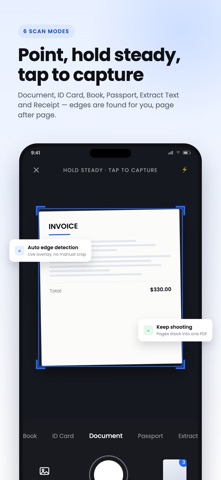
* Multiple Scan Modes: Dedicated scanning for Documents, ID Cards, Passports, and Books - each optimised for perfect captures every time.
* OCR Text Extraction: Turn scanned images into editable, searchable text directly on your device.
* AI Organised Folders: Your scans are automatically sorted into smart folders, so you never lose a document again.
* Smart File Naming: AI automatically names your files based on content - no more "Scan_2847.pdf."
* Google Drive Cloud Backup: Safely back up and sync your documents to Google Drive.
* Complete PDF Toolkit: Reorder pages, compress PDFs, and convert Word to PDF, Excel to PDF, and PowerPoint to PDF - all built in.
CORE SCANNING & PDF FEATURES
* Document Scanning: Scan any document, note, or paper into a clear digital copy using your phone's camera.
* Image to PDF: Convert single or multiple images into professional, polished PDFs.
* PDF Splitting: Break large PDFs into smaller, manageable files.
* PDF Merging: Combine multiple PDFs into a single document.
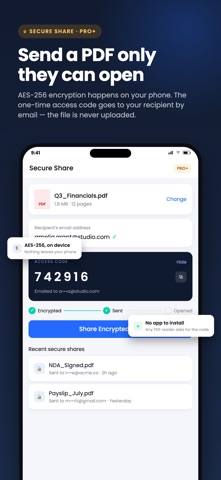
* Password Protection: Encrypt your PDFs with strong password security.
* JPEG Scanner: Scan directly to JPEG for quick sharing or archiving.
* Offline Scanning: Scan and convert documents without Wi-Fi or mobile data - ideal for travel and business.
YOUR PRIVACY MATTERS
Your scans and documents are processed securely. Sensitive files stored in Secure Vault stay protected on your device with PIN, pattern, or fingerprint locks. Cloud Backup is fully optional and only syncs when you choose to enable it.
LEGAL
By subscribing, you agree to our Terms of Use (EULA): https://www.apple.com/legal/internet-services/itunes/dev/stdeula/
Privacy Policy: https://tokyobay.co.jp/privacy/pdf-scanner.html
FREE TO START
Get started with our core scanning, Image-to-PDF, and PDF tools at no cost. Unlock premium features like AI Receipt Analyser, Secure Vault, and unlimited Cloud Backup with a simple subscription - cancel anytime.
WHY CHOOSE PDF SCANNER?
* All-in-One: Replace your scanner, signer, receipt tracker, and file converter with a single app.
* Travel-Ready: Essential for professionals on the move - scan, sign, and send documents anytime.
* Versatile: Perfect as a home document scanner or a complete office productivity tool.
* User-Friendly: Designed for simplicity, making it the best camera scanner and PDF tool for everyone.
We value your feedback! Contact us at developer@tokyobay.co.jp.
PDF Scanner: Document Scanner App by Tokyobay K.K. is your one-stop solution for scanning, signing, securing, and managing documents. Download now for a seamless, efficient document management experience!
Safety and technology
Found in the app by AppBrain- Price
- Free
- App size
- 33.7 MB
- Content rating
- Everyone
Technologies used by PDF Scan: Document Scanner
Releases
Updates seen on the App Store- Version
- 2.0.2
- Launched
- July 2025
No changelog data
Alternatives
Similar apps and more from TOKYOBAY K.K.Alternatives to PDF Scan: Document Scanner




More from TOKYOBAY K.K.




Rankings
App Store top chartsApp Store Rankings for PDF Scan: Document Scanner
About the app and developer
About PDF Scan: Document Scanner
PDF Scan: Document Scanner is an utilities app developed by TOKYOBAY K.K.
User Ratings
The app has no ratings yet.
App Information
PDF Scan: Document Scanner is freely available from the App Store. The app size is 33.68 MB. The latest version available is 2.0.2. The last update was on August 17, 2026.
Technical Requirements
The app has a content rating of Everyone. The app has been available on the App Store since July 2025.
PDF Scan: Document Scanner is made and published by TOKYOBAY K.K. AppBrain is an independent app data site and isn't affiliated with TOKYOBAY K.K. The app name, icon, screenshots and description belong to TOKYOBAY K.K. and are shown as published on the App Store.
Developer information for TOKYOBAY K.K.
Address:
Frequently asked questions about PDF Scan: Document Scanner
Is PDF Scan: Document Scanner free?
Yes. PDF Scan: Document Scanner is free on the App Store.
Is PDF Scan: Document Scanner still available?
Yes. PDF Scan: Document Scanner is on the App Store, and the last update we saw was on August 17, 2026.
How large is PDF Scan: Document Scanner?
PDF Scan: Document Scanner is 33.68 MB.
Is PDF Scan: Document Scanner suitable for children?
App Store rates the content of PDF Scan: Document Scanner as suitable for everyone.
Who made PDF Scan: Document Scanner?
PDF Scan: Document Scanner was developed by TOKYOBAY K.K. It is listed in the utilities category on the App Store.
What are the best alternatives to PDF Scan: Document Scanner?
People looking at PDF Scan: Document Scanner also look at these utilities apps: Image Converter Offline, Video Converter -MOV, MP4, M4V, MUSITEL Remote Control, PDF: Reader, Scanner, Editor, PDF Converter - Document.